







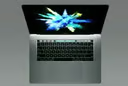
Count Microsoft among the many software makers that are supporting Apple’s new Touch Bar.
Yesterday was a big day for the Mac faithful. Apple unveiled three new MacBook Pros, including 15- and 13-inch models with an OLED touch strip in place of the traditional function keys. Dubbed the Touch Bar, this strip displays contextual controls depending on the application in use.
Soon, Office for Mac will be among the first applications to support Touch Bar.
“Through the Touch Bar, Office intelligently puts the most common commands at your fingertips—all based on what you’re doing in the document,” Kirk Koenigsbauer, corporate vice president of Microsoft Office, said in an Oct. 27 announcement. In Word, for example, Touch Bar enables a new viewing mode that completely dispenses with the software’s toolbar.
“Now from the Touch Bar you can enter Word Focus Mode, a brand-new experience that hides all of the on-screen ribbons and commands so you can simply focus on your work,” added Koenigsbauer. “The Touch Bar is perfect for this moment, putting the most relevant Word features at your fingertips. One tap and you can quickly apply a new style to a heading or paragraph.”
In Excel, Touch Bar displays recently used functions when a user presses the physical equal sign key and provides other time-saving shortcuts. To speed up the process of compiling and formatting reports, Touch Bar offers users one-touch access to recommended charts along with cell color and border tools.
In PowerPoint, users can fine-tune the placement of graphical objects with the Reorder Objects button. To rotate objects into the perfect position, users can swipe along the Touch Bar. Finally, Outlook users are presented with a list of recent documents when they are composing an email. In the Today calendar view, it displays the day’s events along and offers users the option to join meetings scheduled to take place in Skype for Business, which is also getting Touch Bar support.
Microsoft yesterday released the first official Skype for Business Mac Client, more than a year after the Windows client made its debut. Replacing the aging Lync for Mac 2011 application, the new software not only delivers a similar look and feel, but also much of the same functionality that’s present in the Windows version. One way it will soon stand apart is the addition of Touch Bar controls, enabling users to quickly access common Skype call- and meetings-management options (mute mic, share desktop, etc.).
Naturally, Apple’s first-party applications like Pages, GarageBand and Xcode are among the first to be updated for the input method. Final Cut Pro 10.3, the latest version of the company’s professional video editing software, also sports Touch Bar controls.
In addition to a revised interface and an expanded set of controls, the software features “integration with the revolutionary Touch Bar gives professional video editors a whole new way to interact with Final Cut Pro X,” said Susan Prescott, vice president of Apps Product Marketing at Apple. For example, the Touch Bar allows users to jump to a specific section within their projects with a tap of the timeline or quickly access tools while editing clips.