







In a bid to help retailers and other companies better connect with customers, Salesforce.com has introduced improvements to its Community Cloud that makes it easier to create online communities by leveraging the same tools companies may already be using to create their websites.
Community Cloud also integrates with the Salesforce CRM system so custom communities can be created for different customers. This could include online service levels for specific colors such as Gold, Silver or Bronze. Customization can be based on criteria from related CRM and user data as well as standard web rules such are geography or referring domain.
Salesforce officials say a lot of new features and templates have been included to make it easier for users to create online communities quickly without a steep learning curve.
“The user could be anyone. It’s not uncommon for more technical admins to put together a community. You have to have some familiarity with Salesforce, but the goal is that this can be done by a channel manager,” Anna Rosenman, Salesforce senior director of community cloud product marketing, told eWEEK.
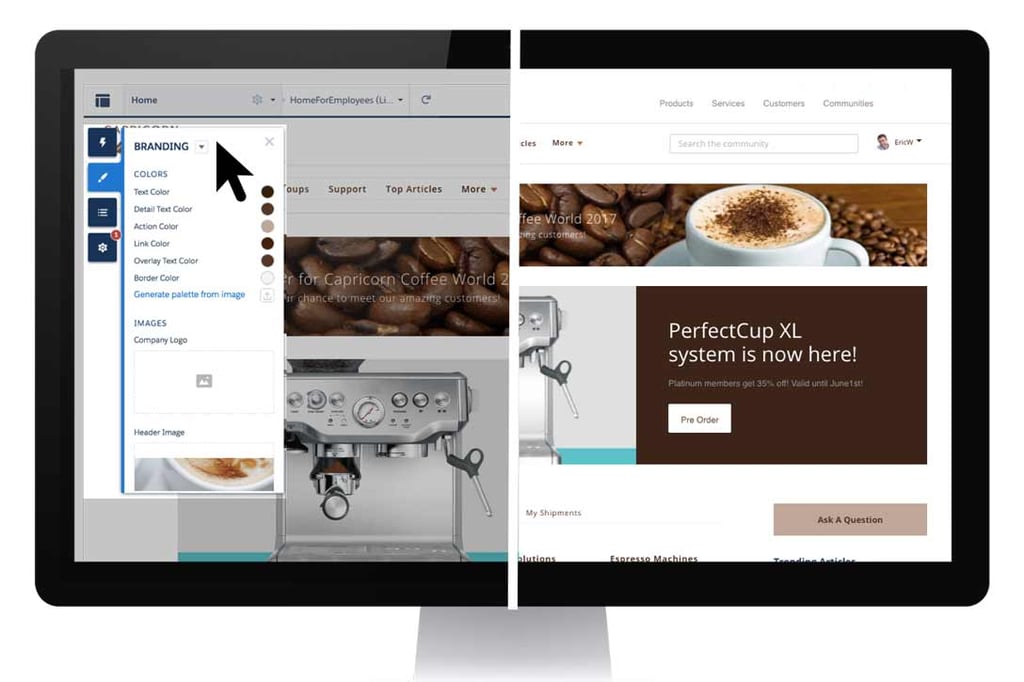
The system’s Lightning Community Builder features a drag-and-drop WYSIWYG interface for what Salesforce calls “no-code development” that can be performed without the assistance of the IT department or trained developers. Once created, users can view the online community in real time with live previews to see what it will look like.
Rosenman said the new features makes Community Cloud more accessible and broadens its appeal to new users and use cases. “We’re doing a lot under the hood with new templates, investing in Einstein and building new, different capabilities into the Salesforce Platform,” she said.
Another key feature of Community Cloud is that the service comes with pre-built Lightning Community templates and layouts to help non-technical users create a community without help. You can also choose a color scheme using one of the new color palettes and instantly apply a set of colors to your community.
The look of a template can be changed from within Community Builder using the system’s Branding panel to apply colors, specify fonts and add a logo.
Community Cloud also supports so-called responsive design making communities available on both desktop and mobile devices without having to be redesigned. For visitor stats and analysis Salesforce said each community search engine optimized with user-friendly and canonical URLs, community and page-level meta tags and automatic sitemap generation.
The service’s CMS Connect feature is designed to let you integrate external content and Cascading Style Sheets with just a few clicks. For example, content and design elements, including headers, footers, banners and fonts, can be pulled automatically from the Adobe Experience Manager content management system.
Integration with other CMS’s, including Drupal and Sitecore, is set for this October. Also in October, Salesforce will release “dynamic themes” letting users override the basic styles of template elements using the CSS Editor feature to customize branding and design.
Salesforce rolled out a significant update to Community Cloud last September with the announcement of Salesforce Lightning Bolt that offered industry specific online templates. Consulting firms Accenture, Cognizant and Deloitte were among 11 partners developing industry-specific applications using the Lightning Bolt framework to offer online communities for insurance agents, store operations and patient scheduling, among others.
Rosenman said the new features in Community Cloud will be prominently featured in presentations at the company’s Dreamforce conference this November in San Francisco with several high profile customers detailing how they’re using it.