







eWEEK Labs Walk-through: Microsoft Windows 7 Beta
By Andrew Garcia
Windows Install

I’ve installed Windows 7 twice-one 32-bit version in a VMware virtual machine and a 64-bit iteration on a Dell XPS M1330. The installations averaged about 25 minutes to complete.
Taskbar 1

Windows 7’s new taskbar automatically groups windows from the same applications, presenting users with thumbnails of open windows. By hovering over a thumbnail, users can see a full-screen preview.
Taskbar 2

With lots of like windows (10-plus) open for a single application, the thumbnail previews disappear, but the full-screen preview mode persists.
Pin to Taskbar

Users can pin application shortcuts to the taskbar, blurring the distinction between running and non-running applications.
Jump Lists

From the items in the taskbar or Start Menu, users can quickly access lists of previously accessed documents or recently visited Web sites for a particular application.
Customizable Start Menu
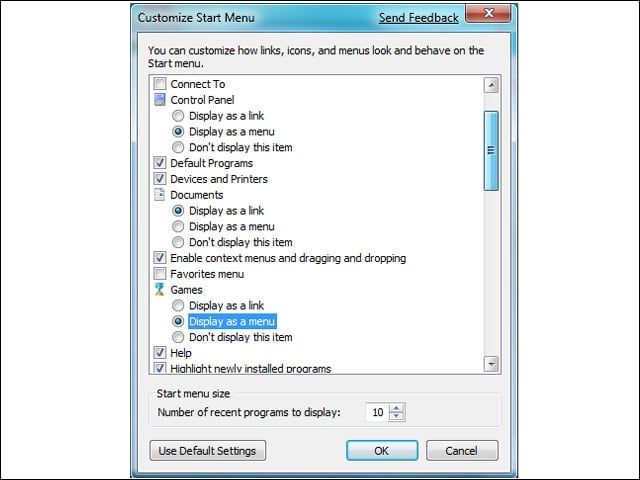
No longer can users revert back to a “Classic Windows” look. However, Windows 7’s Start Menu is highly customizable.
Gadgets

In Windows 7, the Sidebar is gone but the Gadgets have remained. Freed from the Sidebar, Gadgets can now be moved anywhere around the desktop. Users can quickly view them by moving the mouse to the lower right of the screen (which dims open applications).
Notifications

The Notification area-commonly known as the System Tray-has undergone a renovation. Gone, by default, are all the icons for applications running in the background, leaving just a few core system items, such as volume and battery life (lower right). Users can actually control whether running applications show an icon, display notification messages or simply stay silent.
UAC Slider Bar

Users now have four different User Account Control settings that dictate the feature’s behavior. Options include the Vista-like “Always Notify”-the default setting that alerts on software behavior but not user action-an option to alert on software behavior without dimming the screen, and the always popular “Never Notify.”
Automatic Updates Settings

Administrators can easily set Windows 7 to allow Standard Users to install Windows Update without admin credentials.
Join Wireless Network

The included wireless client makes it simple to find and join nearby wireless networks.
Home Group
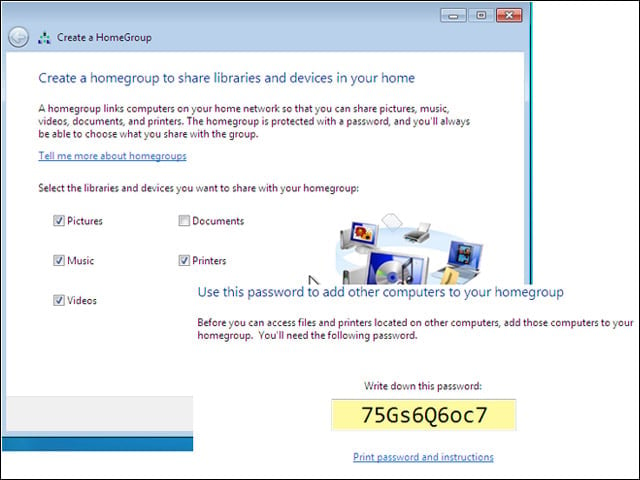
The new Home Group feature allows users to easily share media and documents among multiple PCs in the same network. By selecting the Home network type when first connecting the machine to the network, users are presented with the option to create these shares and have those shares protected with a password.