






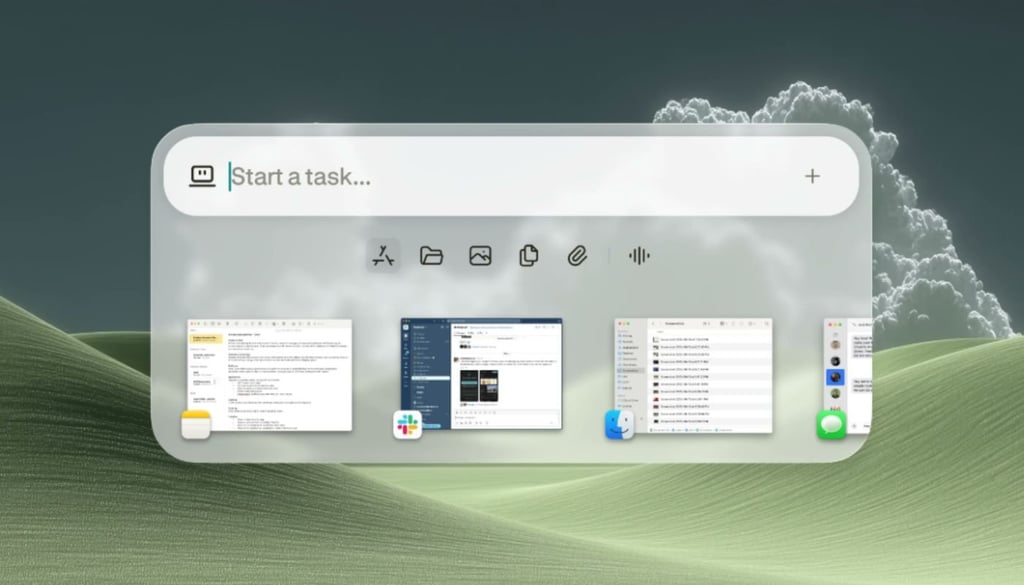


Perplexity is turning your Mac into something closer to an employee than a machine.
After weeks of anticipation, Perplexity is moving beyond the search bar and straight into your hard drive. This week, the company began rolling out “Personal Computer,” an AI assistant that integrates directly with the Perplexity Mac App to operate across local files, native applications, and browsers.
The tool is designed to be a continuous digital worker. Perplexity specifically highlights the Mac mini as the ideal home for this system, allowing the AI to run 24/7 in the background.
The system is built to handle the heavy lifting of multi-step tasks. According to Perplexity, the tool “integrates with the Perplexity Mac App for secure orchestration across your local files, native apps, and browser.”
This isn’t just about reading text; it’s about taking action. The assistant can navigate iMessage, Apple Mail, and Calendar. It even has its own browser, Comet, to research and automate web tasks without the user needing to switch tabs or copy-paste data.
Tasks that move with you across devices
One of the most modern features of the rollout is the ability to hand off tasks between devices. You can start a complex research project or a file-sorting task from your iPhone while you’re out, and your Mac at home will pick up the slack.
In its X post, the company mentioned that you can start a task “from your iPhone, and Personal Computer can operate on your desktop and local files using 2FA.” This remote-start capability relies on the latest iOS update and ensures that your machine stays productive even if you’re miles away.
To keep this process fluid, the system uses a new shortcut (Command + Command) to summon the assistant anywhere on the Mac without breaking your focus. Perplexity describes this interface as “Context aware,” stating that “Computer sees your active app and surfaces the right tools automatically.”
The philosophy behind this update is a departure from how we’ve used computers for decades. Rather than clicking through menus, you tell the AI what you want to achieve, and it figures out which agents to hire for the job. It uses over 20 AI models to determine the best way to handle a request.
How safe is this?
Giving an AI the keys to your iMessages and files is a big ask for privacy-conscious users. To address this, Perplexity says the system runs in a “sandbox” environment.
The platform includes a safety shutdown feature that allows users to immediately shut down all processes. There is also an audit trail so you can see exactly what the AI was doing while you weren’t looking. Unlike Apple’s own Apple Intelligence, which focuses mostly on on-device processing, Perplexity uses a mix of local execution and cloud-based processing to handle heavier tasks.
Who can get it?
This isn’t a free-for-all just yet. The feature is rolling out specifically to Perplexity Max subscribers and those who were on the waitlist.
Perplexity Max is the company’s $200-per-month subscription. Perplexity Pro, the $20-per-month plan, does not include access to Personal Computer, though it does support Perplexity Computer, the less capable web-based version of the assistant.
The launch is Mac-only for now. Broader availability and presumably Windows support have not been announced. To run it, you’ll need at least macOS 14 Sonoma.
For more context on Apple’s AI momentum, read how Mac mini and Mac Studio RAM shortages are reflecting surging demand.