







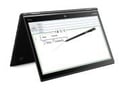
At first glance, it’s easy to mistake Lenovo’s X1 Yoga for its ancestor, the X1 Carbon from Lenovo. The Carbon was a breakthrough laptop design Lenovo and the model still around, but the newest innovations, as well as the touch screen, have moved to the Yoga.
If you’re familiar with Lenovo’s consumer Yoga laptops, then you’ll know that this latest version to enter the ThinkPad PC line features a screen that can be folded all the way around so that the device effectively forms a tablet.
You can also configure the X1 Yoga so that it’s in a tent shape or you can set it so the keyboard forms a base with the screen folded at an angle comfortable for drawing. Lenovo includes a pen that can be used to draw or write on the X1 Yoga’s screen.
The X1 Yoga version that I looked at for this review has a 512 GB SSD storage drive and 8 GB of memory. It’s got a 6th generation Intel i7 processor and an OLED screen with 2560 x 1440 resolution. The 14-inch IPS (In-Plane Switching) screen has an LED backlight. The ThinkPad Pen Pro is included with the X1 Yoga and is located beneath the front edge of the keyboard.
Lenovo’s keyboards have always been some of the best in the industry, probably because the company used to build ThinkPads for IBM, where excellent keyboards are a requirement.
The keyboard in the Yoga belies its thin profile, with good key travel and dished key tops that make typing easy and keep the errors under control. In fact, the keyboard was comfortable enough that I used the built-in keyboard to write this review. It was at least as good as the keyboard on my trusty 4-year-old ThinkPad T-430.
The keyboard on the X1 Yoga is spill resistant, which means you can work at Starbucks without worrying. It’s designed so that the keys are locked and the panel surrounding the keys rises to protect them when the screen is placed in the tent, tablet or back-angled positions where the keyboard is serving as a base for the laptop.
The pen slides out from its home in the lower right corner of the keyboard with a gentle click. Functionally, it’s similar to the pen that accompanies the Microsoft Surface tablets. However, the ThinkPad Pen Pro is shorter than the one on the Surface, and it’s thinner.
Like the Surface, the pen charges when it’s stored. The pen can be used for drawing, taking notes and as a pointing device. It includes mouse buttons for that purpose.