








Both Microsoft Azure Synapse and Databricks are well-respected data platforms that provide the volume, speed, and quality demanded by leading data analytics and business intelligence solutions. They both serve an urgent need in the modern business world, where data analytics and management have become more important than ever.
- Azure Synapse: Best for unified data analytics across big data systems and data warehouses.
- Databricks: Best for use cases such as streaming, machine learning, and data science-based analytics.
Continue reading to see how Azure Synapse and Databricks stack up against each other in terms of pricing, features, implementation, AI, security, and integration.
- Azure Synapse vs. Databricks at a Glance
- Azure Synapse Overview
- Databricks Overview
- Best for Pricing: Databricks
- Best for Core Features: Azure Synapse
- Best for Ease of Implementation: Azure Synapse
- Best for Machine Learning & AI: Databricks
- Best for Security: Azure Synapse
- Best for Integration: Azure Synapse
- Who Shouldn’t Use Azure Synapse or Databricks
- Best Alternatives to Azure Synapse & Databricks
- Review Methodology: Azure Synapse vs. Databricks
- FAQs: Azure Synapse vs. Databricks
- Bottom Line: Azure Synapse vs. Databricks
Azure Synapse vs. Databricks at a Glance
| Azure Synapse | Databricks | |
|---|---|---|
| Price | Flexible detailed pricing; pay-as-you-go; options for savings with pre-purchased units. | Flexible pay-as-you-go; 14-day free trial. |
| Core Features |
|
|
| Ease of Implementation | Seamlessly with other Azure services; familiar for users in Microsoft’s cloud ecosystem. | Offers a collaborative environment with interactive notebooks but may require familiarity with Apache Spark for optimal use. |
| AI and ML | Integrates with Azure Machine Learning and Power BI, providing tools for machine learning projects and business intelligence. | Excels in machine learning and AI with optimized Spark engine and tools like MLflow for managing the ML life cycle. |
| Architecture | SQL-based data warehousing with big data integration, optimized for large datasets and complex queries. | Data lake architecture leveraging Apache Spark for distributed data processing and machine learning workloads. |
| Processing and Performance | Optimizes querying with automatic scaling and performance tuning, leveraging serverless SQL pools for dynamic resource allocation. | Parallel computation, efficient data ingestion and access patterns, and optimized for large data sets with the Photon engine. |
| Security | Features advanced security and privacy controls like automated threat detection, always-on encryption, and fine-grained access control. | Provides robust security features, including role-based access control and automatic encryption, with a focus on collaborative environments. |
| Integration | Extensive with Azure and third-party solutions. | Wide range; supports major data storage providers. |

Azure Synapse Overview
Azure Synapse, previously known as Microsoft Azure SQL Data Warehouse, integrates big data and data warehousing into a single platform.
Its architecture is built on a strong SQL foundation, designed to handle large volumes of data through massively parallel processing. This approach allows Synapse to deliver rapid processing without solely relying on expensive memory, utilizing clustered and nonclustered column store indexes to efficiently manage data storage and distribution.
Key Features
- Limitless scale and query flexibility: Azure Synapse can handle massive datasets without compromising performance, as users can query data across various sources, including data warehouses, data lakes, and big data analytics systems, using both relational and nonrelational data in their preferred language. This feature is particularly beneficial for organizations with diverse data ecosystems as they likely need seamless integration and analysis of all data types.
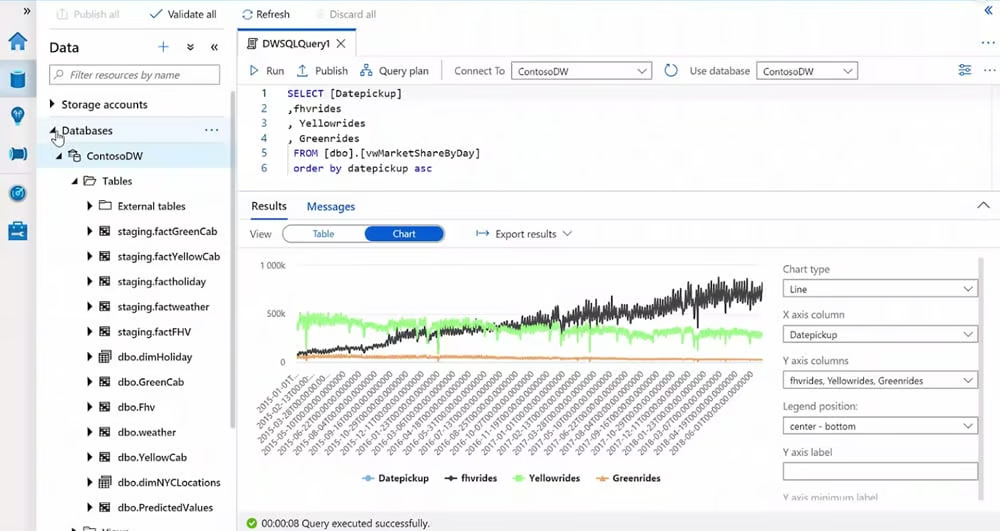
Azure Synapse chart view of insights from multiple data sources.
- Integrated machine learning and BI: The integration with Power BI and Azure Machine Learning empowers users to discover insights across all data. Practitioners can apply machine learning models directly within their apps, significantly reducing the development time for BI and ML projects. This democratizes advanced analytics and allows users to leverage intelligence across all critical data, including third-party datasets, and enhance decision-making processes.
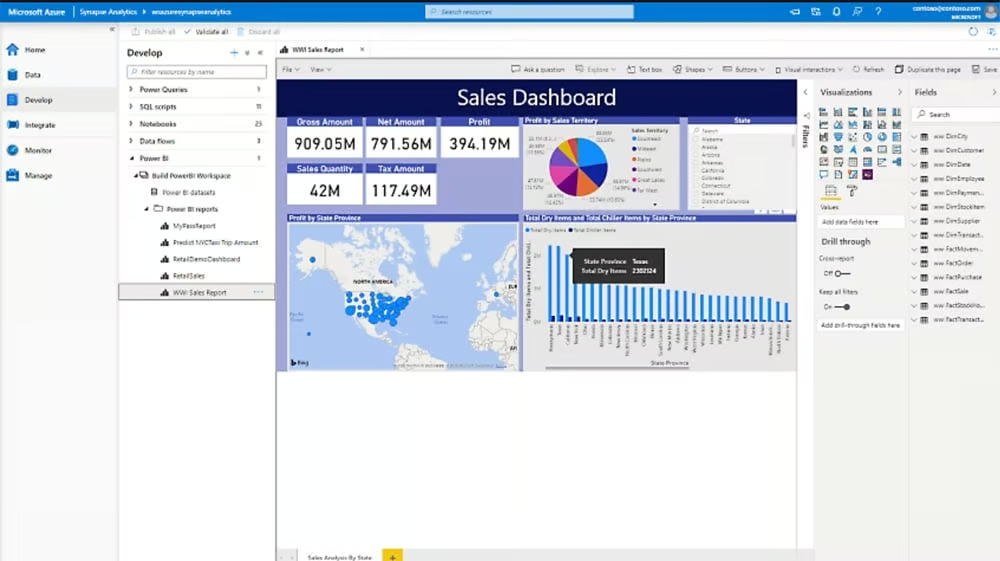
Insights of a sales dashboard powered by Azure ML and Power BI integration.
- Unified analytics workspace: Synapse Studio offers a comprehensive workspace for various data tasks, from data prep and management to data warehousing and artificial intelligence. Its code-free environment for data pipeline management, coupled with automated query optimization and seamless Power BI integration, streamlines project workflows. Teams looking to collaborate efficiently on analytics solutions, from data engineers and scientists to business analysts, will appreciate this capability.
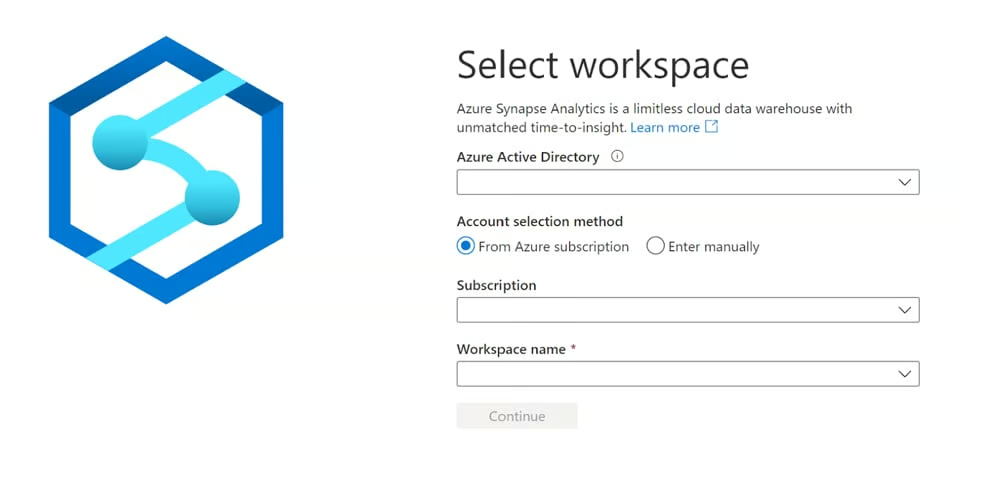
Selecting a Synapse Analytics workspace.
- Real-time insights with Azure Synapse Link: Azure Synapse Link eliminates traditional ETL (extract, transform and load) bottlenecks by providing near-real-time data integration from operational databases and business applications to Azure Synapse Analytics. Organizations can achieve an end-to-end business view more quickly and efficiently, which gives rise to a data-driven culture by democratizing data access across teams.
- Advanced security and privacy: Azure Synapse ensures data protection with state-of-the-art security features, including automated threat detection and always-on encryption. Fine-grained access controls, such as column-level and row-level security, encryption, and dynamic data masking, safeguard sensitive information in real time. This thorough approach to security, backed by Microsoft’s significant investment in cybersecurity, provides peace of mind for organizations concerned with data privacy and compliance.
Pros
- Ideal for analytics with its comprehensive analytics service.
- Offers data protection, access control, and network security features.
- Scalability through massively parallel processing, enabling efficient performance optimization.
- Delivers deep integration with Azure services for enhanced data management and analytics workflows.
Cons
- Can be complex due to its broad range of features.
- Pricing depends on various factors, like the number of data warehouse units and the amount of data stored.
- High-performance configurations can significantly consume resources.
- While powerful within the Azure ecosystem, it may be less flexible outside of it.

Databricks Overview
Databricks, founded on Apache Spark, offers a unified analytics platform that emphasizes machine learning and AI-driven analytics. Positioned more as a data lake than a traditional data warehouse, Databricks excels in handling raw, unprocessed data at scale. Its SaaS delivery model across AWS, Azure, and Google Cloud provides flexibility and scalability to serve a vast range of data processing and analytics needs.
Key Features
- Data Sharing with Delta Sharing: Databricks allows secure data sharing with Delta Sharing, enabling data and AI asset sharing within and outside organizations. This feature is crucial for businesses looking to collaborate on data projects across different platforms, enhancing data accessibility and collaboration.
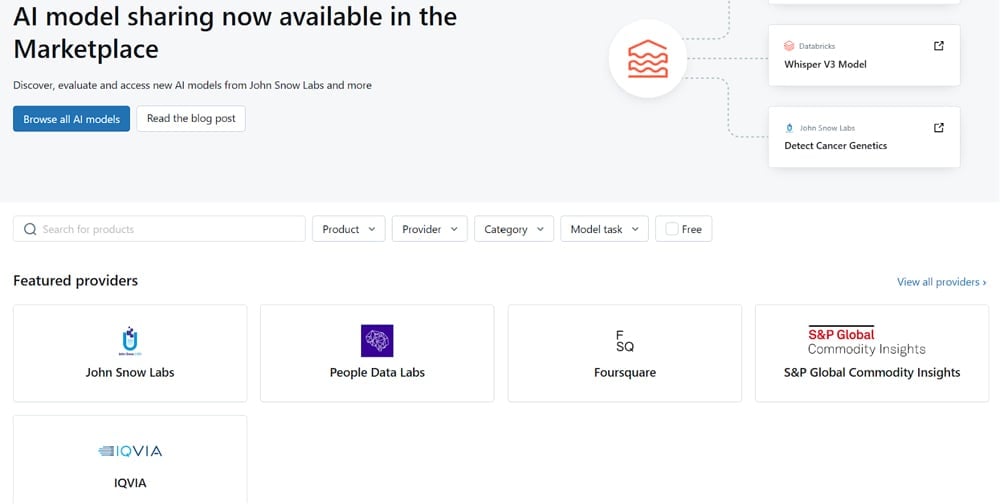
Open marketplace enabling users to share their assets.
- Data engineering: Databricks excels in data engineering, offering robust tools for data preprocessing and transformation. This is essential for organizations focusing on developing machine learning models, ensuring data is in the right format and quality for analysis.
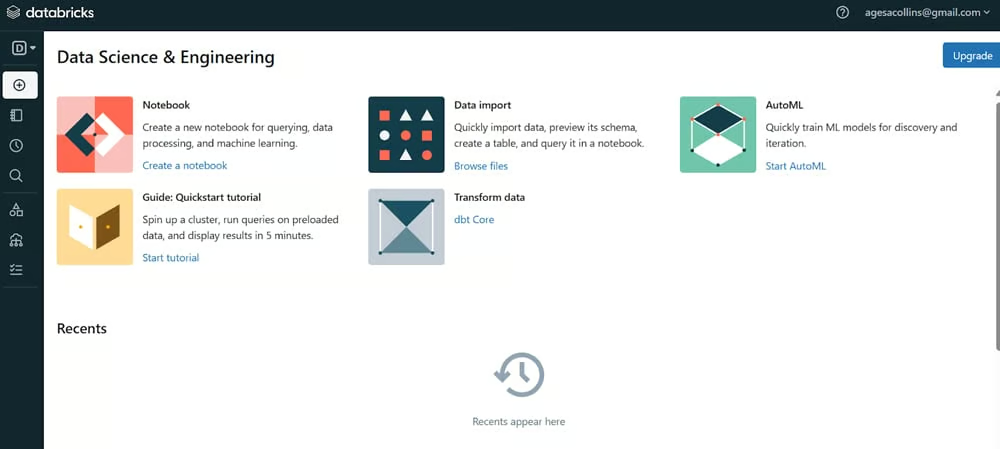
Data science and engineering dashboard in Databricks’ community edition.
- Comprehensive data governance: With features like data cataloging and quality checks, Databricks ensures data is clean, cataloged, and compliant, making it discoverable and usable across the organization. This is vital for companies aiming to maintain high data quality and governance standards.
- Advanced data warehousing: Databricks brings cloud data warehousing capabilities to data lakes with its lakehouse architecture, allowing modeling of a cost-effective data warehouse on the data lake. This suits businesses looking for scalable and efficient data warehousing solutions.
- Artificial intelligence and machine learning: Databricks provides a vast platform for AI and ML, including support for deep learning libraries and large language models. Users can monitor data, features, and AI models in one place, which is useful for organizations looking to leverage AI and ML for advanced analytics and insights.
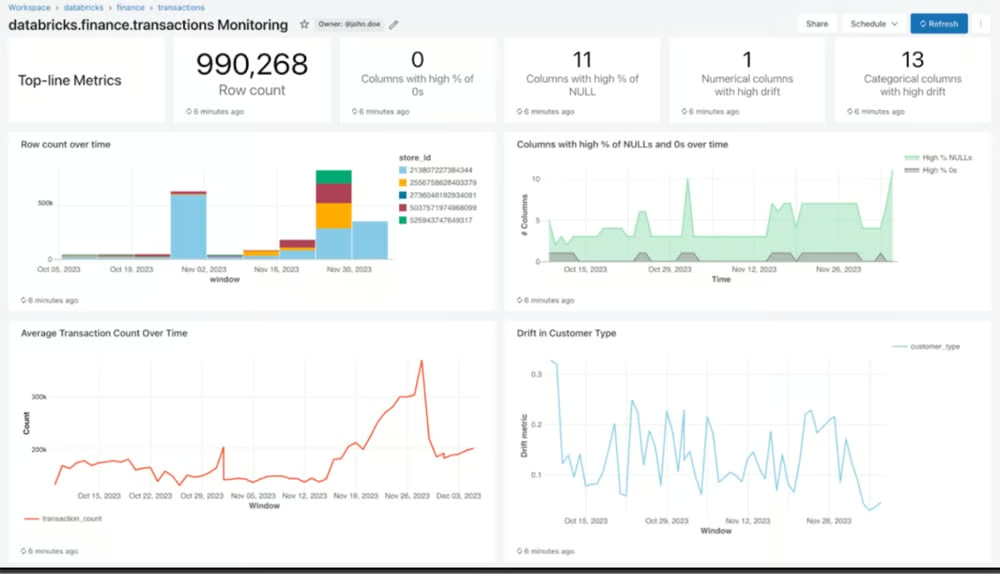
A dashboard monitoring financial transactions.
Pros
- Robust support for machine learning and AI projects with integrated tools like MLflow.
- Built on Apache Spark, ensuring high performance for data processing tasks.
- Available on AWS, Azure, and Google Cloud, providing deployment flexibility.
- Shared notebooks facilitate collaboration and boost productivity of data teams.
Cons
- Aimed at a technical market, it may appear complex and not user-friendly.
- Requires more manual input for tasks like cluster resizing or configuration updates.
- Can be costly for extensive data processing and storage needs.
- Integrating with existing data systems and workflows may need significant effort.
Best for Pricing: Databricks
When comparing the pricing models of Azure Synapse and Databricks, Databricks offers a more accessible entry point with its 14-day free trial, which includes a collaborative environment for data teams and interactive notebooks supporting a wide range of technologies. Its products employ a pay-as-you-go model that ranges between a starting price of $0.07 per Databricks Unit and $0.40 per Databricks Unit.
Azure Synapse, on the other hand, provides a detailed pricing structure that includes options for pre-purchasing Synapse Commit Units (SCUs) for savings over pay-as-you-go prices, with discounts up to 28%.
Pricing for Azure Synapse is based on various factors, including data pipeline activities, integration runtime hours, and data storage, with specific charges for serverless and dedicated consumption models.
While Azure Synapse offers a comprehensive and scalable solution, the complexity of its pricing model and the potential costs associated with large-scale data warehousing and data analytics workloads might make Databricks a more cost-effective option for teams just starting out or with variable usage patterns.
Best for Core Features: Azure Synapse
Azure Synapse offers a comprehensive suite of analytics services that integrate enterprise data warehousing and big data processing. Its core features include limitless scale for querying data, integration with Power BI and Azure Machine Learning for expanded insights, and a unified analytics workspace in Synapse Studio for data prep, management, and exploration.
These capabilities make Azure Synapse particularly well-suited for teams that want a robust platform that can handle extensive data warehousing and analytics tasks within the Azure ecosystem.
Databricks positions itself as more of a data lake than a data warehouse. Thus, the emphasis is more on use cases such as streaming, machine learning, and data science-based analytics. It can be used to handle raw unprocessed data in large volumes.
For those wanting a top-class data warehouse for analytics, Azure Synapse wins. But for those needing more robust ELT (extract, load, transform), data science, and machine learning features, Databricks is the winner.
Best for Ease of Implementation: Azure Synapse
Synapse’s reliance on SQL and Azure offers familiarity to the many companies and developers who use those platforms around the world. For them, it is easy to use. Similarly, Databricks is perfect for those used to Apache tools. But Databricks does take a data science approach, using open-source and machine libraries, which may be challenging for some users.
Databricks can run Python, Spark Scholar, SQL, NC SQL, and other platforms. It comes packaged with its own user interface as well as ways to connect to endpoints such as JDBC connectors. Some users, though, report that it can appear complex and not user friendly as it is aimed at a technical market and needs more manual input for cluster resizing or configuration updates. There may be a steep learning curve for some.
Best for Machine Learning & AI: Databricks
Databricks beats Azure in this category with its Mosaic AI, part of the Databricks Data Intelligence Platform. This platform unifies data, model training, and production environments into a single solution, allowing for the secure use of enterprise data to augment, fine-tune, or build custom machine learning and generative AI models. Databricks offers a more specialized environment tailored for ML and AI development, making it the preferred platform for data scientists and teams working on cutting-edge AI projects.
Azure Synapse Analytics also offers AI and ML capabilities, particularly through its integration with Azure AI services. It allows the enrichment of data with AI in Synapse Analytics using pretrained models from Azure AI services. The platform supports a variety of AI tasks, such as sentiment analysis, anomaly detection, and cognitive services, directly within Synapse notebooks. However, Azure Synapse’s AI and ML functionalities are more about leveraging existing Azure services rather than providing a deeply integrated, customizable ML environment.
Best for Security: Azure Synapse
This is highly dependent on use case; however, for enterprise users, Synapse is the winner. Azure Synapse implements a multilayered security architecture, ensuring end-to-end protection of data. Key security features include data protection with encryption at rest and in motion, comprehensive access control, authentication to verify user and application identities, network security with private endpoints and virtual networks, and advanced threat protection.
This extensive security framework, combined with Azure’s enterprise-grade compliance, makes it quite hard to overlook Azure Synapse as the superior choice for organizations with stringent security and privacy requirements.
Databricks also emphasizes security, offering features like Databricks Runtime for Machine Learning with built-in security for ML workflows, collaborative notebooks with role-based access control, and integration with enterprise security systems. However, Azure Synapse’s deep integration with the broader Azure security and compliance ecosystem, along with its detailed security layers, provides a more holistic security approach.
Best for Integration: Azure Synapse
Azure Synapse offers a wide range of integrations with third-party data integration solutions, supporting a wide corporate ecosystem that includes both Azure and on-premises data sources, as well as legacy systems. This extensive integration capability is facilitated by partnerships with numerous third-party providers such as Ab Initio, Aecorsoft, Alooma, and Alteryx, among others.
Databricks also provides robust integration options, particularly through its Partner Connect hub, which simplifies the integration process with Databricks clusters and SQL warehouses. Databricks supports a variety of data formats like CSV, Delta Lake, JSON, and Parquet, and connects with major data storage providers such as Amazon S3, Google BigQuery, and Snowflake. Additionally, Databricks Repos offers repository-level integration with Git providers, enhancing the development workflow within Databricks notebooks.
However, Azure Synapse’s broader range of data integration partnerships, combined with its native integration within the Azure ecosystem, offers a more extensive solution for organizations seeking to consolidate and analyze data from a wide array of sources.
Who Shouldn’t Use Azure Synapse or Databricks
Even as robust and extensively featured as these two platforms are, it’s impossible to meet all the needs of all kinds of data professionals.
Who Shouldn’t Use Azure Synapse
Azure Synapse, with its expansive data analytics capabilities and integration within the Azure ecosystem, might not be the best fit for small businesses or startups that have limited data analytics requirements or budget constraints. The platform’s complexity and the need for a certain level of technical expertise to navigate its extensive features can and will frustrate organizations that don’t have a dedicated data team.
Additionally, companies not already using Azure services might struggle to integrate Synapse into their existing workflows, making it less ideal for those outside the Azure ecosystem.
Who Shouldn’t Use Databricks
Databricks is tailored for data science and engineering projects. As a result, it can be overwhelming for nontechnical users or those new to data analytics. Its reliance on Apache Spark and emphasis on machine learning and artificial intelligence might not align with the needs of projects that require straightforward data processing or analytics solutions.
Moreover, the cost associated with Databricks’ advanced capabilities, especially for large-scale data processing, might not be justified for organizations with simpler data analytics needs or limited financial resources.
Best Alternatives to Azure Synapse & Databricks

Google Cloud BigQuery
BigQuery, Google’s fully managed enterprise data warehouse, excels in managing and analyzing data with features like machine learning and geospatial analysis. Its serverless architecture allows for SQL queries to answer complex organizational questions without infrastructure management.
BigQuery’s separation of compute and storage layers enables dynamic resource allocation, enhancing performance and scalability. It’s great for teams that want a powerful analytics tool with fast query execution and extensive data integration capabilities.

Snowflake
Snowflake’s cloud data platform is known for its unique architecture that separates compute from storage, allowing for independent scaling and a pay-as-you-go model. It supports standard and extended SQL, transactions, and advanced features like materialized views and lateral views.
Snowflake’s approach to data encryption, object-level access control, and support for PHI data underlines its commitment to security and compliance. It gives organizations a flexible, scalable solution with strong security features.

Teradata Vantage
Teradata Vantage offers a connected multicloud data platform for enterprise analytics, solving complex data challenges efficiently. Vantage is known for its high-performance analytics, comprehensive data integration, and advanced AI and machine learning capabilities, great for enterprises that want reliable analytics across diverse data sets and cloud environments.
Review Methodology: Azure Synapse vs. Databricks
We compared Azure vs. Databricks based on their cost, capabilities, integrations, approach to AI and ML, and user experience.
- Pricing: We evaluated the cost structures of both platforms, considering the transparency and predictability of pricing models, the availability of free trials or versions, and the overall value for money.
- Core features: We examined the capabilities of the two to determine what each is good at. For Azure Synapse, we focused on its data integration, analytics, and management capabilities, while for Databricks, we looked at its collaborative environment, performance optimization, and support for machine learning and AI workflows.
- AI and ML capabilities: We assessed each platform’s strengths in supporting AI and ML projects, such as the availability of built-in models and integration with external AI services.
- User experience: The ease of use, interface design, and ease of setting up are some of the factors we analyzed here to determine which platform provides a more user-friendly experience.
- Integration: We looked at each platform’s ability to integrate with other tools and services, including data sources, BI tools, and other cloud services.
FAQs: Azure Synapse vs. Databricks
What is the difference between Azure Synapse & Databricks?
Azure Synapse integrates data warehousing and big data analytics within the Azure ecosystem, offering a unified analytics workspace. Databricks, based on Apache Spark, focuses on collaborative data science and machine learning, supporting a wide range of data analytics workflows.
How do Azure Synapse & Databricks handle big data processing & analytics differently?
Azure Synapse uses a massively parallel processing architecture ideal for enterprise data warehousing, while Databricks leverages Spark’s in-memory processing for real-time analytics and AI-driven projects, making it suitable for data science tasks.
Are there any specific use cases where Azure Synapse excels over Databricks, & vice versa?
Synapse is preferred for traditional data warehousing and integration within the Azure platform, making it a more fitting choice for businesses that need large-scale data management. On the other hand, Databricks excels in data science and machine learning projects, which make it a better consideration for a more flexible environment for collaborative analytics.
Bottom Line: Azure Synapse vs. Databricks
Azure Synapse and Databricks each cater to different aspects of data analytics and management. Synapse is ideal for enterprises deeply integrated with Microsoft Azure that need robust data warehousing solutions and is more suited for data analysis and for users familiar with SQL.
Databricks is better suited for data science teams requiring a collaborative environment with strong machine learning and AI capabilities and is better suited than Synapse for a technical audience. Ultimately, choosing between the two is based on platform preference, an organization’s use case, existing infrastructure, and the financial resources of an organization.
For a deeper understanding of the data analytics market, see our guide: Best Data Analytics Tools