






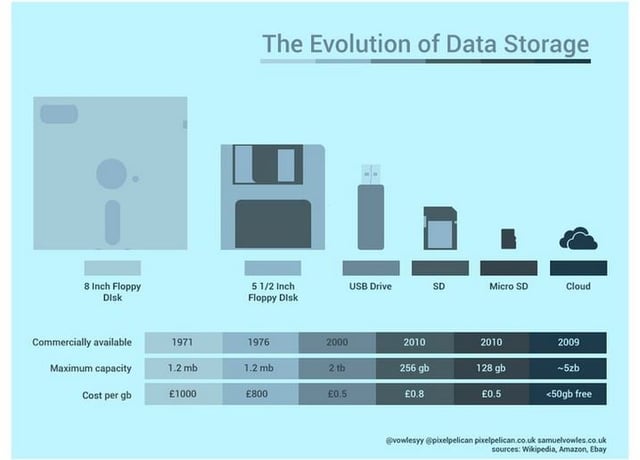

Storage IT has evolved significantly during the past 10 years, particularly since Amazon launched its Simple Storage Service in early 2006, adding a whole new dimension by bringing the cloud into the mainstream enterprise.
This IT sector is a prime example of the data center convergence and hyper-convergence trends. While the size of the storage drives is shrinking, capacity continues to increase. The media itself, whether spinning disks or solid-state NAND flash drives, is being produced with higher quality—including capaciousness—all the time.
Every change in one component leads to changes in other areas, unlocking new ways of looking at data. The increasing demand to monetize an ever-growing pool of unstructured data pushes against storage limitations, forcing storage manufacturers to innovate.
In this eWEEK article, which uses timely industry information from Samsung Product Marketing Director Richard Leonarz, we examine eight practical tips for storage administrators to keep their shops up to date.
- 1. Migrate from a Spinning Disk
- 2. Upgrade Your Storage Interface
- 3. Improve Speed, Performance with PCIe and NVMe
- 4. Factor Total Cost of Ownership into Storage Investment Decisions
- 5. Use AES Encryption to Improve Data Security
- 6. Shift from 2D to 3D NAND
- 7. Use the Right Storage Solution for the Job
- 8. Archive Your Storage
1. Migrate from a Spinning Disk
The ongoing improvements in the performance of PC components pushes against physical limitations of hard disk drives (HDDs), creating bottlenecks that throttle performance. The use of solid state drives (SSDs) and flash memory storage alleviates these bottlenecks and allows engineers to build faster data paths that make the additional cost of an SSD worthwhile.
2. Upgrade Your Storage Interface
Advancements in interface and storage technology are giving companies new ways to manage the world’s massive influx of data. While ribbon cables were once fast enough to handle early PC requirements in storing data on floppy and spinning disk hard drives, improvements in CPU and memory speed have required manufacturers to improve the storage component as well.
3. Improve Speed, Performance with PCIe and NVMe
Non-Volatile Memory Express (NVMe) interface and PCI Express (PCIe) protocol SSD technologies significantly improve the speed and performance of data centers. They deliver substantially higher bandwidth, lower latency and help avoid bottlenecks. Benefits include increasing the numbers of users on the network and faster data analytics or data streaming.
4. Factor Total Cost of Ownership into Storage Investment Decisions
Users must look beyond cost per gigabyte and compare the performance, reliability, and security of SSDs vs. HDDs to measure the true benefits to the organization. Faster transfer speeds improve PC Boot-up and Application Load times, which leads to significant time savings. Additionally, with no moving parts and fewer opportunities for mechanical failure, SSDs can reduce the cost of IT support and most modern SSDs have heightened security features to ensure data is protected.
5. Use AES Encryption to Improve Data Security
Most SSDs are designed with AES (Advanced Encryption Standard) encryption, meaning that data going through the controller is encrypted prior to being stored. Unlike standard software encryption that sits over the operating system, AES encryption limits the ability of hackers to insert malware between the OS and the software encryption.
Features such as Crypto Erase and Secure Erase also help protect data when users or companies are looking to recycle their drives.
6. Shift from 2D to 3D NAND
NAND flash, at one point, made it possible to pack more into each cell, but NAND flash cells became over packed, which led to interference and reduced reliability. Moving from 2D to 3D with V-NAND technology involves creating multiple-layer cell towers that drive improved performance and endurance over planar NAND.
7. Use the Right Storage Solution for the Job
Storage solutions come in a variety of shapes and sizes, but there is no one size fits all. For example, SSDs are designed to work in either client/PC or enterprise server types of environments and can be either internal or external drives.
The data demands on SSDs vary greatly between a client PC used at home, work or school and a data center working 24/7. Manufacturers design their drives to meet the requirements of one application or the other, but not both. IT managers should fully test and qualify the drives to ensure that the warranty adequately covers their applications.
8. Archive Your Storage
A tiered storage approach helps improve the cost effectiveness of the modern data center. A “cold” tier archives the bulk of data center data in HDDs or tape-backups. This takes advantage of the lowest cost per gigabyte, thus allowing data centers to more fully optimize “warm” data and “hot” data in higher-performance storage devices.
[To see a larger version of the chart above, right-click on it and select “View Image.”]