





Creating Acrobat forms - Database - News & Reviews - eWeek.com | eWeek

Creating Acrobat forms
Creating Acrobat forms
Écrit par
eWEEK EDITORS
eWEEK EDITORS
May 28, 2012
1 minute read
eWeek Le contenu et les recommandations de produits sont indépendants de la rédaction. Nous pouvons gagner de l'argent lorsque vous cliquez sur des liens vers nos partenaires. En savoir plus


Creating Acrobat forms

Creating Acrobat forms

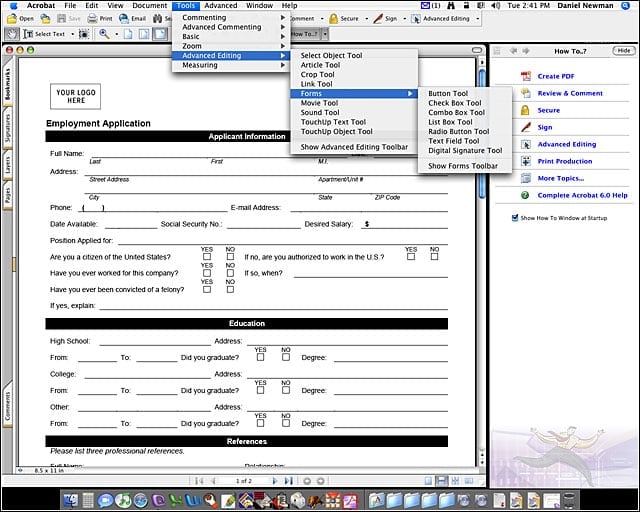
Once youve converted your form into a PDF, select Tools > Advanced Editing > Forms to insert form controls.


Creating Acrobat forms – Formatting options
2

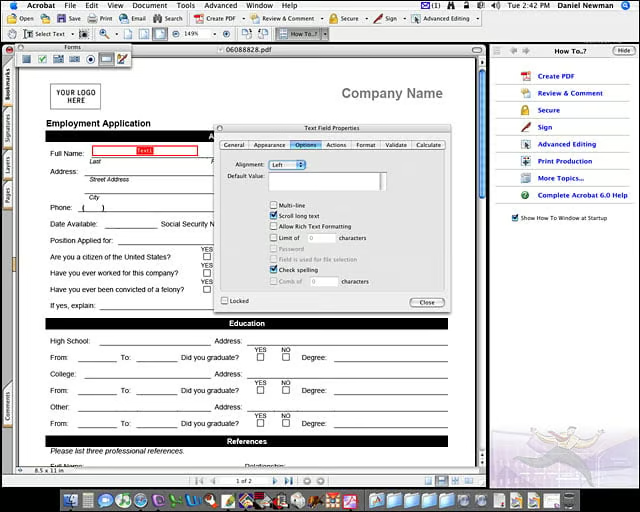
After youve inserted a form field, you can set options for the field such as text alignment, multi-line, scroll long text, or allow rich text formatting.


Creating Acrobat forms – Naming fields
3

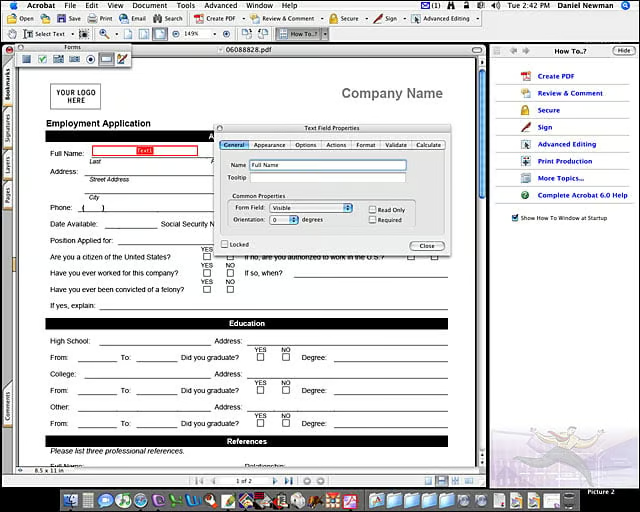
Make sure you write in a useful name for each field. These names will be used for database connectivity should you implement that feature.

eWeek Logo

eWeek has the latest technology news and analysis, buying guides, and product reviews for IT professionals and technology buyers. The site's focus is on innovative solutions and covering in-depth technical content. eWeek stays on the cutting edge of technology news and IT trends through interviews and expert analysis. Gain insight from top innovators and thought leaders in the fields of IT, business, enterprise software, startups, and more.

Propriété de TechnologyAdvice. © 2026 TechnologyAdvice. Tous droits réservés

Divulgation publicitaire : Certains des produits qui apparaissent sur ce site proviennent d'entreprises dont TechnologyAdvice reçoit une compensation. Cette compensation peut influencer la façon dont les produits apparaissent sur ce site, notamment l'ordre dans lequel ils apparaissent. TechnologyAdvice n'inclut pas toutes les entreprises ou tous les types de produits disponibles sur le marché.