Visual Studio Team System 2010 Lab Management Images

Visual Studio Team System 2010 Lab Management Images
Écrit par
Darryl K. Taft
Darryl K. Taft
Published: Nov 10, 2008
Updated: Feb 2, 2021
2 minute read
eWeek Le contenu et les recommandations de produits sont indépendants de la rédaction. Nous pouvons gagner de l'argent lorsque vous cliquez sur des liens vers nos partenaires. En savoir plus


Visual Studio Team System 2010 Lab Management Images

Visual Studio Team System 2010 Lab Management Images

Visual Studio Team System 2010 Lab Management Imagesby Darryl Taft


No Title
2

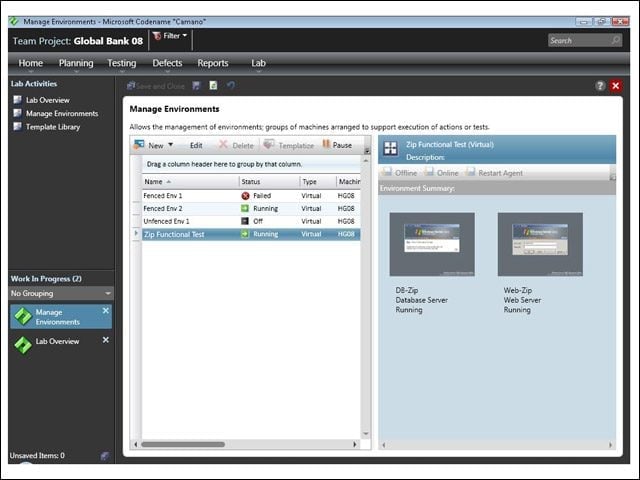
This screen shot shows a running Lab Environment “Zip Functional Test,” which has two virtual machines, a database server and a Web server. The active thumbnail images on the left show the state of these machines. The user can easily connect to the machines by double-clicking on the machine thumbnail or by choosing Connect from the toolbar. The user can interact with the individual machines through the Lab Environment viewer UI. Lab Management enables easy self-service of lab environments that have been created on their behalf by lab managers.


No Title
3

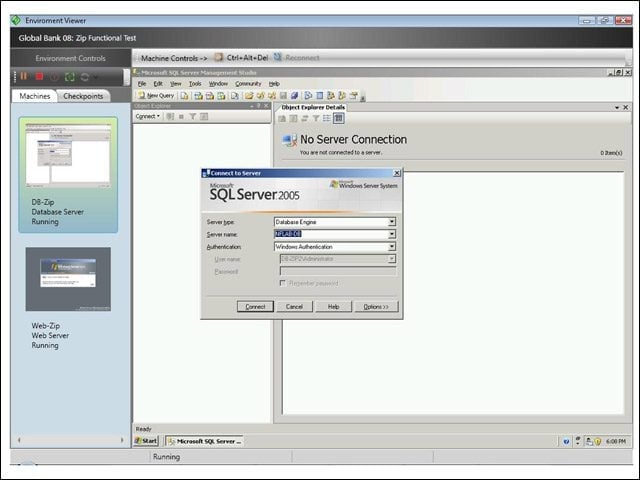
This screen shot shows an active environment as viewed from the Lab Environment viewer when the user either connects to the environment or double-clicks on a specific machine in the environment UI. This UI provides a first-class interface to the Lab Environment, where the user can interact with each of the machines as if connected locally. When a tester files a bug, one of the rich bug attachments is a link to the lab environment, so a developer can easily open the link to gain access to the same environment used by the tester to create the bug. This helps reduce or eliminate the “no repro” bug problem.

Advertisement


No Title

4

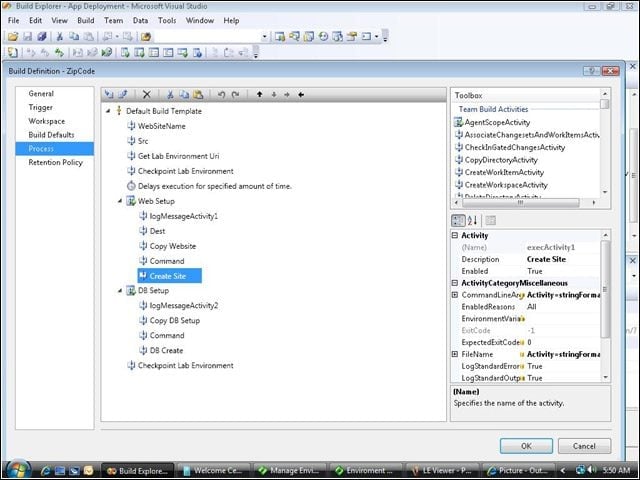
This screen shot shows Lab Management created custom build activities “Checkpoint Lab Environment,” “Web Setup’ and ‘DB Setup,’ enabling a user to take a checkpoint of the lab environment so she can restore the environment to a pristine baseline state very quickly and deploy the application under test to the lab environment to run tests. The workflow enables end-to-end automation of the build, deploy and test cycle, significantly improving the software development process.

Darryl K. Taft

Darryl K. Taft covers the development tools and developer-related issues beat from his office in Baltimore. He has more than 10 years of experience in the business and is always looking for the next scoop. Taft is a member of the Association for Computing Machinery (ACM) and was named 'one of the most active middleware reporters in the world' by The Middleware Co. He also has his own card in the 'Who's Who in Enterprise Java' deck.

eWeek Logo

eWeek has the latest technology news and analysis, buying guides, and product reviews for IT professionals and technology buyers. The site's focus is on innovative solutions and covering in-depth technical content. eWeek stays on the cutting edge of technology news and IT trends through interviews and expert analysis. Gain insight from top innovators and thought leaders in the fields of IT, business, enterprise software, startups, and more.

Propriété de TechnologyAdvice. © 2026 TechnologyAdvice. Tous droits réservés

Divulgation publicitaire : Certains des produits qui apparaissent sur ce site proviennent d'entreprises dont TechnologyAdvice reçoit une compensation. Cette compensation peut influencer la façon dont les produits apparaissent sur ce site, notamment l'ordre dans lequel ils apparaissent. TechnologyAdvice n'inclut pas toutes les entreprises ou tous les types de produits disponibles sur le marché.