






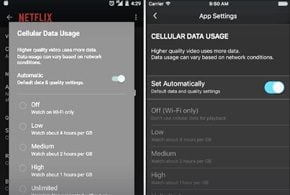

Netflix users who watch streaming videos on their mobile devices across cellular connections now have a new mobile data control tool that can help protect them from blowing over their mobile plan’s data caps.
The cellular data control tool, which has been integrated into the latest Android and iOS versions of the Netflix mobile app, allows users to better control how much data they are consuming when their devices are connected directly to cellular networks, according to a May 5 post by Eddy Wu, the company’s director of product innovation, on the Netflix Blog.
Without such usage controls, Netflix viewers could risk consuming more data than permitted by their mobile phone plans, which could lead to expensive data overage charges. The controls allow users to consume Netflix video at lower quality settings when customers are directly using cellular connections, when their usage can be more expensive. The default setting for the new feature will let users stream about 3 hours of TV shows and movies per gigabyte of data, at a rate of about 600 kilobits per second, according to Wu’s post.
“Our testing found that, on cellular networks, this setting balances good video quality with lower data usage to help avoid exceeding data caps and incurring overage fees,” he wrote. “If you have a mobile data plan with a higher data cap, you can adjust this setting to stream at higher bit rates. Our goal is to give you more control and greater choice in managing your data usage whether you’re on an unlimited mobile plan or one that’s more restrictive.”
This controls only affect data usage while customers are viewing video on mobile devices using cellular networks, he added. Streaming on WiFi or when using a tethered connection is not affected by the lower bit rate settings.
“To set your cellular data usage, make sure you have updated your Netflix app on iOS or Android to the most recent version, select ‘App Settings’ from the menu, and pick ‘Cellular Data Usage,'” wrote Wu. “There you can switch off the automatic default and select a higher or lower data usage setting that works with your mobile data plan, including an unlimited option.” Users can get more information about the process in an article in the Netflix Help Center.
“We are always working on ways to improve picture quality while streaming more efficiently, so bit rates could change over time,” wrote Wu. “As with all streaming, actual data usage can vary based on your device capabilities and network conditions. Your mobile carrier also may impact the actual data usage even if you elect a higher setting in the Netflix app.”
Netflix first announced the new data management capabilities back in March as a way to help customers who face restrictive data caps on their mobile accounts and may not be able to watch video content as much as they desire due to costly data charges, according to an earlier eWEEK story.
The company said that its internal research showed that many customers worried about exceeding their mobile data caps with their phone carriers, which inspired the company to find a way to resolve some of those concerns.
Also in March, the company disclosed that it has been lowering the quality of its video feeds to mobile customers of AT&T and Verizon to protect those consumers from exceeding mobile data caps.