








Most people are still using ChatGPT the way they used Google in 2005: type a question, get an answer, close the tab. A lot of people aren’t even asking the AI to use web search, and just relying on its “training date”. Le gasp!
That worked fine when AI was a novelty in 2023 or 2024. In 2026, it’s like owning a professional kitchen and only using the microwave. If you’re feeling attacked right now, good. Channel that energy to upgrade your AI skills in 2026 and keep scrolling…
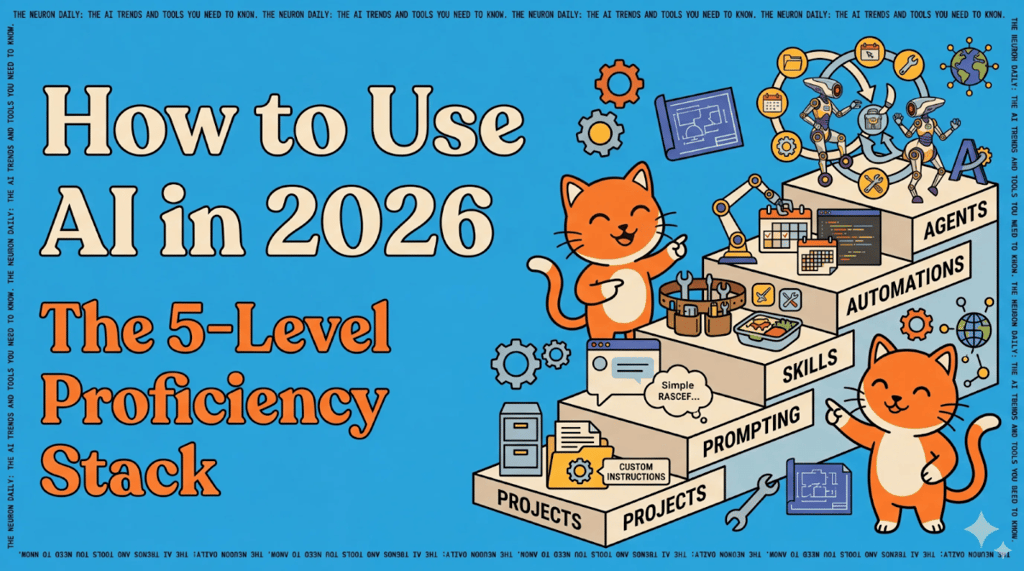
We’ve been reflecting on this here at The Neuron, especially since so many of our readers are totally new to AI. So here’s the framework we recommend for getting real, compounding value out of AI. Think of it as five levels.
Here’s the stack
Level 1: Projects. Stop chatting in the main window. Create a project folder (ChatGPT, Claude, and Gemini all have them).
Inside, add custom instructions (persistent rules the AI follows every time), upload reference documents (style guide, brand voice, codebase), and set memories (facts it remembers across sessions).
This is the foundation for your work. Don’t do any sort of work without this setup.
Level 2: Prompting. Ya that’s right, this is level two (not one). After your project is set up, you can then focus on how to prompt.
Simplest formula: Persona + Task + Context + Format. “You are a senior content strategist. Create a content plan for a tech blog targeting AI beginners. Present as a bulleted list.” Goal, context, constraints. That’s it.
Level 3: Skills. Once you’ve gone back and forth enough to nail a task, package that conversation into a reusable skill. Then you can ask your AI at any time to use that skill to do that same task without memorizing or saving the prompt somewhere.
Ask: “Reverse-engineer this conversation into a skill using your skill creator skill I can call anytime.” If it doesn’t give you a doc you can “install”, it didn’t work right; see below for more. This is a one-click trick that will save you twenty minutes of prompting for something you already got your AI to do for you once before. If you use ChatGPT and have never made a skill before, click this!
Level 4: Automations. Once you’ve got skills you can call any time, now you can schedule them for your recurring tasks. Claude’s Cowork, OpenAI’s Codex, and Gemini’s Opal and Scheduled Actions all support this.
Level 5: Agents. These are AI that reason, act, and use tools in a loop.
Automations run tasks on a schedule; agents run toward a goal. They reason about what needs to happen, pick the right tools (or skills), act, check if it worked, and loop until the job is done.
Three ways to use them
- For you: an OpenClaw or Claude Code agent that manages your calendar, triages your inbox, and files your expenses without being told each step
- For your customers, on your behalf: a support agent that reads tickets, pulls up account data, resolves issues, and only escalates what it can’t handle.
- As the product itself: an AI tutor, financial advisor, or research assistant, where the agent IS the thing you sell.
The difference from Level 4: at Level 4, you decide what runs and when. At Level 5, the AI decides what and when. You give it “keep my inbox under 20 unread,” and it figures out the filtering, replying, and archiving on its own.
Why this matters
The gap between “I use ChatGPT sometimes” and “AI saves me 10 hours a week” is almost entirely about moving up this stack. Most people are stuck at Level 2. The real productivity gains live at Levels 3-5.
Our take: You don’t need to be a developer. You need to stop treating AI as a search engine and start treating it as a coworker who needs onboarding. Projects are the onboarding. Skills are the training. Automations are the job to be done every day. And agents are the coworkers you interact with to get it all done.
Editor’s note: This content originally ran in the newsletter of our sister publication, The Neuron. To read more from The Neuron, sign up for its newsletter here.