







Newcomer Backblaze Offers Ultra-Cheap, Do-It-Yourself Cloud Storage
Backblaze is Bay Area-based a startup that provides unlimited online backup for laptops or desktops to its customers for $5 per month, which is similar in many ways to cloud storage services such as Carbonite, Mozy and Amazon S3. To make his business commercially viable, founder Gleb Budman had to figure out how to store hundreds of petabytes of customer data in a reliable, scalable way—and still keep his costs low. After looking at several commercial solutions that he considered overpriced, Budman told eWEEK that he and his team decided to build their own custom Backblaze Storage Pods with commodity hardware. They constructed 67TB worth of capacity in a 4U-sized server array. Total cost: $7,867. Budman isn’t afraid to document everything about this project. The new cloud storage system is now working well for Backblaze, Budman said.
However, he and his crew didn’t stop at that. They have since decided to share their development recipe and parts list for this low-cost storage system in an open-source manner. They figure that if companies can build their own cloud storage for a lot less up-front money, then perhaps those same companies will consider utilizing Backblaze’s cloud storage management software.
“Our hope is that by sharing, others can benefit and, ultimately, refine this concept and send improvements back to us,” Budman said. “Evolving and lowering costs is critical to our continuing success at Backblaze.”
In this slideshow, we’ll show a general overview about how to make one of these storage pods yourself and save thousands of dollars. Backblaze has made the actual blueprints available in a free download.
You can view a more detailed blog post and a short 3D video illustrating the storage box.
What a Cloud Storage Server Does
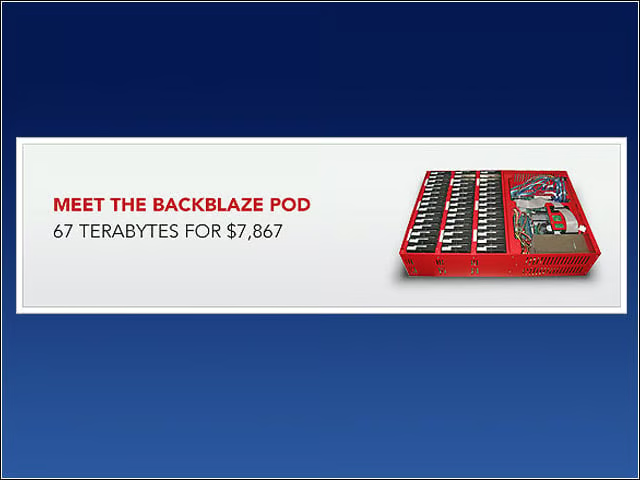
Backblaze Storage Pod is a fully contained storage server. However, the intelligence of where to store data and how to encrypt it, deduplicate it and index it is all at a higher level (outside the scope of this slideshow and available in Backblaze’s cloud storage software). “When you run a data center with thousands of hard drives, CPUs, motherboards and power supplies, you are going to have hardware failures-it’s irrefutable,” Backblaze engineer Tim Nufire wrote in his blog. “Storage Pods are building blocks upon which a larger system can be organized that doesn’t allow for a single point of failure. Each pod in itself is just a big chunk of raw storage for an inexpensive price; it is not a ‘solution’ in itself.”
Main Components
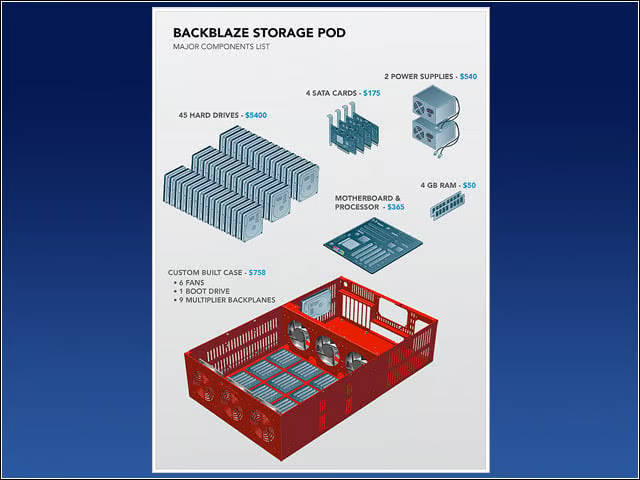
A Backblaze Storage Pod is a self-contained unit that puts storage online. It’s made up of a custom metal case with commodity hardware inside. Specifically, one pod contains one Intel motherboard with four SATA cards plugged into it. The nine SATA cables run from the cards to nine-port multiplier backplanes that each have five hard drives plugged directly into them (45 hard drives in total).
Power Diagram
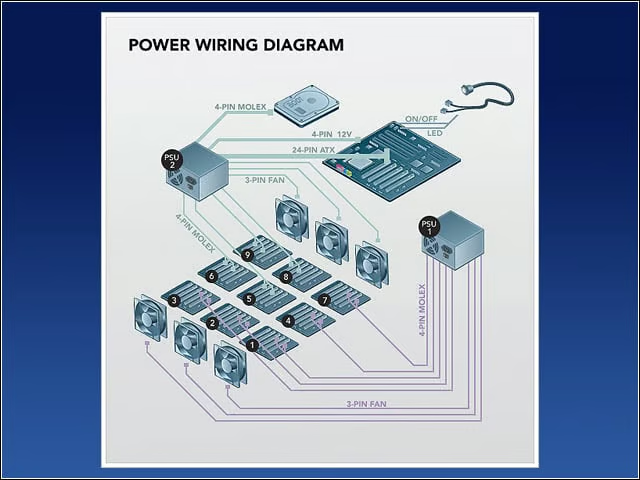
The power wiring diagram of a Backblaze Storage Pod is shown here. Power supply units (PSUs) provide most of their power on two different voltages: 5V and 12V. Backblaze uses two power supplies in the pod because 45 drives draw a lot of 5V power, yet high-wattage ATX PSUs provide most of their power on 12V. This is not an accident: 1,500-watt and larger ATX power supplies are designed for powerful 3D graphics cards that need the extra power on the 12V rail.
SATA Wiring Diagram
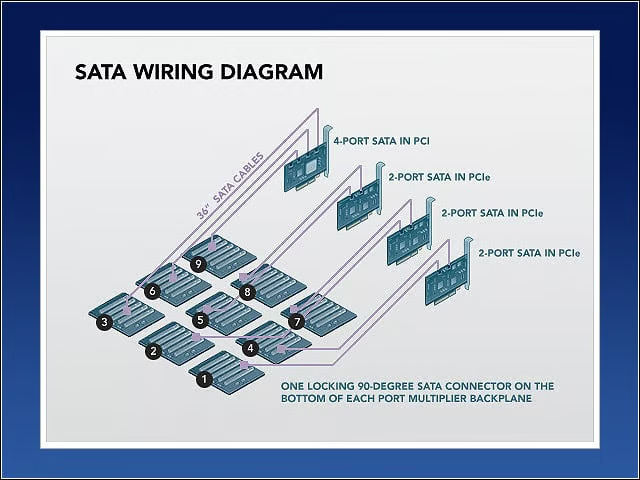
The Intel motherboard has four SATA cards plugged into it: three SYBA two-port SATA cards and one Addonics four-port card. The nine SATA cables connect to the top of the SATA cards and run in tandem with the power cables. All nine SATA cables measure 36 inches and use locking 90-degree connectors on the backplane end and non-locking straight connectors into the SATA cards.
Pods Use Only Free Software
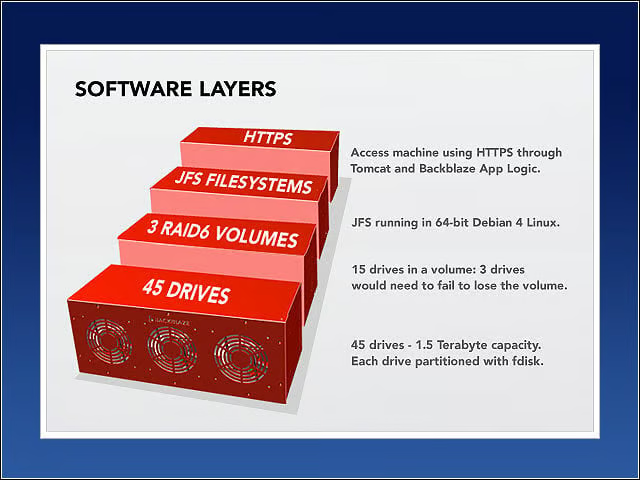
A Backblaze Storage Pod boot 64-bit Debian 4 Linux and the JFS file system. They are self-contained appliances, where all access to and from the pods is through HTTPS.
A Partially Assembled Pod
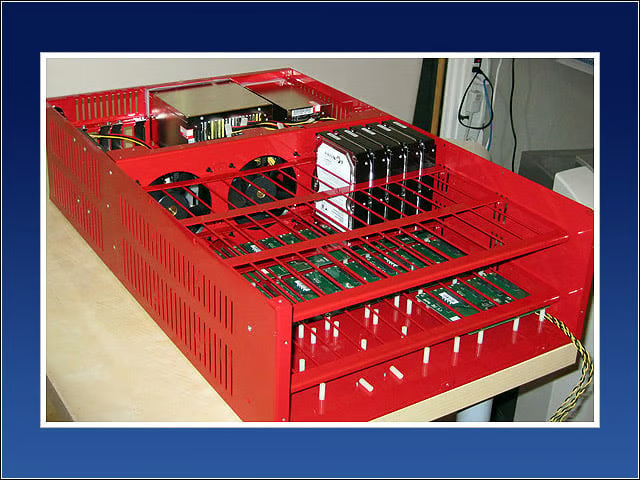
Below is a picture of a partially assembled Backblaze Storage Pod. The metal case has screws mounted on the bottom, facing upward, where they attached nylon standoffs (the small white pieces). Nylon helps dampen vibration, and this dampening is a critical aspect of server design. The circuit boards shown on top of the nylon standoffs are a few of the nine SATA port multiplier backplanes that take a single SATA connection on their underside and allow five hard drives to be mounted vertically and plugged into the topside of the board. All the power and SATA cables run underneath the port multiplier backplanes. One of the backplanes in the picture below is fully populated with hard drives to show the positioning.
Humming Right Along
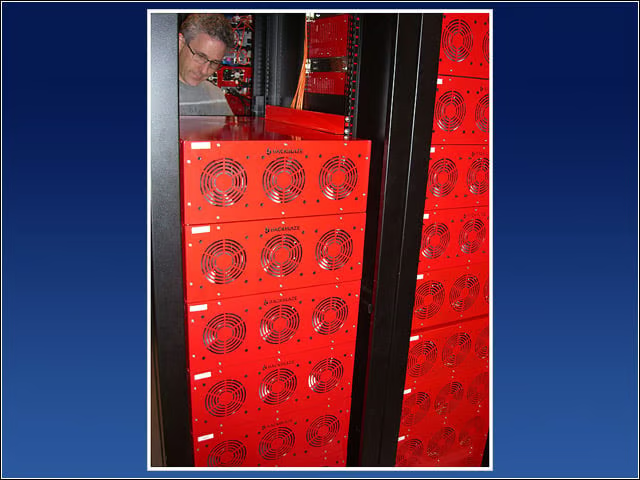
Backblaze chief engineer Tim Nufire checks on the racks of storage pods in the company’s data center.