




Should you buy a Google Chromecast?
Early reviews of the $35 video accessory Google introduced July 24 make clear that there’s little decision making to agonize over. I’ll give you the spoiler right here: If you already own the $99 Apple TV or the $60 Roku box, you do not need a Chromecast. If you have neither of these things, though, and it would be convenient for you to watch Netflix and YouTube on your high-definition TV, instead of on your laptop, tablet or smartphone running iOS, Android or Windows Phone, it’s likely to be $35 well spent.
“I like it and can recommend it, despite some drawbacks,” Walter Mossberg wrote in The Wall Street Journal July 10. “The biggest: It only works so far with a handful of mobile apps and most notably Netflix and Google’s own YouTube.”
On the bright side, Google says it’s working to made Chromecast compatible with more apps, including its photo app and music app Pandora.
Which is not to say Netflix and YouTube are all you can watch. Chromecast can “cast” Web content from the Chrome browser.
“When I wanted to watch a video from the browser, I was usually able to get rid of extraneous material by setting the video to full screen view on the computer,” wrote Mossberg.
While casting content from YouTube and Netflix, a user can still multitask—email and whatnot on the device—which ABC News’ Joanna Stern says Google has “nailed.” Though you’ll need a solid WiFi network.
“Over LTE [Long Term Evolution], video was choppy and getting everything to work was a struggle,” wrote Stern. “Even on WiFi, I encountered some app crashes in YouTube and some distortion using the Chrome extension, though in my five days of testing there were only a handful of hiccups.”
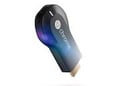
Two other notes on setup: You plug the Chromecast into the HDMI slot on your television and then use an AC adapter to connect the other end of the Google device into a power outlet. That last bit—that this isn’t really a “dongle” after all—is something “Google cleverly hid in the photos,” wrote Stern.
USA Today‘s Edward C. Baig points out in his review that while Chromecast works with a “slew of devices,” for now you can’t set it up with an iPhone or iPad.
“You can fetch an Android app for Chromecast in the Google Play store or visit google.com/chromecast/setup to download an app for your computer,” wrote Baig. “You can’t set up the device using iOS yet, though Google says an app for that purpose is coming soon. Once Chromecast is set up using Android or your computer, it will work with your iOS devices.”
Baig also points out that two people in the house can cast at once, with the second caster knocking out the first.
“Do I sense a fight between spouses waiting to happen?” asked Baig.
In the Los Angeles Times, Salvador Rodriguez wrote that the Chromecast’s high-definition video came across as well as on Apple TV and Roku.
“My only issue with watching Netflix video on Chromecast was controlling it with the iPhone,” he added. “The Netflix app was not very responsive when I would try to fast forward, rewind or pause the video. … When I used the Android version of Netflix, it worked fine.”
Rodriguez also complained that while one can multitask in the Google-sanctioned apps, when casting content from Chrome, which requires downloading a Google Cast extension, you have to make the video full screen on your laptop to make it full screen on your TV.
“That means you won’t be able to do any other tasks while you do this,” he wrote. “That goes against one of Google’s selling points for the Chromecast, which is the ability to ‘multitask freely.'”
Echoing the sentiments of the other reviewers, Rodriguez wrote, “All in all, Chromecast is a great option if you just watch Netflix and YouTube on TV.”
However, for those who “simply want the best digital TV receiver out there, Chromecast isn’t it—at least for now,” he added.