






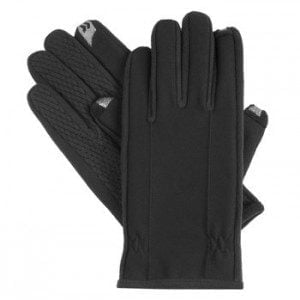

[WP_IMAGE]Last year I got myself a pair of Isotoner SmartTouch gloves at Macy
’
s. I love these gloves and would get them again in a second. This year I got pitched on a couple of related touchscreen gifts from Newer Technologies: NuTouch Gloves and the NuScribe 2-in-1 touch screen stylus and pen.Before I relate my experience with these 2011 gift ideas, let me say a word about my Isotoner gloves. Best. Gift. Ever. The only thing I lose faster than an umbrella is gloves. But not these SmartTouch lovlies. The conductive fibers in the forefingers and thumbs are stitched in such a way that they form a pretty accurate finger press area. That means typing on my HTC EVO 4G smartphone is fairly accurate, even on a jouncing BART train.The gloves are warm enough for train commuting in Chicago, flexible enough to comfortably grip a phone and stylish enough to pass for a night at the San Francisco Symphony. I also like that the palm and inside finger surfaces are crisscrossed with a slip-resistant pattern so I always feel confident that I have a firm grasp on my phone. I bought my gloves for $30 and that
’
s about how much they are this year.Okay. So how did the $11.99 NuTouch Gloves hold up? Meh. On the plus side the conductive fiber is woven into the tips of all ten fingers. And that
’
s about it. During tests with several Ziff Davis (the company that owns eWEEK) staffers the most common complaint was that the broad finger press area led to inaccurate typing on a smartphone. On a tablet, (we used an Apple iPad2 and a 7
″
Samsung Galaxy Tab) the larger key area improved typing accuracy. On the downside the woven, single-layer gloves weren
’
t that warm (even in San Francisco
’
s mild
“
winter
”
), the material lacked gripping traction and the styling, is, well, not present.Bottomline: Conductive fiber gloves are a great last minute gift idea but the NuTouch Gloves won
’
t win you any lasting goodwill from the recipient.So, what about the NuScribe stylus/pen? The touchscreen stylus is where the eraser would be on a pencil. It
’
s a rubber bulb covering a stylus nub. The press action on the stylus is good. So, if you have to accurately poke at screen targets it
’
s pretty good. The press-and-drag action was smooth, the right mix of grip and glide. This is good for drawing on the screen and flipping the pages of an e-reader. The downside, as one fellow Labbie pointed out is that it
’
s a stylus. I will lose a stylus faster than an umbrella, which, you know from what I
’
ve written above is pretty dang fast. And while it
’
s true that the NuScribe cuts down on greasy screen smears, it was also true that I had to switch from two-thumbed typing to hunt-and-peck poking when using the NuScribe, which is significantly slower for me.Finally, I
’
m sure more than one person who gets this $10 stylus/pen will first damage the device by trying to remove the rubber covering over the stylus. I also predict that a fair number will try
“
clicking
”
the top with the expectation that a touchscreen-friendly stylus will emerge from business end of the pen. It didn
’
t take me that long to figure out the correct use of the gadget, but that
’
s because I didn
’
t succeed in pulling off the rubber nub.Bottomline: The stylus seems like a great idea, but it
’
s not. Better to gift a box of chocolates than this seemingly good idea.