







[WP_IMAGE]In competitive diving a small splash as the diver enters the water is the tell tale sign of a slight flaw in what might otherwise appear to be a well-executed maneuver.The 13.3-inch Lenovo X1 laptop created just such a small splash during my tests at eWEEK Labs.But first, let
’
s concentrate on the preponderance of the X1 features that will please frequent travelers who want durable style.
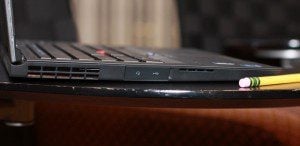
Here is a more realistic view of the side ports on the X1. Without special camera flash illumination the ports are quite difficult to see. The cover hatch needs to be folded back to reveal the ports.
There are a number of firsts in the Lenovo X1. Corning Gorilla Glass makes it
’
s debute and providing a durable, sharp view with an entirely flat, easy-to-clean viewing area. Island-style keys replace the fabled, chamfered key caps. The keys are well spaced and the wonderful key press action of the legacy Lenovo keyboard has been successfully retained in the X1.The ThinkLight is gone (look at the top of the display bevel of a classic ThinkPad) and for the first time a ThinkPad has a back light in the keyboard.In the X1 there is only one set of mouse buttons, above the trackpad, although the lower edge of the trackpad is articulated so that a left- and right-button press provides the functionality of the second set of mouse buttons usually found on a ThinkPad.Now for the splash.Think of Darth Vader
’
s TIE fighter or the traditional economy overhead bins in a Boeing 767. Both Vader
’
s craft and the 767 overhead storage look good but are of doubtful practical use. The X1 ThinkPad is edged in angles that successfully hide ports and obscure the speakers. For the first time in I can
’
t remember when, the headphone jack and one of the three USB ports were covered with a pesky access cover.My test unit, clearly marked as
“
not a customer ship level system
”
had a stuck
“
z
”
key problem and inconsistent trackpad operation.Overall, the X1 is a fine performer and overcomes it
’
s over-styled exterior. You can read my full review of the X1 including specifications, benchmarks and options later this week at eWEEK.com.