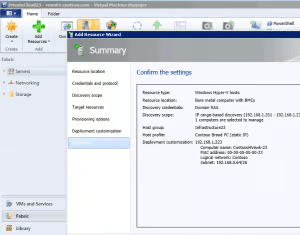

In advance of the System Center 2012 Release Candidate announcement on January 17, I attended a reviewer workshop at the Microsoft campus in Redmond, Wash. As I have predicted for many years, management mastery of virtualized environments will distinguished accomplished IT managers from the “also ran.” It’s clear that in the System Center 2012 RC, Microsoft is on to something. [WP_IMAGE] Today, I’ll focus in on System Center 2012 – Virtual Machine Manager (SC VMM). Since 2008, SC VMM has been able to manage not only Microsoft Hyper-V virtualization hosts but also VMware ESX hosts as well. Citrix XenServer hosts can also be monitored and managed using SC VMM. For IT managers, this means that the widely used System Center tools are gaining in capability. This has two positive and one negative effects. First, there is a relatively large pool of IT professionals with System Center experience, which means that there is talent available to implement and use the tool. Second, Microsoft’s decade plus of experience in datacenter management means that System Center has enough experinece under its belt to credibly handle the root cause analysis and error management reporting needed to help IT staff quickly identify problems and take action. On the downside, using System Center requires a substantial Microsoft ranging from Active Directory to WSUS (Windows Server Update Service) to Microsoft SQL Server. These components are tied together very tightly, such that once SC VMM is in place, stringent change management controls will be needed to keep the system running smoothly. So what do you get with SC VMM besides basic management across the three major hypervisor platforms? For one thing, you will get one of the best single products for managing a Microsoft Hyper-V environment. And with the improvements I’ve seen in the virtualization capabilities that will be offered in the upcoming release of Windows Server 8, the enhancements in SC VMM will lay the basis for the automation and fault resolution needed to keep a virtual datacenter up and running. There are alternatives to SC VMM for heterogeneous hypervisor management. BMC, CA, HP and IBM-Tivoli all make tools that can monitor one or more virtual and physical environments inside a common framework. As I delve into SC VMM at eWEEK Labs, expect to see more about how the product stacks up to these established datacenter players.




AI thrives on data but feeding it the right data is harder than it seems. As enterprises scale their AI initiatives, they face the challenge of managing diverse data pipelines, ensuring proximity to insights, and supporting a growing range of workloads. In this episode, Corey Knowles speaks with Vrashank Jain, lead product manager for Dell’s AI Data Platform, about how businesses can overcome these hurdles with solutions that simplify data management, enhance performance, and unlock the full potential of their AI investments.

In this episode of eSpeaks, Jennifer Margles, Director of Product Management at BMC Software, discusses the transition from traditional job scheduling to the era of the autonomous enterprise.

eSpeaks’ Corey Noles talks with Rob Israch, President of Tipalti, about what it means to lead with Global-First Finance and how companies can build scalable, compliant operations in an increasingly uncertain world. They explore how automation, AI, and integrated platforms are helping finance teams tackle today’s biggest challenges, from cross-border compliance and FX volatility to […]

-
Latest News - Resources Resource HubsFeatured ResourcesLink to The Real AI Power Play: Who Controls Your Enterprise Data Layer? The Real AI Power Play: Who Controls Your Enterprise Data Layer?IT and data teams were promised that AI would make work easier. Instead, it's created new layers of complexity.Link to Building the Backbone of Agentic AI with Trusted, Context-Rich Data Building the Backbone of Agentic AI with Trusted, Context-Rich DataIn this 10-minute take video, Reltio Principal Solutions Consultant Guy Vorster explains how organizations can overcome fragmented data challenges to power AI agents.Link to IHG scales real-time, trusted data across global brands IHG scales real-time, trusted data across global brandsAccelerating time to value while powering data-driven engagementLink to Dell’s Vrashank Jain on The Data Problem That Could Break Your AIDell’s Vrashank Jain on The Data Problem That Could Break Your AI
AI thrives on data but feeding it the right data is harder than it seems. As enterprises scale their AI initiatives, they face the challenge of managing diverse data pipelines, ensuring proximity to insights, and supporting a growing range of workloads. In this episode, Corey Knowles speaks with Vrashank Jain, lead product manager for Dell’s AI Data Platform, about how businesses can overcome these hurdles with solutions that simplify data management, enhance performance, and unlock the full potential of their AI investments.
Link to BMC’s Jennifer Margules on Intelligent Enterprise OrchestrationBMC’s Jennifer Margules on Intelligent Enterprise OrchestrationIn this episode of eSpeaks, Jennifer Margles, Director of Product Management at BMC Software, discusses the transition from traditional job scheduling to the era of the autonomous enterprise.
Link to Global-First Finance: Building Scalable, Compliant Operations in an Uncertain WorldGlobal-First Finance: Building Scalable, Compliant Operations in an Uncertain WorldeSpeaks’ Corey Noles talks with Rob Israch, President of Tipalti, about what it means to lead with Global-First Finance and how companies can build scalable, compliant operations in an increasingly uncertain world. They explore how automation, AI, and integrated platforms are helping finance teams tackle today’s biggest challenges, from cross-border compliance and FX volatility to […]
-
Artificial Intelligence -
Video -
Big Data & Analytics -
Cloud -
Networking - Cybersecurity Cybersecurity
- Applications Applications
- IT Management IT Management
- Storage Storage
- Mobile Mobile
- Small Business Small Business
- Development Development
- Database Database
- Servers Servers
- Android Android
- Apple Apple
- Innovation Innovation
- PC Hardware PC Hardware
- Reviews Reviews
- Search Engines Search Engines
- Virtualization Virtualization
-
- Blogs Blogs
- Events Events