








Google Gemini is getting a visual reset, and the chatbot is starting to look less like a blank chat window and more like a full AI workspace.
According to 9to5Google, the redesign introduces a gradient background, a pill-shaped prompt box, a reorganized tools menu, and a new layout for model selection. The changes appear aimed at making Gemini’s tools easier to access across iOS and Android.
The shift matters because AI assistants are no longer just places to type questions. They are becoming launchpads for voice, files, media, live conversations, and specialized models.
What’s changing in this redesign
While Gemini’s core capabilities remain the same, the redesign significantly changes how users access them, shifting from a chat-first layout to a more organized, tool-driven interface.
The most obvious user-facing change is the prompt box’s new shape. With this redesign, Google is removing the familiar rectangular box and replacing it with a pill-shaped one, a change we’ve already seen in ChatGPT.
The redesign retains voice input and Gemini Live on the right. The plus icon on the left remains, too, but it now serves as a single entry point for both tools and uploads. Instead of separating functions across multiple shortcuts, tapping that plus sign now opens a dropdown panel that groups media, files, and built-in Gemini tools.
The model picker has also moved from the prompt box to the top-left corner of the UI, creating more space within the new pill-shaped prompt box. Opposite its new position is the temporary chat button.
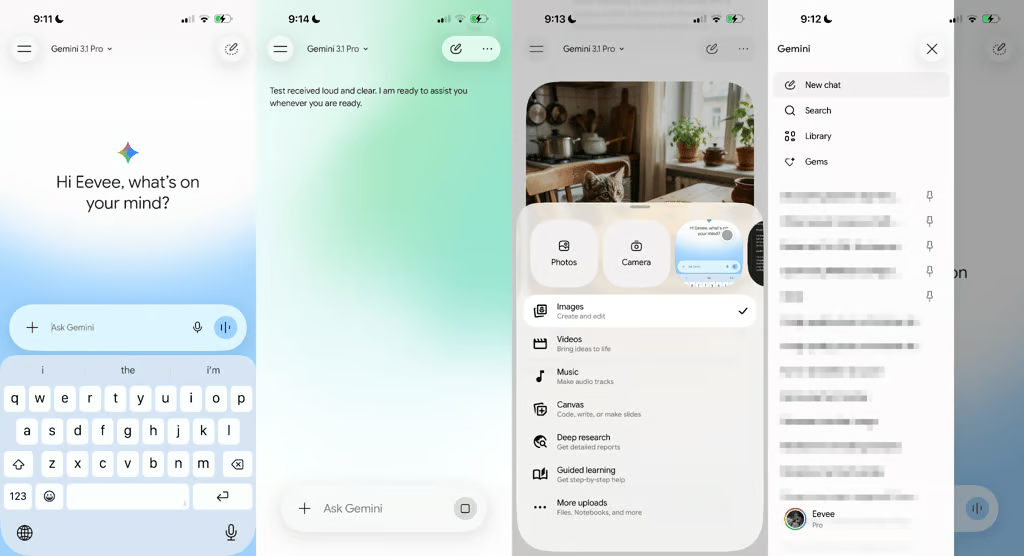
Button layouts aren’t the only thing Google changed. The background now gets an animated glow, making the app feel alive during conversations.
Google’s decision to switch to a more aesthetic experience appears to be more pronounced on iOS devices, since it will naturally blend into Apple’s Liquid Glass design.
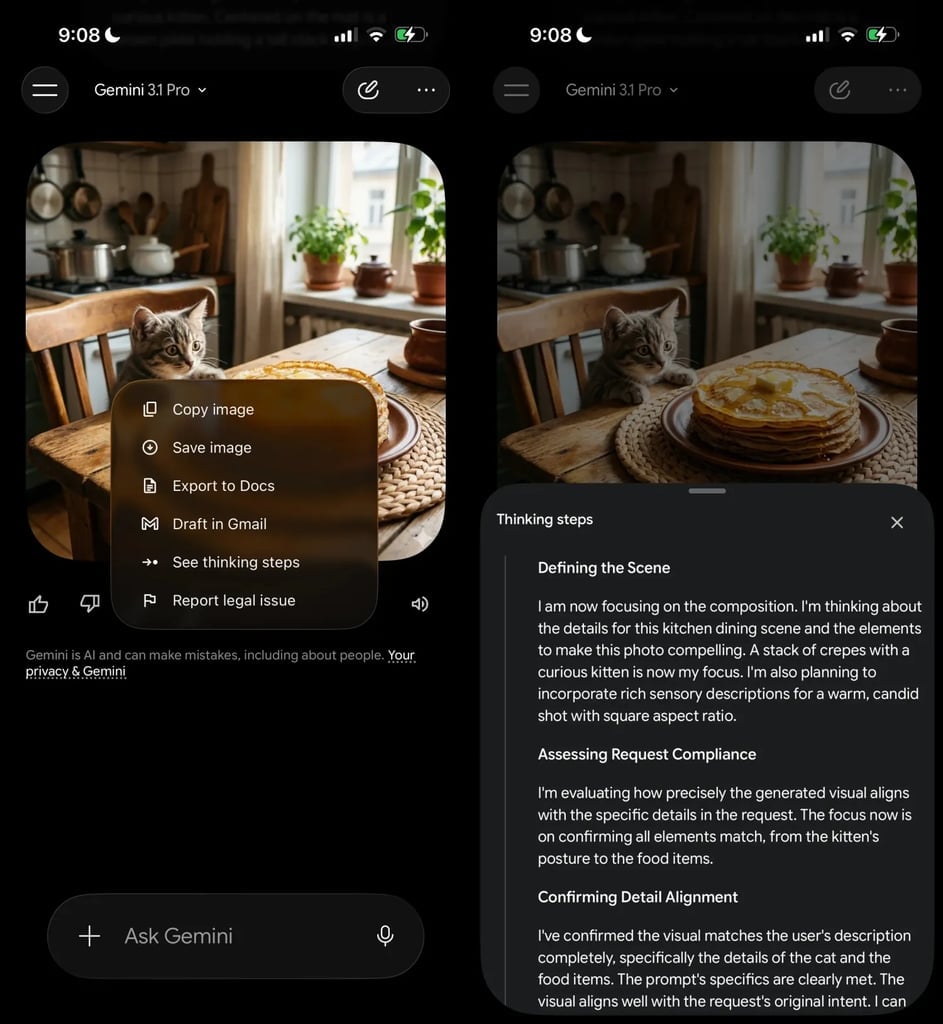
It also introduces a quieter change that will mostly affect users who rely on the “Thinking” or “Pro” models. Instead of showing the reasoning process more openly, Google now hides it behind the overflow menu, meaning you have to open the three-dot options to see how the model arrived at your answer.
Who gets Gemini’s redesigned UI first
Although Google owns Android, iOS users seem to be getting it first. Even at that, it is currently rolling out in phases, as is typical of Google updates. As a result, not all iOS users will receive it now.
However, users across different platforms will eventually get to experience it, according to 9to5Google, which says the UI redesign will unify experiences across platforms, a trend that has been spotted with other software companies. Recently, Microsoft announced the end of life for its Outlook Classic app, prompting users to move to the main Outlook app for a more unified experience.
Taken together, the redesign indicates a shift from a simple chat interface to a more structured AI tool built to be interactive rather than static.
Also read: Google’s Gemini 3.1 Flash TTS adds audio tags, over 70 languages, multiple accents, and SynthID watermarking for AI-generated speech.