








A couple of years ago, spotting an AI-generated image was almost a game. You didn’t need sharp eyes; just count the fingers, or recall that bizarre AI clip of Will Smith eating spaghetti.
The results were fascinating, funny… and very obviously fake.
Today, that’s no longer the case. AI image generators have gotten dramatically better, turning out photos that can look realistic enough to pass at a quick glance… and sometimes even longer.
The good news: AI still isn’t perfect. Well, not yet. Even the best-generated images tend to stumble over certain details, especially when scenes get busy or realistic in small, human ways. If you know where to look, those slip-ups are surprisingly easy to spot.
Here are five simple ways to tell whether an image was created by AI.
1. Read the text within the image
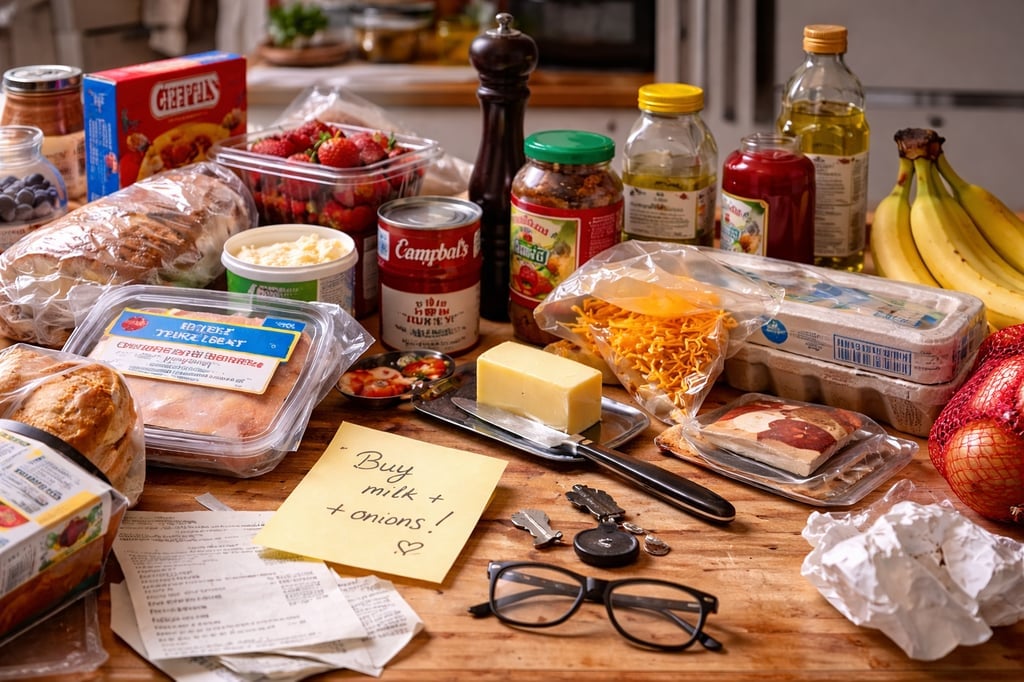
Image: DALL·E 3
AI can be good at making text look right, even if it’s not actually readable. At first, text and logos often pass as normal. It’s only when you slow down and really read what’s there that things start to feel off. Words may be slightly misspelled, letters can change shape mid-word, or fonts shift in ways real designers wouldn’t choose, like in this AI-generated image.
This happens because image generators treat text as a visual pattern rather than language. In this example, labels aren’t readable, letterforms drift, and designs feel oddly inconsistent, like placeholders pretending to be packaging. Real photos might include blurry or partially obscured text, but they rarely produce this many objects covered in writing that doesn’t quite exist.
2. Look closely at hands
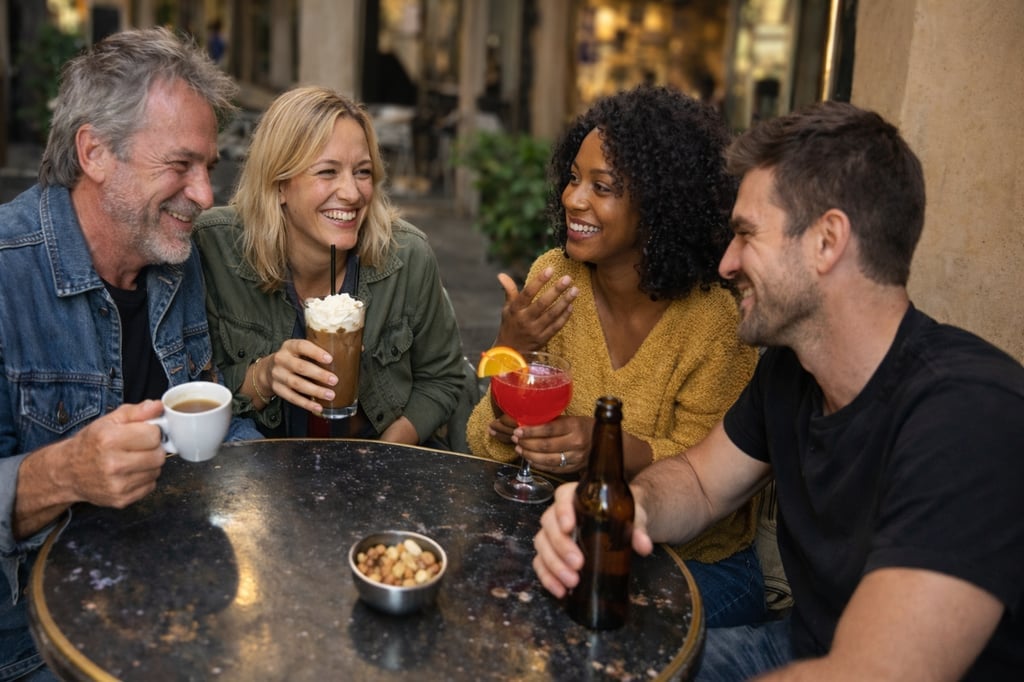
Image: DALL·E 3
While AI has improved significantly at generating the right number of fingers, hands remain one of the hardest things for it to get right, especially when people are mid-gesture or holding everyday objects.
Grips, finger placement, and the way hands wrap around cups, phones, or utensils require precise anatomy and physics. AI often gets close, but “close” isn’t the same as correct. Fingers may bend at odd angles, blend slightly into objects, or feel stiff in ways real hands rarely do.
This image is a good example of how subtle those errors can be. Look closely at the woman in the yellow top. Her hands seem perfectly normal, until you notice an extra set of fingers under her glass. It’s a subtle mistake, but a common one when AI tries to juggle anatomy, perspective, and motion at the same time.
3. Watch for people who look too perfect to be real
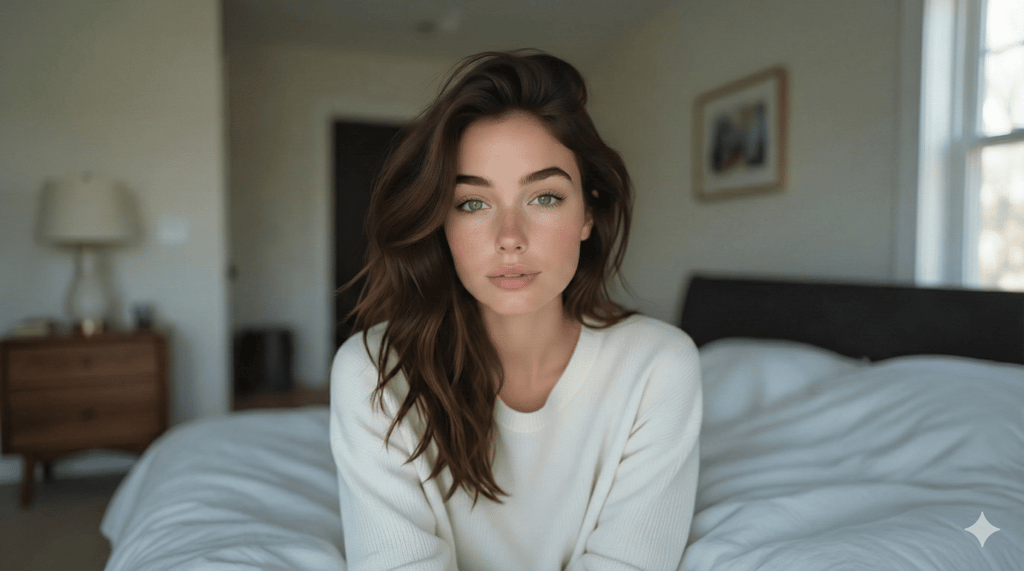
Image: Google Gemini
This tip is about polish rather than beauty.
Real photos, even of the most beautiful Hollywood actors, usually come with some visual noise: uneven lighting, skin texture, slight asymmetry, or stray hairs that don’t behave. AI images tend to smooth all of that away. The result can look impressive, but also a little over-controlled, especially when the image claims to be casual or unedited.
In this example, the person’s skin looks uniformly smooth, with little to no visible pores, and the lighting flatters every angle of the face a bit too evenly. The face itself appears almost perfectly symmetrical, and the hair doesn’t break into natural strands so much as flow together, more like a painted texture than something you could run your fingers through.
These details create a level of perfection that real cameras rarely achieve by accident.
4. Pay attention to the background, not just the subject
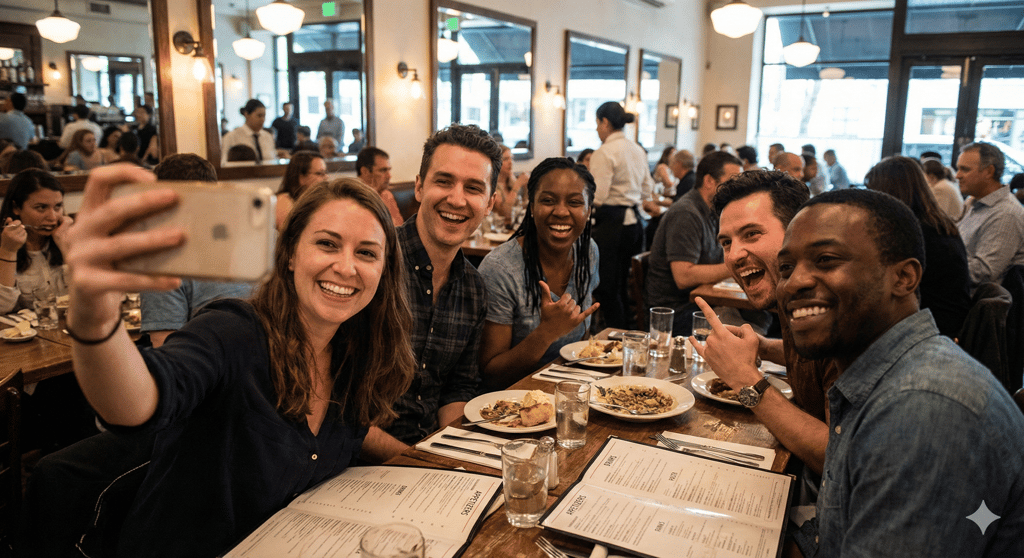
Image: Google Gemini
AI is good at making the main subject look convincing. The trouble usually starts around the edges. Backgrounds are where small logic problems sneak in: objects that don’t belong, reflections that don’t line up, or everyday setups that feel slightly wrong once you actually look at them.
That’s exactly what’s happening here. The people in the foreground look convincing, but the background raises questions once you slow down. A woman appears to be eating from a warped spoon, a picture frame behind her looks awkwardly cut off, and one of the forks on the table is missing a prong. Each detail is easy to miss, but they don’t behave the way real objects normally would.
5. No obvious tell? Check the context
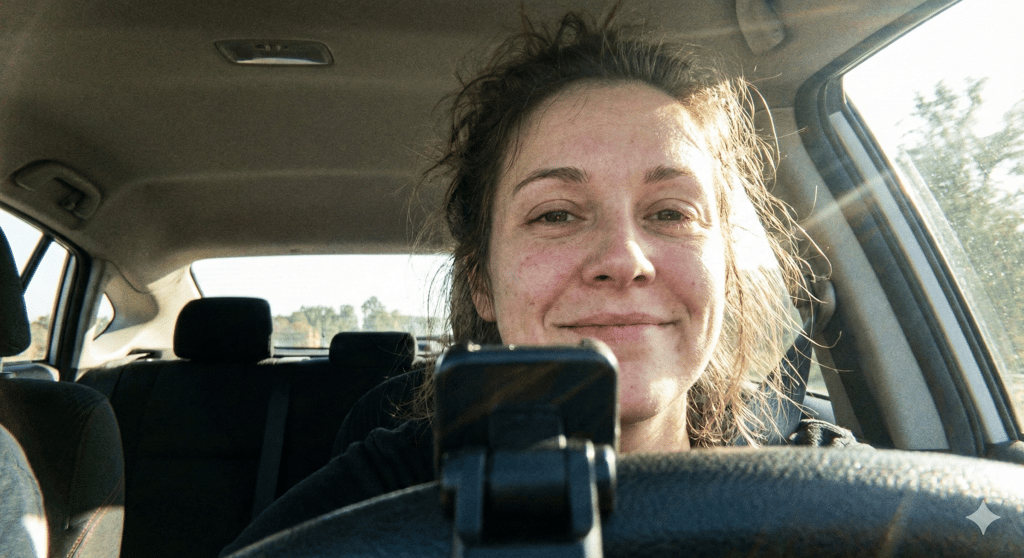
Image: Google Gemini
Sometimes an image passes every visual test. The hands look right. The lighting makes sense. Nothing in the background feels off. When that happens, your next move should be to step back and ask where it came from. Who shared it? Is it showing up anywhere else? Does it come with real context, or does it exist as a single, perfectly framed moment?
This is one of those cases. It looks like a normal, casual photo: natural skin texture, messy hair, imperfect lighting, and a believable setting inside a car. There’s no obvious visual clue that it isn’t real.
On its own, this kind of image is harmless, but not every ultra-realistic AI image is. When visuals like this are used to cause harm, context is what separates curiosity from consequence. That’s when verification does the heavy lifting: check the source, the account, and whether the image exists beyond this one post.
Seeing isn’t believing anymore
For many people, AI-generated images are still just a creative tool used for fun, art, or experimentation. But the same technology can also be used to mislead, whether that’s through scams, misinformation, or images created and shared without someone’s consent.
That’s why being able to slow down and question what you’re seeing matters. You don’t need to spot every AI image perfectly to be better off. You just need the habit of looking twice, asking where something came from, and resisting the urge to take images at face value. In a world where realism is cheap and easy to generate, a little skepticism goes a long way.
Higgsfield has reached a $1.3 billion valuation after raising an $80 million Series A extension and scaling faster than expected.