






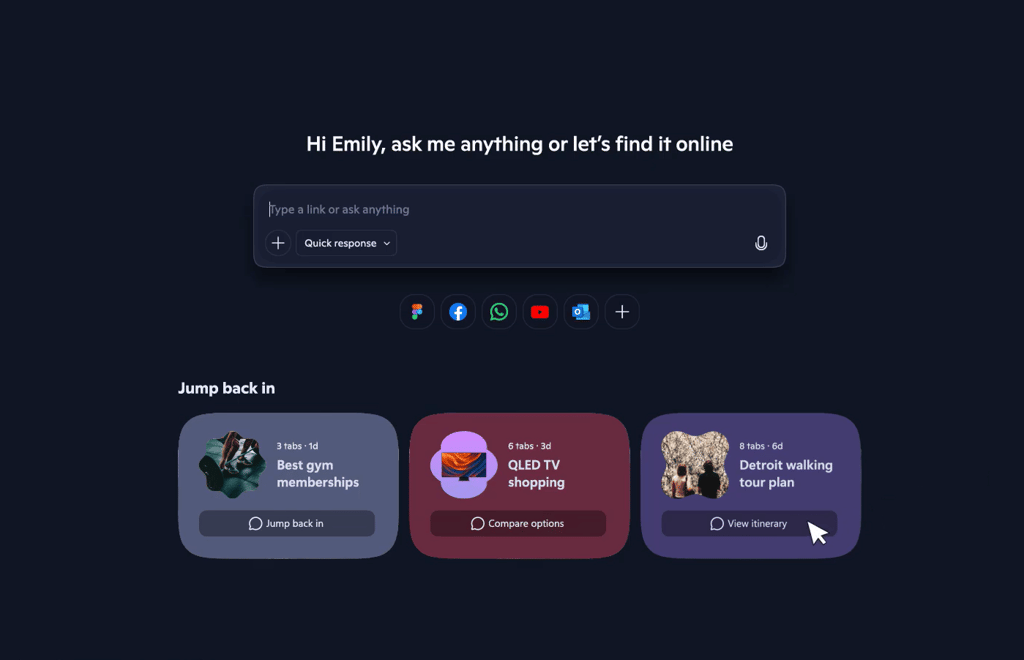


For decades, browsers were built to find information. Now, Microsoft wants them to finish the task.
With the new Copilot Mode, Edge isn’t just a window to the web. It’s a full-fledged digital assistant built into your browser. You can talk to it, plan with it, and even automate your online routines, all from one place. Microsoft’s bold redesign reimagines what it means to “go online” — turning Edge into an AI partner that helps you get things done.
A browser that thinks with you, not for you
Copilot Mode can plan a trip, summarize long pages, or juggle recipes and schedules with just a few clicks. Microsoft calls it a step toward AI-native browsing, where chat, voice, and reasoning work together to help users finish what they start.
Here’s what the new experience brings together:
- Copilot Actions: Edge now takes spoken or typed instructions and delivers results. Users can tell Copilot to unsubscribe from emails, make restaurant reservations, or open specific sites — freeing time for what actually matters.
- Journeys: It can remember your past sessions and groups related pages into topics, so you can pick up projects exactly where you left off — no more digging through tabs or bookmarks to resume unfinished work.
- Multi-step task automation: Copilot can handle more complex requests, such as organizing a walking tour or planning an event, by completing several actions in sequence rather than one at a time.
- Cross-tab reasoning: Edge can “reason across multiple open tabs,” connecting information between them to summarize content or surface insights, turning scattered browsing into something more coherent.
- Context that follows you: A dynamic pane keeps Copilot visible as you browse, maintaining the context of your current page so you can chat or act without switching screens.
- Smarter suggestions with history: If enabled, Copilot can use your browsing history to refine answers or make recommendations based on past activity. The feature is optional and can be turned off anytime.
Both Copilot Actions and Journeys are available for free in a limited US preview as Microsoft tests how far the browser can go from showing the web to actually helping you use it.
AI with boundaries
Microsoft says Copilot Mode is built for intelligence with restraint. Users decide when it’s on, what it can access, and how it responds.
“Your data stays yours,” Sean Lyndersay, VP of Microsoft Edge, wrote, noting that Edge shows clear visual cues whenever Copilot is active, listening, or performing a task.
All AI features follow Microsoft’s existing privacy standards, meaning browsing data and personal information aren’t shared without consent. Copilot won’t use a user’s history without permission, and personalization settings can be adjusted or disabled at any time.
Edge also adds protection through local AI tools. The Scareware Blocker detects and stops full-screen scam takeovers on-device, while the password manager creates and monitors strong credentials, alerting users to potential breaches around the clock.
Microsoft folds Edge into its trust-first Copilot revolution
Edge’s Copilot Mode is part of a broader shift inside Microsoft to make its products more intuitive and assistive across platforms. The company describes this vision as “human-centered,” aiming for technology that feels helpful, safe, and deeply personal.
That ambition mirrors a wider industry turn toward intelligent browsers built to work alongside users. For example:
- Google has embedded its Gemini assistant directly into Chrome, calling it the browser’s biggest upgrade in history.
- OpenAI recently launched ChatGPT Atlas, a standalone browser built around its chatbot.
- Perplexity’s Comet takes a similar approach with built-in task execution and reasoning tools.
The Edge rollout brings that philosophy to life, turning the browser itself into an active workspace rather than a passive tool. Copilot Mode is now available on Edge for Windows and Mac, with a mobile version coming soon.
The commitment to safe, human-centered design is now defining Microsoft’s broader AI direction. The company is also reinforcing that its AI is built to guide, not flirt or imitate emotion.