









Starting a new month’s budget can feel overwhelming, but AI tools like Gemini can actually help simplify the process. Instead of starting at a blank spreadsheet, you can describe what you want in plain language and let Gemini create an organized budget plan for you.
According to Google’s official blog, Gemini works well because it reduces friction without trying to replace actual financial advice. Think of it more as a planning assistant that helps you organize financial data and integrate with tools you already use, like Google Sheets and Gmail.
Here’s a breakdown of how you can plan your budget with Gemini.
1. Plan for big-ticket purchases
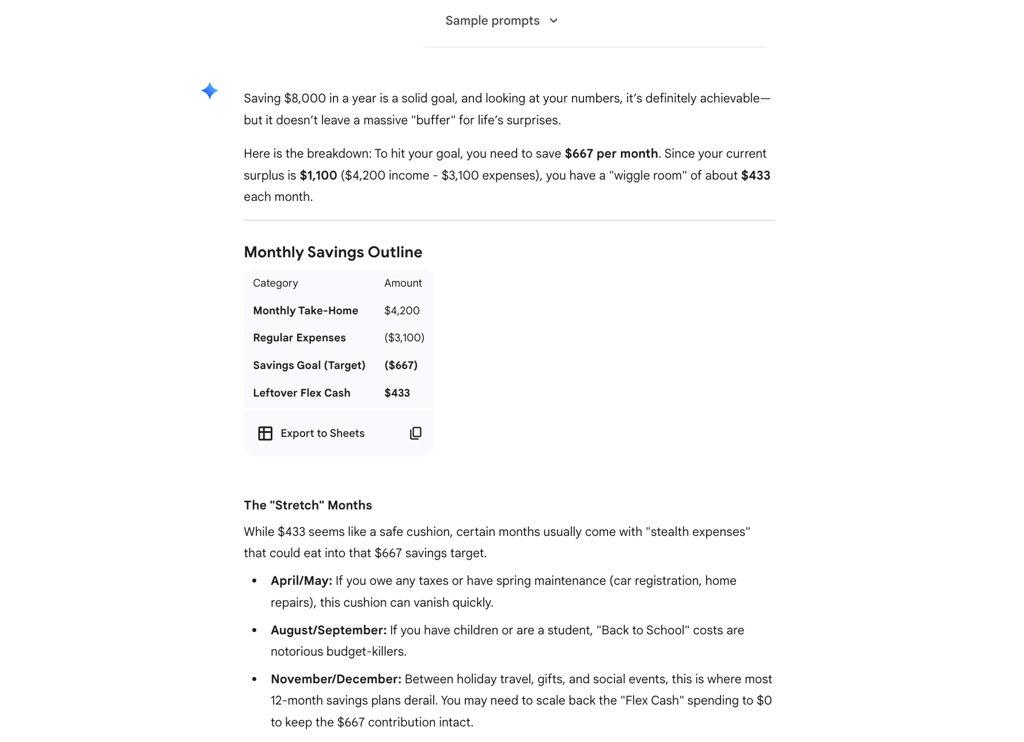
One way to use Gemini is to plan for major expenses, such as saving for a new car or an international trip. Gemini can be used to create a multi-month savings plan based on income, expenses, and target dates, helping users easily visualize progress and identify risks for overspending.
“Planning your 2026 budget doesn’t have to start with a blank page and a headache,” Google noted. Gemini can help users organize their finances, find savings, and generate a clear roadmap for the future.
Sample prompt: “I want to save $8,000 over the next year for a major purchase. My monthly take-home income is $4,200, and my regular expenses total about $3,100. Create a monthly savings outline and flag months where my budget could be stretched.”
2. Weigh different budget scenarios
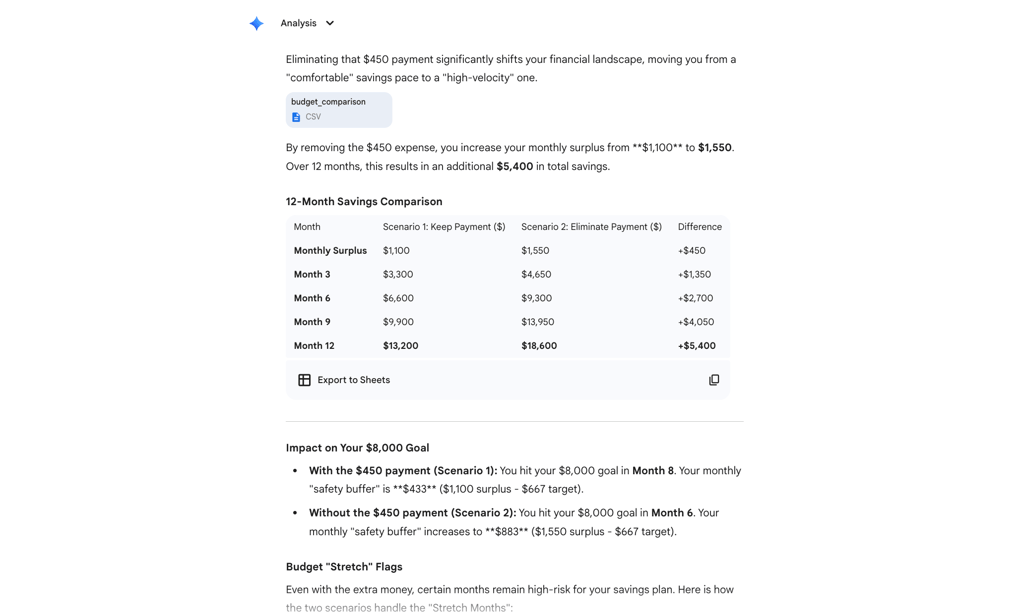
Gemini can also be used to compare two versions of a budget and show how each affects savings over time, helping users understand the impact of keeping or removing a recurring cost. This type of comparison is designed to make trade-offs easier to see without needing to build complex spreadsheets.
Sample prompt: “Compare two versions of my budget over the next 12 months. In one scenario, I keep a $450 monthly payment for an ongoing expense. In the other, I eliminate that payment and move the money into savings. Show how each option affects my total savings by the end of the year.”
3. Track everyday spending and spot leaks
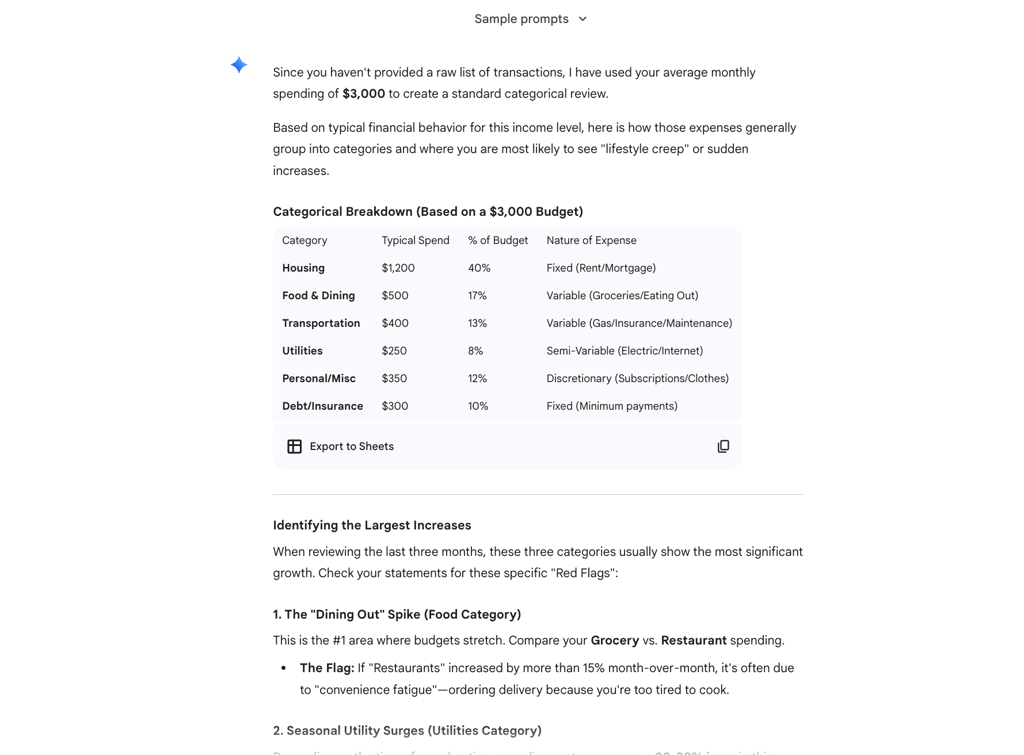
For day-to-day budgeting, Gemini can help organize spending data and highlight where money is being spent. Grouping transactions by category makes it easier to identify patterns that might be missed when reviewing individual purchases. This is where Gemini comes in: the goal is to identify small changes early, before they escalate into larger budget problems.
Sample prompt: “Review my last three months of spending, where my average monthly expenses are about $3,000. Group transactions into categories and identify which categories have increased the most compared with earlier months.”
4. Find recurring costs hiding in your inbox
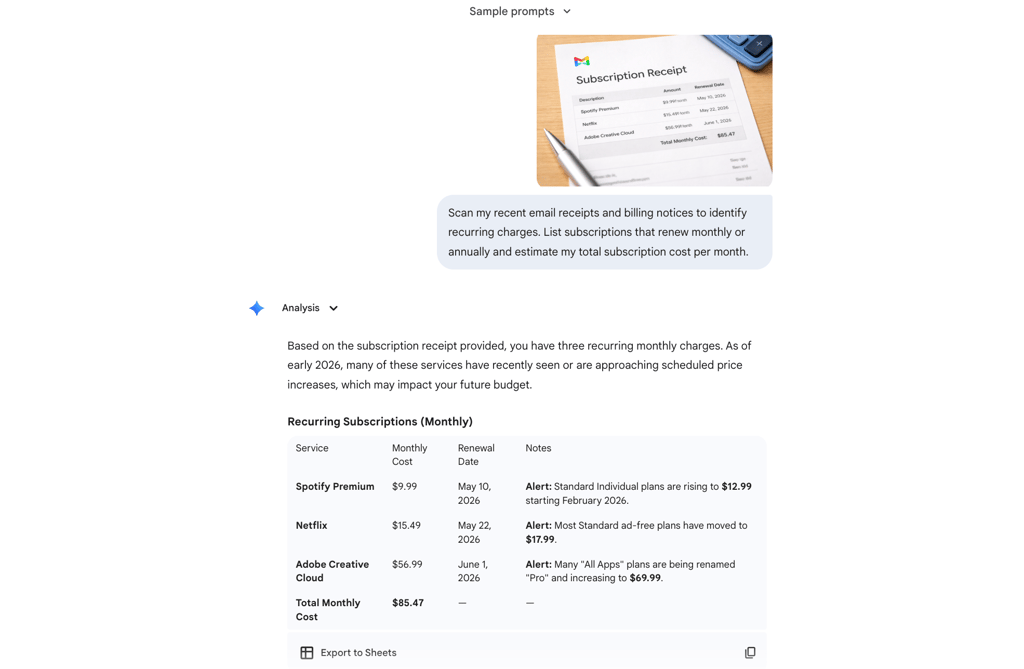
Subscriptions and automatic charges can be easy to forget. Gemini’s Gmail integration can scan receipts and billing emails to identify recurring payments and summarize how much they add up each month.
“By letting Gemini handle the heavy lifting, you can spend less time in the weeds of your bank statements and more time reaching your goals,” Google noted.
Sample prompt: “Scan my recent email receipts and billing notices to identify recurring charges. List subscriptions that renew monthly or annually and estimate my total subscription cost per month.”
Bottom line: Gemini is meant to help organize budgets, not replace financial advice
Google emphasized that Gemini is intended to help organize information and explore options, not replace professional financial or tax advice. Gemini can help users summarize data, compare scenarios, and highlight areas that may need closer review. Overall, budgeting becomes easier when information is organized and visible, and Gemini helps users get to that point faster without replacing human judgment.
To see how Gemini compares with other AI tools for everyday use, read eWeek’s breakdown of Gemini 3 versus ChatGPT 5.2.