





Creating Acrobat forms - Database - News & Reviews - eWeek.com | eWeek

Creating Acrobat forms
Creating Acrobat forms
Written By
eWEEK EDITORS
eWEEK EDITORS
May 28, 2012
1 minute read
eWeek content and product recommendations are editorially independent. We may make money when you click on links to our partners. Learn More


Creating Acrobat forms

Creating Acrobat forms

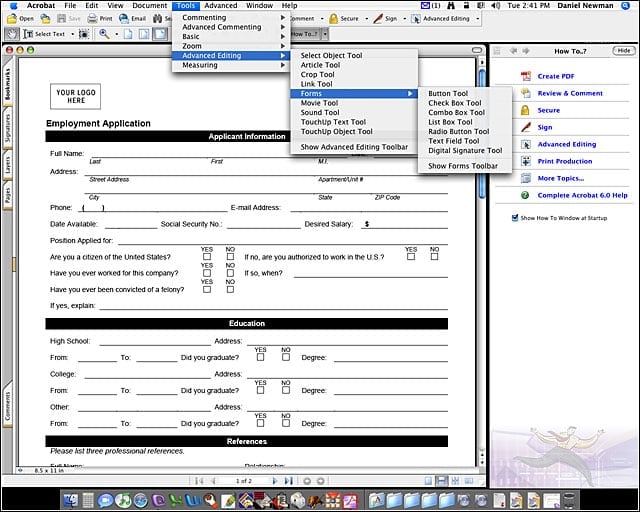
Once youve converted your form into a PDF, select Tools > Advanced Editing > Forms to insert form controls.


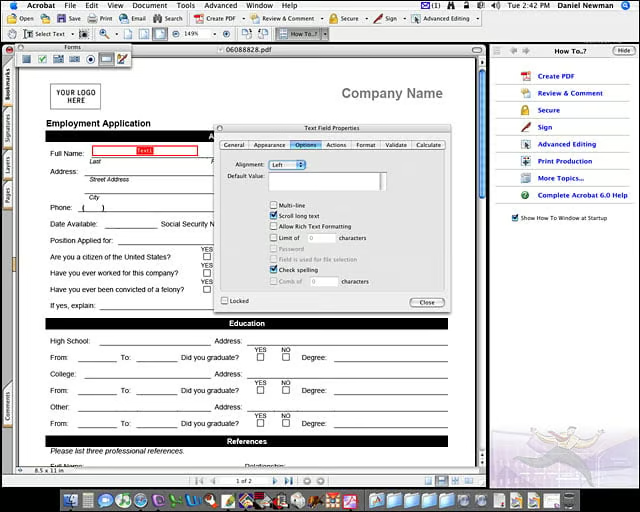
Creating Acrobat forms – Formatting options
2

After youve inserted a form field, you can set options for the field such as text alignment, multi-line, scroll long text, or allow rich text formatting.


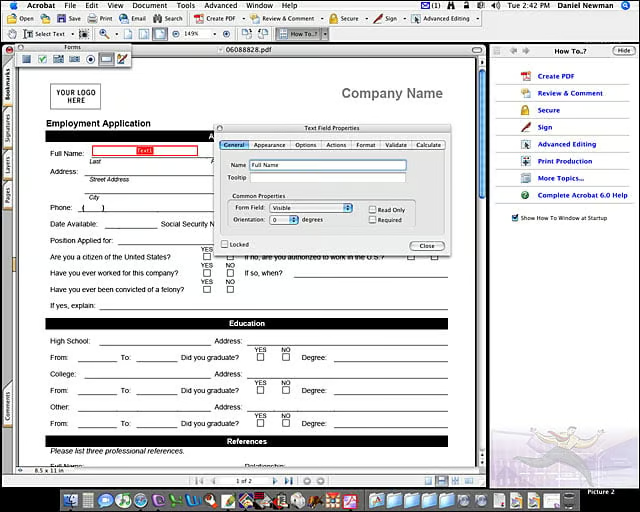
Creating Acrobat forms – Naming fields
3

Make sure you write in a useful name for each field. These names will be used for database connectivity should you implement that feature.

eWeek Logo

eWeek has the latest technology news and analysis, buying guides, and product reviews for IT professionals and technology buyers. The site's focus is on innovative solutions and covering in-depth technical content. eWeek stays on the cutting edge of technology news and IT trends through interviews and expert analysis. Gain insight from top innovators and thought leaders in the fields of IT, business, enterprise software, startups, and more.

Property of TechnologyAdvice. © 2026 TechnologyAdvice. All Rights Reserved

Advertiser Disclosure: Some of the products that appear on this site are from companies from which TechnologyAdvice receives compensation. This compensation may impact how and where products appear on this site including, for example, the order in which they appear. TechnologyAdvice does not include all companies or all types of products available in the marketplace.