





Starting from Home

Starting from Home
Written By
P. J. Connolly
P. J. Connolly
Published: May 10, 2011
Updated: Feb 2, 2021
1 minute read
eWeek content and product recommendations are editorially independent. We may make money when you click on links to our partners. Learn More


Starting from Home

1

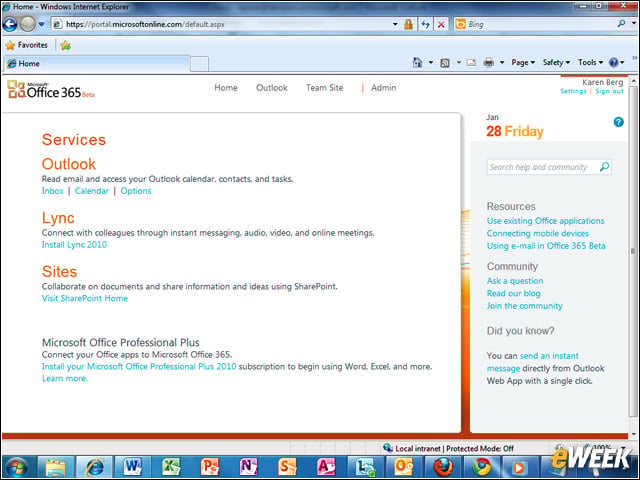
Office 365’s home page gives users access to Lync, Outlook and SharePoint, and provides a download link for Office Professional Plus.


Policy-Based Management

2

Setting up ActiveSync policies for mobile devices that connect to Exchange Online is as easy as it is on an in-house server.


SharePoint Online Collaboration
3

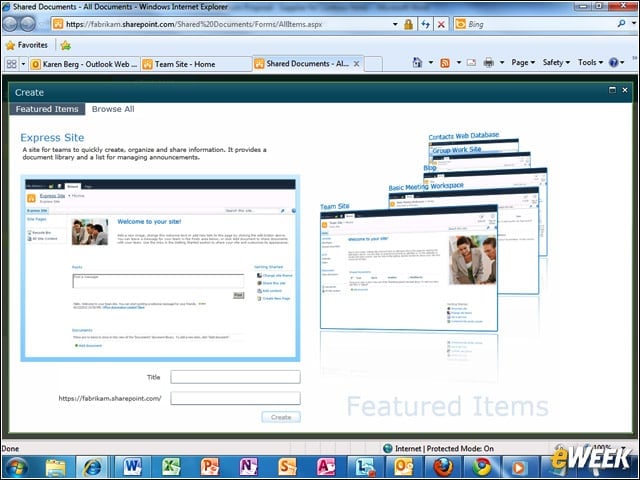
Collaboration is made easier with SharePoint Online, which offers users the ability to quickly set up team sites with document libraries and announcement lists.


Administration Console

4

The Office 365 administration console provides a central management point for Exchange Online, Lync Online and SharePoint Online, as well as the Office applications.


Working Side-by-Side

5

Its possible to have two people working on a document in Office Live simultaneously; each is notified of the others edits.


Advertisement

Domain Federation for IM and Presence

6

Lync Online allows domain federation, with the option to blacklist or whitelist domains, thereby enabling the sharing of instant messaging functions and presence information.


Share Whiteboards and Desktops

7

Lync Online allows presenters in online meetings to share whiteboards and desktops and to pass control of the meeting from one presenter to another.


Role Assignment

8

Users can be assigned with varying levels of privilege, including the ability to perform user management and provisioning tasks.


Browser-Based Office Applications

9

Office 365 includes access to the Office Web Apps, which are hosted versions of the Office components. These are designed to work with major browsers such as Google Chrome and Mozilla Firefox.

P. J. Connolly

P. J. Connolly began writing for IT publications in 1997 and has a lengthy track record in both news and reviews. Since then, he's built two test labs from scratch and earned a reputation as the nicest skeptic you'll ever meet. Before taking up journalism, P. J. was an IT manager and consultant in San Francisco with a knack for networking the Apple Macintosh, and his love for technology is exceeded only by his contempt for the flavor of the month.

eWeek Logo

eWeek has the latest technology news and analysis, buying guides, and product reviews for IT professionals and technology buyers. The site's focus is on innovative solutions and covering in-depth technical content. eWeek stays on the cutting edge of technology news and IT trends through interviews and expert analysis. Gain insight from top innovators and thought leaders in the fields of IT, business, enterprise software, startups, and more.

Property of TechnologyAdvice. © 2026 TechnologyAdvice. All Rights Reserved

Advertiser Disclosure: Some of the products that appear on this site are from companies from which TechnologyAdvice receives compensation. This compensation may impact how and where products appear on this site including, for example, the order in which they appear. TechnologyAdvice does not include all companies or all types of products available in the marketplace.