






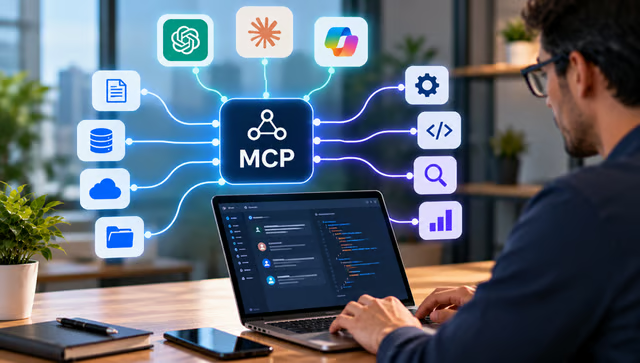


AI models can reason, summarize, and generate content, but business use cases often require access to current data and the ability to interact with external systems. Historically, connecting an AI application to a CRM, database, analytics platform, or other business tool meant building and maintaining a separate integration for each connection.
Model Context Protocol (MCP) provides a standard way for compatible AI applications to discover and use external data, tools, and workflows. MCP does not replace the underlying CRM, database, or API. Instead, it creates a consistent AI-facing interface for accessing selected capabilities from those systems.
MCP becomes more useful when an AI agent can connect to trusted business data rather than relying only on model knowledge or uploaded files. ZoomInfo's MCP server lets compatible AI tools access B2B companies and contact intelligence for account research, prospect discovery, enrichment, CRM-ready outputs, and sales prioritization.
- What is Model Context Protocol?
- How Model Context Protocol works
- What is an MCP server?
- MCP architecture at a glance
- How an AI agent uses an MCP server
- Benefits of Model Context Protocol
- Model Context Protocol use cases
- ZoomInfo gives AI agents access to B2B intelligence through MCP
- Why MCP matters for sales and RevOps
- Model Context Protocol security risks
- MCP security best practices
- How to evaluate an MCP server for business use
- Should you build an MCP server or use an existing one?
- Frequently asked questions
- Bottom line
What is Model Context Protocol?
Model Context Protocol is an open standard that lets AI applications connect to external tools, data sources, and workflows through a common interface.
An MCP-compatible application can discover available capabilities from an MCP server and use them as needed during a conversation or agent workflow. Those capabilities might expose files, databases, CRM records, search functions, company intelligence, or actions in another application.
The official MCP SDK documentation describes the protocol as a standard connecting AI applications to the systems where their data and tools live. Servers can expose tools, resources, and prompts for compatible hosts to use.
Why was MCP created?
Before MCP, an AI product typically needed a separate custom integration for every external system it wanted to use. Another AI product connecting to the same systems might need its own set of integrations.
MCP reduces that duplication by creating a shared protocol that compatible AI hosts and servers can implement.
A simplified comparison looks like:
Without MCP
AI application → custom CRM connection
AI application → custom database connection
Second AI application → separate CRM connection
Second AI application → separate database connection
With MCP
Compatible AI applications → MCP interface → compatible MCP servers
MCP was introduced by Anthropic in 2024 and was later donated to the Agentic AI Foundation under the Linux Foundation. By December 2025, Anthropic reported adoption across products including ChatGPT, Gemini, Microsoft Copilot, Cursor, and Visual Studio Code.
MCP vs API
MCP and APIs solve related but different problems.
MCP | API |
| Standardizes AI-facing tool and context access | Exposes application data or functions |
| Designed around AI hosts and agents | Used by many types of software |
| Supports capability discovery | Usually relies on predefined endpoints |
| Can expose several tools consistently | Interface is specific to each provider |
| May call APIs behind the scenes | Often provides the underlying system access |
MCP does not replace APIs. An MCP server may call one or more APIs behind the scenes, then expose selected functions to AI applications through MCP.
For a deeper explanation of APIs and system connections, read our guide to What Is API Integration? The Ultimate Guide for Businesses.
MCP vs function calling
Function calling lets a model invoke functions supplied by an application. MCP operates at another layer by standardizing how external tools and context can be exposed to compatible AI applications.
An MCP tool may ultimately be presented to the model through the host's tool-calling system. In that sense, MCP can help standardize where those tools come from and how they are described, while function calling handles the model's invocation of them.
MCP vs RAG
MCP and retrieval-augmented generation, or RAG, can work together but solve different problems.
MCP | RAG |
| Connects AI to external tools and systems | Retrieves relevant content for generation |
| Can retrieve data and perform actions | Primarily supplies context |
| Useful for live or transactional workflows | Useful for searchable knowledge collections |
| Can expose CRM, search, and business tools | Often uses indexed documents or databases |
RAG is usually focused on giving a model relevant information before generating a response. MCP can also expose actions, such as searching an account database or updating a system.
MCP vs proprietary connectors
Proprietary connectors can provide excellent integrations, but they are usually tied to one vendor's ecosystem.
MCP's appeal is that compatible servers can potentially work across multiple supported AI applications. That does not mean every MCP server behaves identically in every client. Authentication, supported capabilities, permissions, and client features can still differ.
How Model Context Protocol works
A typical MCP interaction involves an AI host, an MCP client, an MCP server, and the underlying system the server exposes.
User → AI application → MCP client → MCP server → external system → response to AI
MCP host
The host is the AI application coordinating the interaction. It may connect to one or more MCP servers depending on the tools or data required for a task.
MCP client
The client handles communication between the host and a specific MCP server.
MCP server
The server exposes approved data or functions through MCP so the AI application can discover and use them.
The 2026-07-28 specification changed the protocol architecture significantly. MCP now uses a stateless core, removing the previous protocol-level session and initialization handshake. Each request carries the information the server needs, while the new server/discover method lets clients retrieve server capabilities when required.
What is an MCP server?
An MCP server is software that exposes tools, resources, prompts, or other supported capabilities to MCP-compatible AI applications.
The word "server" does not necessarily mean a dedicated physical server. An MCP server can run locally alongside an AI application or remotely as a network service.
Server type | How it is used |
| Local MCP server | Runs on the same machine or environment as the client |
| Remote MCP server | Runs elsewhere and is accessed over a network |
| Vendor MCP server | Exposes a software provider's data or functions |
| Internal MCP server | Exposes a company's private applications or data |
The current MCP TypeScript SDK supports servers that expose tools, resources, and prompts, and the 2026-07-28 specification supports stateless HTTP operation for remote deployment.
MCP architecture at a glance
Component | Role |
| Host | AI application coordinating MCP connections |
| Client | Communicates with an MCP server |
| Server | Exposes tools and context |
| Tools | Functions the AI can invoke |
| Resources | Data the AI can retrieve |
| Prompts | Reusable interaction templates |
| Transport | Carries MCP messages between systems |
How an AI agent uses an MCP server
Suppose a sales rep asks:
"Find 10 midsize cybersecurity companies in California and identify VP-level sales leaders at each."
An MCP-enabled workflow might:
- Receive the user's request.
- Discover the available tools.
- Call an account-search tool.
- Return companies matching the criteria.
- Call a contact-search tool.
- Filter contacts by role and seniority.
- Return a structured list to the user.
The user does not need to manually open a database, export records, or write API calls. The AI interacts with approved tools exposed by the MCP server.
Benefits of Model Context Protocol
- Reusable AI integrations: A vendor or internal development team can expose a capability through MCP instead of rebuilding an entirely separate AI-specific connector for every compatible application.
- Access to current business data: AI applications can retrieve information from connected systems at request time rather than relying solely on model training data.
- Action-oriented AI: MCP tools can let AI applications perform approved tasks rather than simply answer questions.
- Lower integration duplication: A standard interface can reduce the amount of custom connection logic needed across multiple AI tools.
- More portable workflows: A compatible MCP server can potentially support multiple AI hosts rather than one proprietary client.
- Controlled access: Organizations can decide which capabilities an MCP server exposes instead of giving an AI unrestricted access to an entire system.
Model Context Protocol use cases
- Enterprise search: MCP can connect AI applications to document stores, files, databases, and other internal information sources.
- Software development: Development teams can expose repositories, issue trackers, deployment services, or testing tools to AI coding agents.
- Data analysis: An AI application can call tools that retrieve current database or analytics data and use the response during analysis.
- Customer service: MCP servers can expose customer records, knowledge systems, or ticketing functions to support agents.
- Sales and CRM: AI applications can use MCP tools to research accounts, identify contacts, enrich records, summarize account context, or prepare meeting briefs.
- RevOps: RevOps teams can use MCP-accessible business data to support account segmentation, territory planning, prioritization, routing, CRM enrichment, and reporting.
- AI agents: Agents can use MCP to access the external tools required for multi-step workflows. For more background, see AI Agents Cheat Sheet: What They Are and How They Work.
ZoomInfo gives AI agents access to B2B intelligence through MCP
ZoomInfo's MCP server exposes B2B data and research tools to MCP-compatible AI applications. ZoomInfo currently lists support for Claude, ChatGPT, Perplexity, Replit, and other compatible AI tools, with OAuth used to authenticate access.
The current ZoomInfo MCP toolset includes Find Accounts, Enrich Accounts, Research Accounts, Find Contacts, Enrich Contacts, and Research Contacts. These tools can support ICP account discovery, contact identification, meeting preparation, enrichment, QBR research, campaign segmentation, and territory planning.
Example: MCP for sales account research
Consider a rep preparing for a meeting with a target account.
The rep asks:
"Research this company, identify likely decision-makers, summarize recent account context, and prepare a meeting brief."
A workflow could look like:
AI application → ZoomInfo MCP → account research → contact discovery → enrichment → AI summary → meeting brief
ZoomInfo’s MCP connector can return structured business information suitable for CRM or operational use and can support workflows such as target-account list building, account research, enrichment, routing, and prioritization.
Whether the AI can then write information directly into a CRM depends on the tools, permissions, and systems enabled in that environment.
Why MCP matters for sales and RevOps
- Less tool switching: Sales reps can request account information from an AI interface instead of moving manually between several research systems.
- Faster account research: An AI tool can combine instructions from the user with current account and contact information exposed through an MCP server.
- Better targeting: Structured firmographic and contact data can support ICP filtering, segmentation, and account prioritization.
- Faster meeting preparation: Agents can retrieve company and contact context and organize it into a meeting brief or account summary.
- RevOps workflows: MCP-connected data can support territory planning, CRM enrichment, routing, account prioritization, and QBR preparation. ZoomInfo, for example, lists territory planning, outbound list creation, campaign segmentation, and QBR target-setting among workflows for its MCP tools. For more on automating revenue processes, see RevOps Automation: What to Automate Across the Revenue Funnel.
Model Context Protocol security risks
MCP can increase what AI applications are able to access or do. That makes governance especially important.
- Excessive permissions: An AI application should not receive access to every available tool simply because an MCP server supports them. Read-only account research carries a different level of risk than modifying CRM records or sending messages.
- Untrusted MCP servers: Connecting to an unknown or poorly reviewed server may expose sensitive information or allow unsafe actions.
- Prompt injection: Malicious content could attempt to influence an AI system into calling tools or revealing information in ways the user did not intend.
- Credential exposure: OAuth tokens, API credentials, and other secrets need secure storage and limited scopes.
- High-impact actions: Tools capable of changing records, sending communications, deleting information, or initiating transactions require stronger controls than information-retrieval tools.
- Data leakage: Connecting CRM, customer, financial, or employee systems to AI applications can increase the risk of sensitive information moving outside intended workflows.
MCP security best practices
- Use least privilege: Expose only the tools and data needed for the workflow.
- Approve MCP servers centrally: Review third-party servers before employees connect them.
- Separate read and write actions: Start with retrieval before allowing system changes.
- Require confirmation: Add human approval for high-impact actions.
- Use scoped credentials: Limit authentication to the required systems and functions.
- Log tool calls: Maintain visibility into who accessed what and which actions occurred.
- Validate inputs and outputs: Do not assume AI-generated arguments are safe.
- Disable unused tools: Reduce unnecessary access.
- Test misuse cases: Include prompt injection, ambiguous instructions, and unauthorized actions.
- Monitor updates: MCP servers and protocol implementations continue to change.
The 2026-07-28 specification also introduced authorization hardening, including issuer validation and a move away from Dynamic Client Registration toward client metadata documents.
How to evaluate an MCP server for business use
1. Start with the business task
Define what the AI needs to accomplish before looking at the tool catalog.
Example: If the goal is preparing account briefs, you may need account research and contact discovery but not CRM write permissions.
2. Review the exposed tools
Inspect exactly what the server allows the AI to retrieve or change.
Example: Separate search and enrichment tools from actions that modify CRM records or initiate workflows.
3. Verify authentication and permissions
Review the authentication method, user permissions, scopes, administrative controls, and credential lifecycle.
Example: Confirm whether each user's MCP access follows their existing application permissions or uses a shared service account.
4. Evaluate the underlying data
For data-focused servers, check coverage, freshness, accuracy, provenance, and output format.
Example: Test account and contact results against records your sales team already knows well.
5. Confirm client compatibility
Make sure the server works with the AI applications your organization actually plans to use.
Example: A server working in one MCP host does not automatically mean every feature behaves identically in another.
6. Review logging and governance
Determine whether administrators can trace users, tool calls, data access, failures, and actions.
Example: A CRM-writing tool should leave enough history to determine which AI request changed the record.
7. Test failures and misuse
Test missing data, ambiguous requests, expired credentials, unavailable tools, prompt injection, and unauthorized actions.
Example: Ask the agent to change a record it should only be allowed to read and confirm that the action is blocked.
8. Begin with read-only workflows
Start with search, research, and enrichment before enabling more consequential actions.
Example: Deploy account research first, then add CRM updates after permissions, logging, and approval controls have been tested.
Should you build an MCP server or use an existing one?
Use an existing MCP server when | Build an MCP server when |
| Vendor already exposes the data or tools you need | Internal system has no suitable MCP server |
| Standard functions cover the workflow | You need proprietary business logic |
| Faster implementation matters | You need full control over tools and permissions |
| Vendor maintains the connector | Data must remain inside your environment |
| Lower engineering effort is preferred | Internal applications need AI access |
An existing vendor MCP server is usually the faster route when it already exposes the required capabilities. Building internally makes more sense when the underlying system is proprietary, or the organization needs tighter control over permissions, data handling, and business logic.
Frequently asked questions
Is MCP only for Claude?
No. Anthropic originally introduced MCP, but it was later donated to the Agentic AI Foundation. Anthropic reported adoption across ChatGPT, Gemini, Microsoft Copilot, Visual Studio Code, Cursor, and other AI products by December 2025.
Does MCP replace APIs?
No. MCP servers often use APIs underneath. MCP provides a standardized way to expose selected data and tools to AI applications, while APIs remain a general interface for software-to-software communication.
Is MCP the same as RAG?
No. RAG primarily retrieves relevant information to give an AI model better context. MCP can expose data as well as executable tools and actions. The two approaches can be used together.
Is MCP secure?
MCP can support authenticated and permissioned access, but security depends on the server, client, connected systems, tool permissions, and organizational controls. Businesses should apply least privilege, logging, approval controls, secure authentication, and server review before granting AI access to sensitive systems.
Bottom line
Model Context Protocol gives AI applications a common way to access external data, tools, and workflows. Its value is not replacing APIs, CRMs, databases, or business software. Instead, MCP gives compatible AI applications a standardized interface for discovering and using selected capabilities from those systems.
For sales and RevOps teams, this can bring current account and contact intelligence directly into AI-assisted research and workflow design. ZoomInfo's MCP server is one example, exposing account discovery, enrichment, research, contact discovery, and related B2B intelligence to compatible AI applications.