







- eWEEK Labs Walk-through: Office 2008 for Mac
- eWEEK Labs Walk-through: Office 2008 for Mac – ‘Save to PDF’
- eWEEK Labs Walk-through: Office 2008 for Mac – More Discoverability’
- eWEEK Labs Walk-through: Office 2008 for Mac – ‘More Visibility’
- eWEEK Labs Walk-through: Office 2008 for Mac – ‘Bibliography and Citations’
- eWEEK Labs Walk-through: Office 2008 for Mac – ‘Formatting Palette in Excel’
- eWEEK Labs Walk-through: Office 2008 for Mac – ‘Get help building formulas’
- eWEEK Labs Walk-through: Office 2008 for Mac – ‘Learn on the Job’
- eWEEK Labs Walk-through: Office 2008 for Mac – ‘Preformulated Worksheets’
- eWEEK Labs Walk-through: Office 2008 for Mac – ‘Ledger Sheets’
- eWEEK Labs Walk-through: Office 2008 for Mac – ‘Need More Help?’
- eWEEK Labs Walk-through: Office 2008 for Mac – ‘Object Palette in Excel’
- eWEEK Labs Walk-through: Office 2008 for Mac – ‘Formatting Palette’
- eWEEK Labs Walk-through: Office 2008 for Mac – ‘Cant Read Macros’
- eWEEK Labs Walk-through: Office 2008 for Mac – ‘Custom Animation’
- eWEEK Labs Walk-through: Office 2008 for Mac – ‘SmartArt Graphics’
- eWEEK Labs Walk-through: Office 2008 for Mac – ‘Exchange Rate’
- eWEEK Labs Walk-through: Office 2008 for Mac – ‘Make My Day’
- eWEEK Labs Walk-through: Office 2008 for Mac – ‘Calendar Enhancements’
- eWEEK Labs Walk-through: Office 2008 for Mac – ‘Less Junk’
- eWEEK Labs Walk-through: Office 2008 for Mac – See More Slideshows Like This One
eWEEK Labs Walk-through: Office 2008 for Mac

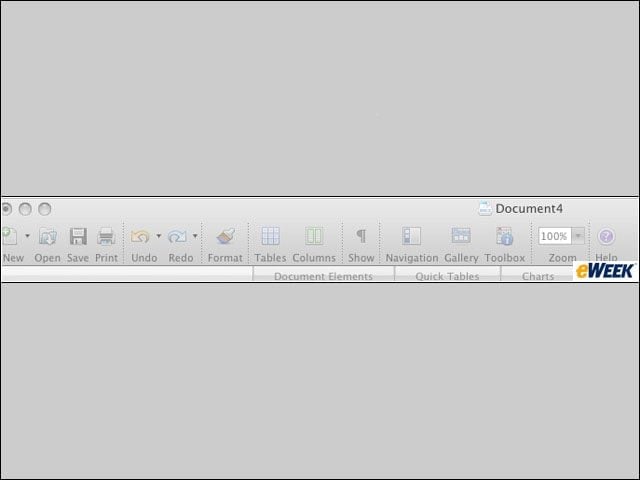
No Ribbons
Office 2008 for Mac uses tabs–not the ribbon that debuted in Office 2007–to organize functions. The suite also keeps the bulk of its functions accessible by drop-down menus, such as File, Edit and View.
eWEEK Labs Walk-through: Office 2008 for Mac – ‘Save to PDF’
Office 2008 for Mac includes the option to save files to PDF.
eWEEK Labs Walk-through: Office 2008 for Mac – More Discoverability’
The Elements Gallery helps users quickly access a variety of tools by simply clicking through tabs.
eWEEK Labs Walk-through: Office 2008 for Mac – ‘More Visibility’
Word’s newly introduced Document Elements toolbar helps users see the predesigned elements available to them, including cover pages, tables of contents, and headers and footers.
eWEEK Labs Walk-through: Office 2008 for Mac – ‘Bibliography and Citations’
Premade templates for creating bibliographies and citations are new features in Word.
eWEEK Labs Walk-through: Office 2008 for Mac – ‘Formatting Palette in Excel’
Users can quickly access tools to customize their spreadsheets via the Formatting Palette toolbar.
eWEEK Labs Walk-through: Office 2008 for Mac – ‘Get help building formulas’
One of the brighter spots of Excel 2008 is the new Formula Builder tool, which provides a comprehensive list and explanation of all of Excel’s formula functions.
eWEEK Labs Walk-through: Office 2008 for Mac – ‘Learn on the Job’
Users unfamiliar with a function can get a definition and other helpful information to better understand Excel’s formulas.
eWEEK Labs Walk-through: Office 2008 for Mac – ‘Preformulated Worksheets’
Users can now immediately start working in spreadsheets that have already been designed with formulas.
eWEEK Labs Walk-through: Office 2008 for Mac – ‘Ledger Sheets’
Ledger Sheets are the big new feature in Excel 2008. These templates offer pre-formulated cells so that novice Excel users can get an immediate handle on the application’s formula-driven tasks.
eWEEK Labs Walk-through: Office 2008 for Mac – ‘Need More Help?’
Still confused on a function? The Formula Builder tool further instructs users on functions, offering detailed explanations and examples.
eWEEK Labs Walk-through: Office 2008 for Mac – ‘Object Palette in Excel’
The floating toolbar, a carry-over from Office 2004, allows users to customize objects in a spreadsheet.
eWEEK Labs Walk-through: Office 2008 for Mac – ‘Formatting Palette’
The floating toolbar has been beefed up to let users customize documents by changing font size and style, and inserting bullet, border and paragraph styles.
eWEEK Labs Walk-through: Office 2008 for Mac – ‘Cant Read Macros’
The removal of Visual Basic means macros embedded in Excel can’t be read.
eWEEK Labs Walk-through: Office 2008 for Mac – ‘Custom Animation’
Users can now include animated effects to add pizzazz to presentations–for example, moving objects on and off a slide. These effects are similar to those found in the presentation applications of Apple’s iWork ’08 and OpenOffice.org’s OpenOffice 2.3.
eWEEK Labs Walk-through: Office 2008 for Mac – ‘SmartArt Graphics’
SmartArt Graphics lets users select a variety of pre-designed graphic elements. Users can choose a design and easily add text to these blocks with the handy text pane.
eWEEK Labs Walk-through: Office 2008 for Mac – ‘Exchange Rate’
Entourage 2008 still doesn-
eWEEK Labs Walk-through: Office 2008 for Mac – ‘Make My Day’
The My Day interface appears even if Entourage is closed and displays a user’s calendar and to-do items.
eWEEK Labs Walk-through: Office 2008 for Mac – ‘Calendar Enhancements’
Entourage 2008 can now launch meeting reminders and can keep multiple meeting participants in the loop as far as last-minute changes go.
eWEEK Labs Walk-through: Office 2008 for Mac – ‘Less Junk’
Enhancements made to Entourage 2008 include beefed-up junk mail and phishing filters.
eWEEK Labs Walk-through: Office 2008 for Mac – See More Slideshows Like This One

Worst Data Breaches EverThe Most Poisonous BugsEight Top Security ConcernsThe Security of Biometrics: Two Screws and a Plastic Cover