








- Microsoft Soups Up Internet Explorer 9 for Performance and Interoperability
- Microsoft Posts an IE9 Platform Preview on Test Drive Site
- Microsofts IE9 Delivers New JavaScript Engine Known as ‘Chakra’
- Microsoft SunSpider Benchmark Tests Show IE9 Runs Faster than IE8
- Microsoft Says IE9 Supports the Most Widely Used APIs
- IE9 Improves on Acid3 Test Performance
- Microsoft Complies with World Wide Web Consortium (W3C) Specifications
- IE9 Supports HTML5
- IE9 Supports CSS3
- IE9 Supports SVG
- Microsoft Demonstrates Map Zooming in IE9
- IE9 Enhances the Document Object Model (DOM)
- IE9 Delivers New Developer Enhancements
- IE9 Supports GPU-Powered HTML5
Microsoft Soups Up Internet Explorer 9 for Performance and Interoperability

By Darryl K. Taft
Microsoft Posts an IE9 Platform Preview on Test Drive Site

Internet Explorer 9 Platform Preview includes expanded support for HTML5, hardware-accelerated graphics and text, and a new JavaScript engine. Together these allow developers to use the same markup and deliver graphically and functionally rich Web applications that take advantage of modern PC hardware through a modern operating system.
Microsofts IE9 Delivers New JavaScript Engine Known as ‘Chakra’

Internet Explorer 9 introduces a new scripting engine, internally known as “Chakra,” that delivers significant performance gains and better integration into all subsystems, leading to improved overall performance. In fact, according to Webkit.org’s SunSpider benchmark test, Internet Explorer 9 Platform Preview is faster than the current shipping version of Firefox.
Microsoft SunSpider Benchmark Tests Show IE9 Runs Faster than IE8

The WebKit SunSpider JavaScript benchmark results show the IE9 Platform Preview to be at least six times faster than IE8 and significantly faster than the IE9 edition demonstrated at Microsoft’s Professional Developers Conference (PDC) in November 2009.
Microsoft Says IE9 Supports the Most Widely Used APIs
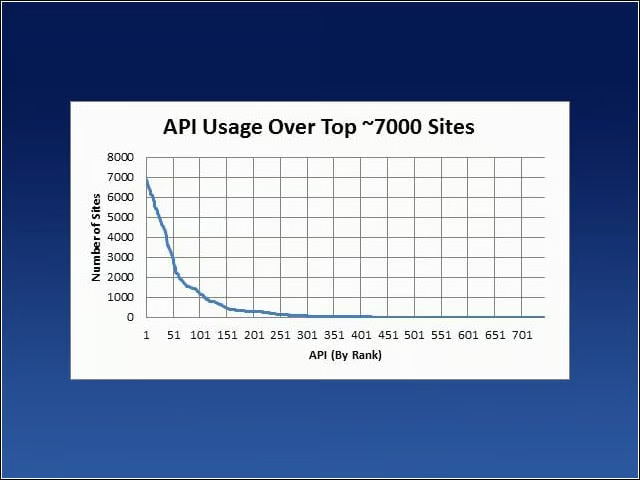
Although Microsoft is supporting HTML5, CSS3 and other Web standards, the company is not adopting those and other specifications in their entirety. One reason is that Microsoft claims IE9 can support the most widely used APIs on the Web by going the route the software giant has chosen. This slide illustrates the company’s point.
IE9 Improves on Acid3 Test Performance

IE9’s performance on the Acid3 test is a significant improvement over the company’s performance with IE8 and a previous build of the IE9 technology. Acid3 is a test page from the Web Standards Project that checks how well a Web browser follows certain selected elements from Web standards, especially relating to the Document Object Model (DOM) and JavaScript.The Acid3 test is a test of compliance with various Web standards. However, Microsoft maintains that compliance with Acid3 matters less than meeting user needs to access sites and use the same markup. IE9 got a 55 out of 100 on its latest Acid3 test. At the PDC in November, IE9 got 32 out of 100.
Microsoft Complies with World Wide Web Consortium (W3C) Specifications

In a statement, Jason Upton, IE test manager said: “We have created these tests (and welcome your feedback!) to help web developers see if a browser supports what they are trying to do before they depend on it. Because there are ambiguities and options in any specification, there may be cases where some browsers behave differently. The Internet Explorer team remains committed to making the same markup work across browsers. This is why we are contributing these cases to the web standards working groups at the W3C.”
IE9 Supports HTML5

HTML5 is a specification maintained by the Web Hypertext Application Technology (WHAT) Working Group and the W3C. As part of Microsoft’s commitment to HTML5 support, Internet Explorer 9 continues to add features from the HTML5 specification, and the Internet Explorer 9 Platform Preview offers the first glimpse of some of its offerings.
IE9 Supports CSS3
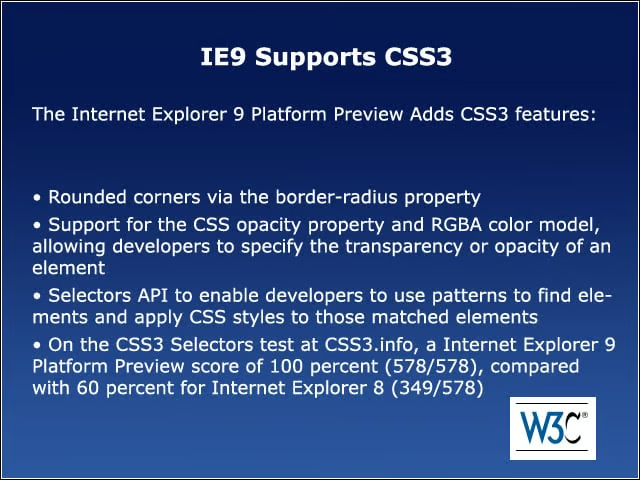
The Internet Explorer 9 Platform Preview adds CSS3 features.
IE9 Supports SVG
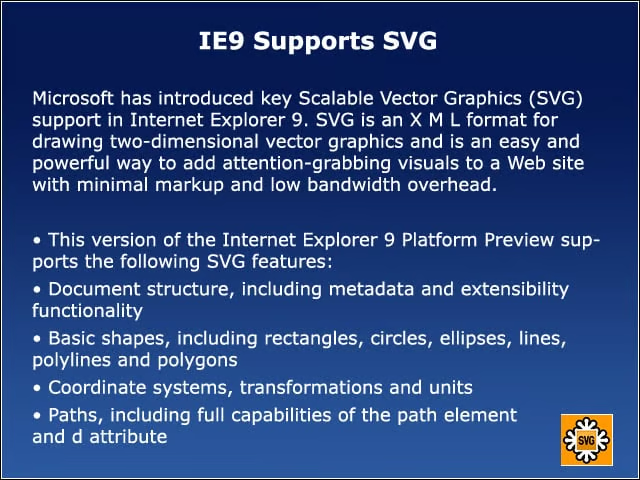
Microsoft has introduced key Scalable Vector Graphics (SVG) support in Internet Explorer 9. SVG is an X M L format for drawing two-dimensional vector graphics and is an easy and powerful way to add attention-grabbing visuals to a Website with minimal markup and low-bandwidth overhead.
Microsoft Demonstrates Map Zooming in IE9
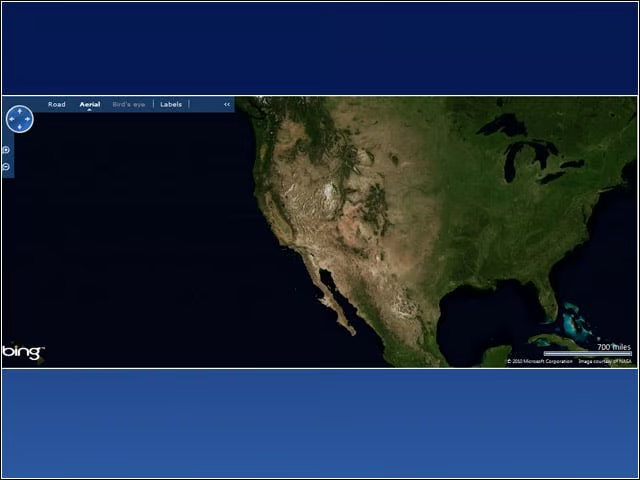
Graphics hardware acceleration increases the performance of many common tasks on the Web, such as using maps. Rendering tasks are moved from the CPU to the graphics card using Direct2D and DirectWrite. Graphics hardware acceleration means that rich, graphically intensive sites can render faster while using less CPU.
IE9 Enhances the Document Object Model (DOM)

Internet Explorer 8 improved upon its Document Object Model and added new features such as mutable DOM prototypes. Building modern Web applications requires enhanced DOM features, which have been added to Internet Explorer 9.
IE9 Delivers New Developer Enhancements
Increasing support for standards is just part of the equation for creating the next version of IE. In addition to standards support, the IE9 developer tools borrow from the principles set by Visual Studio. These tools make it easier for them to create, test and debug their Websites. Internet Explorer 8 introduced the industry’s first set of built-in developer tools, allowing developers to start without having to download or enable any additional add-ons. The Internet Explorer 9 Platform Preview enhances those with significant performance improvements, and a network tab. The Network tab allows developers to capture, display and save Web requests. This enables developers to better understand what’s happening behind the scenes without having to install complex tools or use proxies to get the same information. Like the rest of the developer tools, it’s just built in.
IE9 Supports GPU-Powered HTML5
HTML5 is about being able to build powerful, graphically rich Web applications. Like Asynchronous JavaScript and X M L (AJAX) was before it, GPU-powered HTML5 presents the ability for developers to create applications that run seamlessly across the Web. Harnessing the power of the Graphics Processing Unit (GPU) makes it possible to reallocate much of the graphic processing done by Internet Explorer 9 to the GPU instead of the CPU; this allows the browser to take advantage of the power of modern hardware while engaging fewer resources on the PC.