







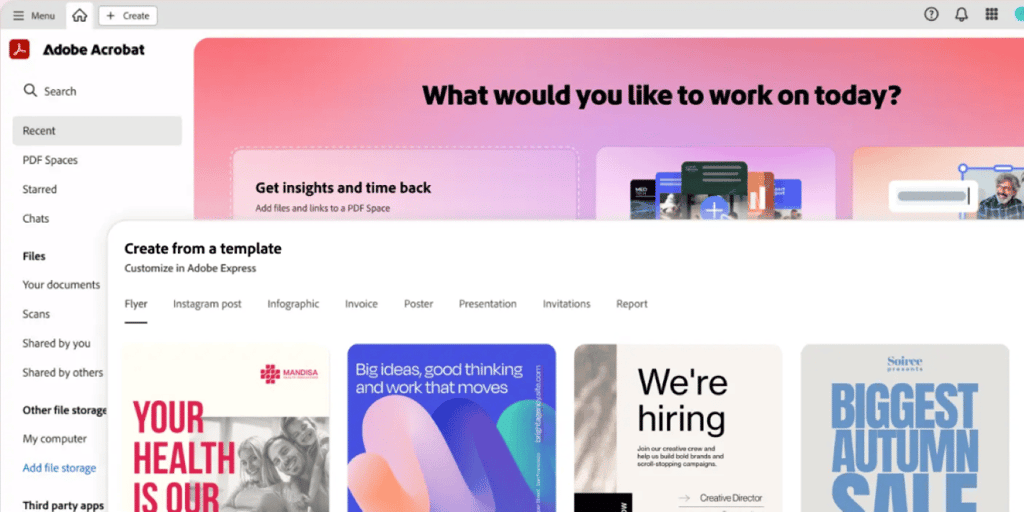
We’re living in the age of AI agents, and yet, we’re still working with PDFs? What gives?Well, Adobe unleashed Acrobat Studio last week, and it’s about time someone made PDFs less… PDF-y.
The new platform combines Adobe Acrobat, Adobe Express, and AI agents into one workspace where you can chat with your docs, get insights, and create content without jumping between 47 different apps.
What is the standout feature?
The star feature is called PDF Spaces. Think of it as turning your document dumps into smart assistants. Upload PDFs, docs, web pages, whatever, and then AI agents help you find insights, answer questions, and cite their sources. You can even customize these AI assistants for specific roles or create your own.
What you can actually do with it
- Business pros can dump client files into a space, ask AI to summarize key insights, then turn those into polished reports or infographics.
- Students can organize research notes, generate study guides, and get proper citations without the usual academic panic.
- Regular humans can upload mortgage contracts, ask AI to explain the confusing parts in plain English, then e-sign everything in one place.
Real-world use cases across departments
- Sales teams generate tailored proposals and streamline RFP responses.
- Legal can compare contracts, summarize policies, and organize case files securely.
- Marketing can synthesize customer feedback and create launch materials.
- Finance can summarize reports and generates compliance-ready presentations.
- HR can review resumes at scale and simplify onboarding processes.
The content creation piece is where it gets interesting. Once you extract insights, you can immediately turn them into infographics, presentations, or social posts using Adobe Express tools… all powered by Adobe Firefly for image and video generation.
Enterprise angle
Adobe’s betting big on security here. Everything runs in sandboxed environments with enterprise-grade encryption, and they’re not training AI models on customer data.
The AI assistants can take on different roles too — like “instructor,” “analyst,” or “entertainer” (how about “read my docs in the style of The Neuron”) depending on how you want information presented. Plus, you can share entire PDF Spaces with colleagues, so everyone’s working from the same smart document hub. That’s nice.
Pricing
The pricing starts at $24.99/month for individuals ($29.99 for teams), which isn’t cheap, but it includes Adobe Express Premium and all the traditional Acrobat Pro tools.
Good luck unsubscribing though lol (can y’all @ Adobe fix this? k thx bye).
Our take
As Axios pointed out, some people (like Wedbush analyst Dan Ives) think Adobe’s playing catch-up here. Ives recently removed Adobe from his AI 30 list. Meanwhile, Google’s NotebookLM already does a version of this for free, Claude and ChatGPT’s Projects offers similar document chat features, and like we said before (and SemiAnalysis confirmed), we think OpenAI is going for a super app that eventually houses all your docs.
The enterprise angle is where Adobe might have an edge. Recent research shows 69% of organizations cite AI-powered data leaks as their top concern, and enterprises are blocking 59.9% of AI transactions due to security fears. Adobe’s pitch around enterprise-grade security and not training on customer data could resonate.
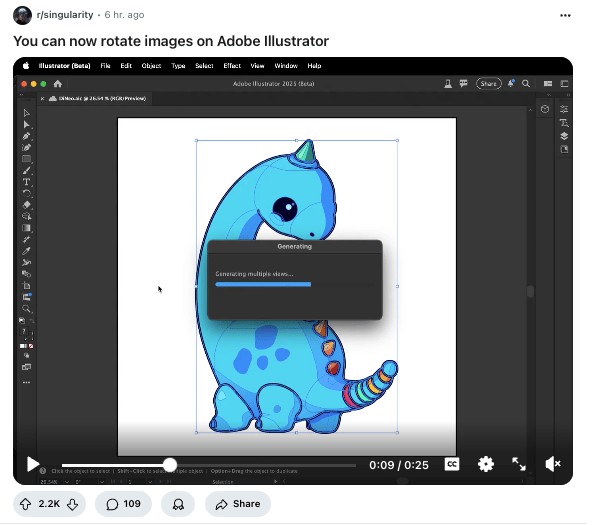
Anyway, as cool as all this is or isn’t, the most viral new Adobe feature is actually this one from Illustrator, which lets you finally rotate your images.
Editor’s note: This content originally ran in our sister publication, The Neuron. To read more from The Neuron, sign up for its newsletter here.