








eWEEK Labs Walk-Through: Internet Explorer 8 Release Candidate 1

by Jim Rapoza
No Title

The new InPrivate Browsing feature in IE 8 lets users surf the Web without having any information about the browsing session saved.
No Title

When InPrivate Filtering is enabled, users can let IE 8 choose what content to save or they can define the content filtering themselves.
No Title

From the InPrivate Filtering settings, users can control how the private browsing feature in IE 8 works.
No Title

One of the more unique features in IE 8 is its ability to color code tabs launched from a Web site to help users visually manage the many tabs they may have open.
No Title

Accelerators in IE 8 RC1 can be accessed by highlighting text in a Web page and clicking on the icon that IE displays.
No Title

IE 8 Accelerators provide nice inline functionality within the browser, such as the ability to quickly translate highlighted sections of text.
No Title

When users of IE 8 use the Delete Browsing History feature of the browser, they can choose what data they want to delete or save.
No Title

Like most newer browsers, IE 8 suggests search terms when a search is entered in the integrated browser search field.
No Title

The new Web Slices feature makes it possible to pull content from Web sites that have built Web Slices and view it from the browser’s favorites bar.
No Title

Web sites can integrate with the toolbar and other areas of IE 8 by taking advantage of the new Web Slice feature and having visitors install the Web Slice on their browser.
No Title

When launching a new blank tab in IE 8, users are given multiple options for launching content from Accelerators or previously visited Web sites.
No Title
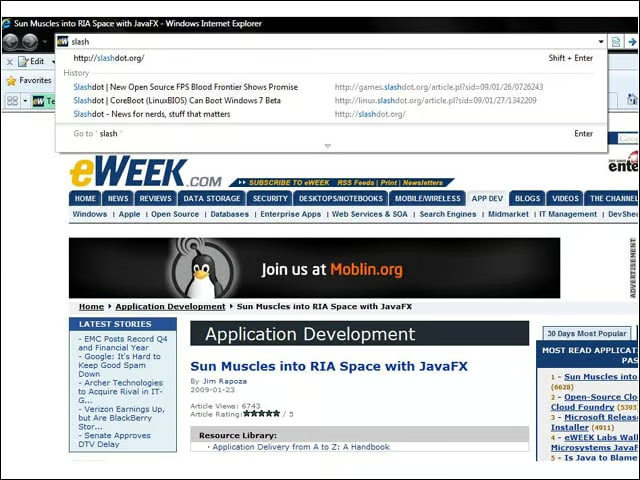
Typing in the address bar in IE 8 brings up suggestions for content pulled from sites visited in the browser history.
No Title

IE 8 now uses a standard inline find-in-page feature as opposed to the pop-up window used in previous versions of Internet Explorer.
No Title

When visiting any Web site, users can click the Suggested Sites button to get a list of sites similar to the one they are viewing.
No Title

IE 8’s compatibility mode lets users run the browser in an emulate IE 7 mode for those sites that don’t run well in IE 8.
No Title

While IE 8 has better standards support than IE 7, it still scores lower on the Acid3 standards test than any other newly released Web browser.
No Title

IE 8 RC1 features much-improved management for add-ons including plug-ins and the new Accelerators.
No Title

IE 8 bolds the core domain name of Web sites in the address bar to help users detect fraudulent Web sites with similar names.
No Title

When users run across potentially malicious Web sites, they can choose to have the IE 8 SmartScreen Filter check the site on demand.
No Title

Users can choose to have the SmartScreen Filter on in order to detect potentially dangerous sites or can have the filter turned off by default.
No Title

When a site fails to load or connections fail, IE 8 can attempt to diagnose and solve the problem.
