







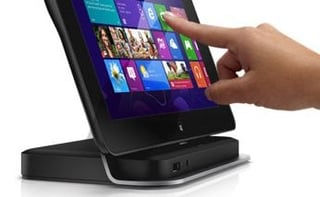
Computer maker Dell announced the latest configuration of its Latitude 10 tablet aimed at small and midsize businesses (SMBs) and educational organizations with limited budgets looking to increase mobility.
Powered by Intel’s Atom system-on-a-chip, the tablet can run Windows 8 Snap Mode, allowing students, teachers or road warriors to multitask between two applications, such as interacting with a remote teacher or office through Skype while taking notes in Microsoft OneNote.
The Latitude 10 tablet essentials configuration with 64GB of storage is available starting at $579, and the 32GB model will be available in the coming months at $499; they join the Latitude 10 standard configuration announced in Oct. 2012. The tablet does not require new mobile-device management (MDM) or software licensing, supports new and legacy Windows applications, and is compatible with Adobe Flash. It is available with an optional productivity dock with a traditional keyboard and mouse for desktop content creation.
“Dell’s heritage is rooted in meeting the needs of our customers with cost-effective, tailored solutions that empower them to reach their potential, be it in the office, classroom or hospital,” Neil Han, Dell end-user computing products vice president, said in a statement. “This legacy, combined with our portfolio of new enterprise services and product offerings, such as the Latitude 10, enables our customers to deploy the latest technology while balancing IT control and end-user productivity.”
Other features include a Corning Gorilla Glass 10.1-in. touch-screen display, optional Dell ProSupport, and a full-size USB port that provides connectivity to existing equipment and Secure Digital (SD) card reader to enable file transfers and data backup when Internet access is not available. The Instant-On with Connected Stand-By mode feature allows for faster access to resources, and a Dell engineer is available 24/7 online or by phone for unexpected hardware and software remote troubleshooting. Rounding out the tablet are a headphone jack, four USB 2.0 ports and an Ethernet port.
“Our commitment to innovation in education runs deep, and the Latitude 10 essentials configuration offers the robust accessibility features and personalized learning experience educators, students and parents tell us they need for a productive classroom,” Mark Horan, Dell global education vice president, said in a statement. “An end-to-end education solutions provider, Dell designed this tablet with schools in mind to provide an affordable, efficient device that is a snap to manage and deploy while protecting previous investments in applications and other classroom devices.”