







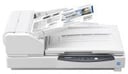
Panasonic System Communications has released the A3 Flatbed Production scanner, which combines 95 pages-per-minute and 190 impressions-per-minute productivity speeds with the flexibility of twin document feeders.
Government agencies, service bureaus, legal operations and others can benefit from Panasonic’s latest flatbed scanner series, which has been designed to deliver fast and affordable scanning solutions for businesses without compromising on quality, according to the company.
The scanner features two feeders— a 200-sheet automatic document feeder (ADF) for normal one-sheet originals and a flatbed for scanning books, magazines and thick documents such as passports and appointment calendars.
Although the scanner is rated at 95ppm and 190ipm, scanning speeds differ based on the host computer, operating system, application, data amount and paper type, the company noted.
Other advanced features of the KV-S7097 scanner, which retails for $8,995, include consecutive scanning of ADF and flatbed documents and automatic separation of scanned images from two-page book, magazine and other bound-volume spreads into discrete, single-page electronic sheets.
The scanner also can complete accurate scanning of EKG monitoring sheets and similar long documents, multicropping for single-pass scanning of different-sized small items and mixed document feeding with user-selectable page alignment.
One-touch scanning provides up to nine different frequently used scanning jobs, which can be registered for further time-saving efficiency, according to the company. In addition, a user-friendly, built-in A3 ledger flatbed automatically switches between the sheet-fed ADF and flatbed scanner during scanning.
The Double-Feed Skip function limits wasted time on paper-feed errors and provides a more valuable scan by automatically pausing for labels and envelopes—users simply can choose to skip them and scanning resumes as normal.
Built-in image orientation, two-page separation, automatic cropping and skew correction features reduce the time spent conducting post-image processing, the company noted. What’s more, users can scan documents of various sizes all at once using the multicrop tool, also saving time as well as paper consumption.
In addition, Auto Rescan and Auto Preview features allow users to review and adjust images without the need for rescanning.
The scanner also comes bundled with network-based fleet management software, which allows users to remotely monitor and manage their Panasonic scanners, as well as update device firmware and client applications.
The standard package comes with a quick installation guide, power cord, USB 3.0 cable, Panasonic software CD-ROM and bundled software including Panasonic Image Capture Plus, a trial version of EMC Quick Scan Pro and Panasonic User Utility.
Optional extras are available, including a roller exchange kit, roller cleaning paper, ink cartridges, Kofax VRS Elite 5 Workgroup, a network scanner option and site central management software.