







B2B revenue teams depend on accurate information about companies, contacts, markets, and buying activity. Keeping that information current internally is difficult: people change jobs, companies restructure, contact details age, and new buying signals emerge.
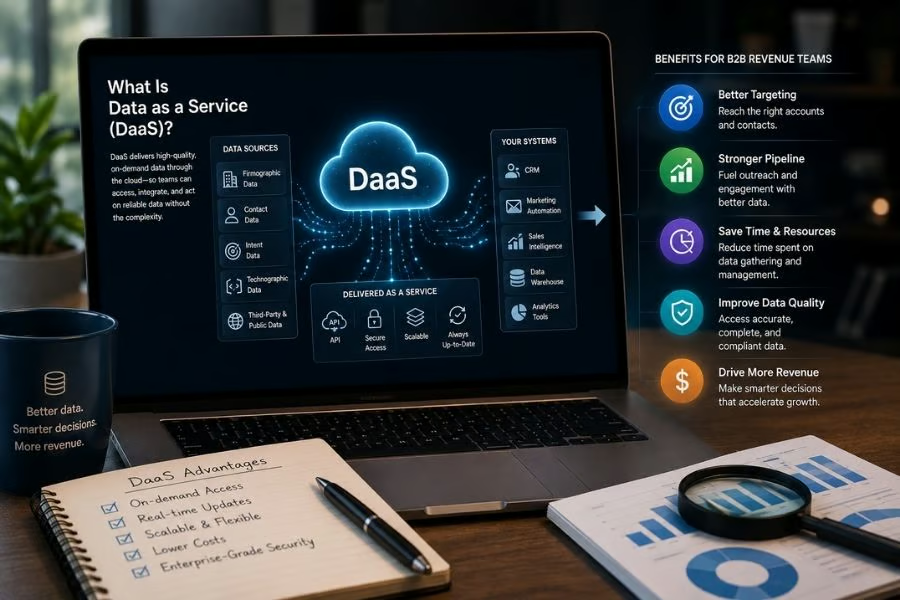
Data as a Service (DaaS) provides organizations with access to provider-managed data via cloud applications, APIs, integrations, or data feeds. For sales, marketing, and RevOps teams, it can support prospecting, enrichment, segmentation, routing, territory planning, and account prioritization without requiring the business to source and maintain every dataset itself.
ZoomInfo provides B2B company, contact, enrichment, and buying signal data that revenue teams can incorporate into existing sales and marketing workflows.
- What is Data as a Service (DaaS)?
- How does Data as a Service work?
- DaaS vs SaaS: What's the difference?
- What types of B2B data can DaaS provide?
- Benefits of Data as a Service for B2B revenue teams
- How B2B revenue teams use DaaS
- Where ZoomInfo fits into B2B DaaS
- DaaS implementation challenges to consider
- What to look for in a B2B DaaS provider
- How to implement Data as a Service
- Turning external data into revenue intelligence
What is Data as a Service (DaaS)?
Data as a Service (DaaS) is a cloud delivery model in which an organization accesses data maintained and made available by another provider. Instead of building all of the infrastructure and processes required to source, clean, update, and distribute that information internally, customers access it through applications, APIs, integrations, data feeds, or other delivery methods.
In this article, DaaS refers specifically to Data as a Service. The acronym is also used elsewhere in technology for terms such as Desktop as a Service and Database as a Service, so the context matters.
Data as a Service is a broad model that can apply to many types of information. For B2B revenue teams, the data may include company attributes, professional contact information, organizational relationships, technology usage, intent signals, and other account intelligence.
A simplified B2B DaaS workflow looks like this:
Data sources → collection and processing → validation and maintenance → delivery → revenue systems and workflows
The model is particularly useful for information that changes frequently. A static contact list can begin becoming outdated as employees change roles or organizations evolve. A DaaS provider takes responsibility for maintaining and delivering its dataset according to its own collection and update processes.
How does Data as a Service work?
Implementation varies by provider and dataset, but a typical DaaS model includes four stages.
1. Data collection
The provider gathers information from one or more sources. Depending on the service, these may include public records, websites, licensed datasets, proprietary research, contributed information, and other collection methods.
Coverage matters because even a large dataset may be less useful if it does not adequately represent the geographies, industries, companies, or contacts a revenue team targets.
2. Data processing and validation
Raw information usually needs to be standardized before it can support business workflows.
Providers may normalize fields, remove duplicates, match records, verify information, and organize data into consistent entities. With B2B data, that can include associating contacts with the correct companies or linking subsidiaries with parent organizations.
Also read: Best B2B Database Providers & Software
3. Data maintenance
Business information changes continuously. Employees move, companies merge, domains change, new organizations appear, and existing records become outdated.
DaaS providers maintain their datasets according to their own refresh and validation processes, reducing the amount of collection and updating customers need to perform internally.
4. Data delivery
Customers need a practical way to use the information. Common delivery methods include:
- Cloud applications
- CRM integrations
- Marketing automation integrations
- APIs
- Data feeds
- Data warehouses or cloud environments
- Automated enrichment workflows
Delivery matters as much as the dataset itself. Information that cannot reach the systems where teams work may create another data silo instead of improving execution.
Also read: Top 8 AI CRM Software To Seriously Consider
DaaS vs SaaS: What's the difference?
DaaS and Software as a Service (SaaS) both use cloud delivery, but they provide different primary value.
DaaS | SaaS | |
| Primary offering | Managed data | Software functionality |
| Customer accesses | Datasets and data services | An application or capability |
| B2B revenue example | Company or contact enrichment | CRM or sales engagement software |
| Typical delivery | APIs, integrations, feeds, platforms | Cloud application |
| Primary value | Access to maintained information | Ability to perform a business process |
The categories can overlap. A vendor may provide proprietary data through a SaaS application while also making that information available through APIs, integrations, or feeds.
For buyers, the useful distinction is where most of the value comes from. If it comes primarily from the underlying dataset and its ongoing maintenance, the offering has a DaaS component. If the value is primarily the software workflow, it is more accurately treated as SaaS.
What types of B2B data can DaaS provide?
The right dataset depends on the problem the revenue team needs to solve.
Company and firmographic data
Firmographic data describes organizations and may include:
- Industry
- Employee count
- Revenue or revenue range
- Location
- Company hierarchy
- Ownership
- Growth indicators
Revenue teams can use these attributes to segment markets, define territories, identify ICP-fit companies, and support account scoring.
Contact and professional data
Contact data helps sellers and marketers identify relevant people within target organizations. Fields may include:
- Name
- Job title
- Department
- Seniority
- Business email
- Business phone number
- Employment information
This information can support contact discovery, buying committee research, routing, and outreach preparation.
Technographic data
Technographic data describes technologies an organization uses.
Sales and marketing teams may use it to identify integration opportunities, competitive displacement targets, likely technology requirements, or other use cases tied to an account's existing technology stack.
Intent and buying signal data
Some providers also offer behavioral or company-level signals that can add context to account prioritization.
Depending on the provider, these might include:
- Topic research
- Website activity
- Leadership changes
- Funding events
- Hiring activity
- Technology changes
These signals should not be treated as proof that a company will buy. Their value is in adding context to account fit and first-party engagement.
Benefits of Data as a Service for B2B revenue teams
The main benefit of DaaS is not simply access to more information. It can reduce the effort required to acquire, maintain, and operationalize external data used in recurring revenue workflows.
Improve CRM completeness
CRM records often contain missing or outdated fields. DaaS can enrich accounts and contacts with attributes such as industry, company size, job title, or location.
More complete records can improve segmentation, routing, scoring, and reporting.
Also read: Best AI Sales Tools to Boost Your Revenue
Reduce manual research
Sellers often spend time identifying companies, locating relevant contacts, and checking basic account information before outreach.
Making that information available inside prospecting tools or CRM workflows can reduce repetitive research and give sellers more time to evaluate and engage prospects.
Improve segmentation and targeting
Firmographic, technographic, contact, and other account data provide revenue teams with additional dimensions for defining audiences.
Instead of targeting a broad category such as software companies, a team could narrow the segment by company size, geography, technology environment, or other attributes tied to its ideal customer profile.
Support more reliable routing
Automated routing depends on required fields being populated consistently.
If assignments depend on location, industry, company size, account ownership, or other attributes, enrichment can reduce the number of records requiring manual classification.
Add context to account prioritization
External data can complement CRM and marketing information when teams decide where sellers should focus.
An organization might prioritize accounts that match its ICP and also show relevant intent signals or business changes. External data strengthens the prioritization model but does not replace seller judgment.
Improve territory and market analysis
Revenue leaders can use company data to understand how target accounts are distributed across industries, geographies, or market segments.
That information can support territory design, account allocation, capacity planning, and market analysis.
Standardize key account attributes
Sales, marketing, and RevOps teams may use different applications that contain conflicting company information.
A shared external data source can help standardize selected attributes across connected systems when the organization also establishes clear rules for matching, field ownership, and synchronization.
How B2B revenue teams use DaaS
DaaS creates the most value when external data feeds a defined workflow.
Prospecting
Sellers can identify companies that match targeting criteria and find relevant contacts inside those organizations.
Example: An enterprise seller identifies US manufacturers above a particular employee threshold, then finds IT and operations leaders within those accounts.
Lead enrichment and routing
Marketing or RevOps teams can enrich incoming records before assignment.
Example: A prospect submits a form with a business email and name. An enrichment workflow adds company size, industry, and location so the lead can be routed to the appropriate sales team.
Account scoring and prioritization
Teams can combine external data with first-party CRM and engagement information.
Example: An account scoring model considers ICP fit, website engagement, intent signals, and relevant company changes to help sellers identify accounts worth investigating first.
Territory planning
RevOps can analyze target account distribution before assigning territories.
Example: Instead of dividing a region geographically, the team compares account count, company size, industry mix, and estimated opportunity to create more balanced territories.
CRM enrichment
External data can fill missing fields or refresh records.
Example: A CRM contains contacts whose roles have changed. An enrichment process updates available employment information and routes uncertain matches for review.
Market analysis
Revenue teams can use third-party data to estimate the size and composition of a target market.
Example: Before investing in a new vertical campaign, marketing estimates how many organizations meet its target-industry and firmographic criteria.
Where ZoomInfo fits into B2B DaaS
ZoomInfo combines B2B company and contact intelligence with enrichment, organizational information, intent, and other account signals that revenue teams can use across sales and marketing workflows.
For organizations that already use CRM, marketing automation, and other revenue platforms, this external data can supplement the records those systems contain. Teams can use it for prospecting, enrichment, segmentation, territory planning, scoring, and account prioritization rather than relying on static purchased lists.
The practical value is not simply having another database to search. It is making maintained external information available where it can influence targeting, routing, prioritization, and other revenue decisions.
DaaS implementation challenges to consider
Using a DaaS provider can reduce internal data maintenance work, but it does not eliminate the need for governance and validation.
Data quality varies
No B2B dataset is perfectly accurate or complete. Coverage and freshness may differ by geography, industry, company size, contact type, and field.
Recommended approach: Test providers against a representative sample of the accounts and contacts your team actually targets instead of relying only on aggregate accuracy claims.
Record matching can create errors
Enrichment depends on matching an incoming record with the correct company or person.
Recommended approach: Evaluate how the provider handles uncertain matches, subsidiaries, parent companies, duplicates, and similarly named organizations before automating large-scale updates.
More fields can create more clutter
Adding information does not automatically improve the CRM.
Recommended approach: Enrich only fields tied to defined business processes. Additional data can increase administrative complexity without improving decisions.
Integration depth varies
An integration logo does not explain what actually synchronizes.
Recommended approach: Confirm which objects and fields are supported, whether updates are one-way or bidirectional, how frequently data refreshes, and how errors are surfaced and corrected.
Privacy, security, and compliance require review
Using an external provider does not transfer responsibility for the organization's own legal, security, and privacy obligations.
Recommended approach: Review the provider's sourcing practices, security controls, privacy documentation, retention policies, and relevant compliance materials with the appropriate internal stakeholders.
What to look for in a B2B DaaS provider
The strongest provider is the one whose data and delivery model fit the workflows your revenue team needs to support.
Evaluate providers on:
- Coverage: Confirm that the dataset adequately covers the companies, contacts, industries, geographies, and fields relevant to your market.
- Accuracy and freshness: Ask how information is validated and updated, then test actual records from your target segments.
- Data depth: Review whether firmographic, contact, technographic, intent, hierarchy, and other attributes match your use cases.
- Delivery options: Make sure data can reach the systems where users need it through appropriate integrations, APIs, feeds, or enrichment workflows.
- Matching and enrichment: Test how the platform resolves identities, handles duplicates, and responds when match confidence is low.
- Governance and compliance: Review access controls, administrative capabilities, security practices, data sourcing, and privacy considerations.
- Pricing and usage limits: Understand how records, credits, API calls, enrichment, exports, seats, and other usage are measured and billed.
The largest dataset is not automatically the best one. Coverage matters only when the information is sufficiently accurate, relevant, and accessible for the workflows the organization needs to support.
How to implement Data as a Service
A successful implementation starts with a well-defined business problem rather than a general goal of improving data quality.
1. Define the use case.
Choose the workflow the data needs to improve. Potential starting points include prospecting, inbound enrichment, account scoring, territory planning, or CRM cleanup.
Example: If incomplete company-size information is causing routing errors, start by enriching incoming leads rather than attempting to enrich every CRM field at once.
2. Identify the required fields.
Determine which external attributes are necessary for the workflow.
Example: If routing depends on employee count and geography, those fields matter more than dozens of attributes unrelated to assignment.
3. Establish ownership and overwrite rules.
Decide which system owns each field and what should happen when internal and external information disagree.
Example: A seller-maintained customer status field might remain protected even when an enrichment workflow updates firmographic information on the same account.
4. Test a representative sample.
Evaluate the provider against actual accounts, contacts, markets, and segments before deploying it broadly.
Measure coverage, accuracy, match rates, and the amount of manual correction required.
Example: A global organization should test data across its priority countries rather than assuming strong coverage in one market will translate to every region.
5. Integrate data into the workflow.
Put information where teams need it instead of forcing them to consult another isolated system.
Example: Enrich an inbound lead before routing, or surface relevant account information in the seller's existing CRM or prospecting workflow.
6. Measure the outcome.
Track whether the data improves the process it was introduced to support.
Relevant measures can include:
- Enrichment match rate
- Field completeness
- Routing accuracy
- Target account coverage
- Seller research time
- Contactability
- Conversion by enriched segment
Evaluate DaaS based on business utility, not simply the volume of information delivered.
Turning external data into revenue intelligence
Data as a Service can reduce the work required for B2B revenue teams to source, validate, and maintain external information. Its value, however, depends on how effectively that information supports a real business process.
The strongest implementations start with a defined workflow, select the data required to support it, establish rules for matching and ownership, and measure whether the information improves execution. When external data is integrated into the systems teams already use, DaaS becomes a practical input for prospecting, routing, segmentation, territory planning, and account prioritization rather than another disconnected data source.