








- What Microsoft Teams Does for Office Productivity, Collaboration
- The Service Is Baked Into Office 365
- This Is a Corporate Solution
- Chatting Is a Critical Feature
- Create Hubs for Teams to Check Out
- It’s a Place to Share Just About Anything
- Document Editing Is Built-In
- Bundled Microsoft Apps
- Try Out Third-Party Support
- Microsoft Chats Up Teams’ Security
- Try Teams on Mobile and Desktop
What Microsoft Teams Does for Office Productivity, Collaboration

Microsoft Teams is designed to organize corporate workspaces and improve collaboration between individuals in an organization. The new Slack-like tool lets users chat with others.
The Service Is Baked Into Office 365

Unlike Slack, users aren’t required to download a separate software solution to try out Teams. Instead, the service is built into Office 365 and can be provisioned for employees through the platform. But convenience is just one part of the equation: Microsoft said offering Teams in Office 365 allows it to integrate with other apps in that platform.
This Is a Corporate Solution
Microsoft Teams isn’t designed for consumers. To the contrary: Microsoft said in a statement that Teams will live inside its Office 365 Business and Enterprise plans only, leaving individuals out of luck. Whether that will change in the future is unknown.
Chatting Is a Critical Feature

Chatting is arguably the most important feature baked into Teams. Whether it’s in main corporate teams or in smaller teams set up just for a few members, users can send text messages, photos, links and other content. Chatting can be either public for all to see or kept to private channels between two people. By default, however, all chats are public.
Create Hubs for Teams to Check Out

Microsoft encourages users to create hubs for teams to work more effectively together. Hubs essentially are channels of people working around a single topic where they can communicate, share content and ideas, and more. Users can be members in multiple channels and can communicate with different people within each one.
It’s a Place to Share Just About Anything
Microsoft said Teams can also act as a file-storage place of sorts. For instance, in addition to chat logs, the application can be used to upload and access files, videos and even video conference calls. After an item is uploaded, users can search for it later. Teams uses Microsoft Graph, an intelligence platform of sorts, that helps users find relevant content more quickly.
Document Editing Is Built-In
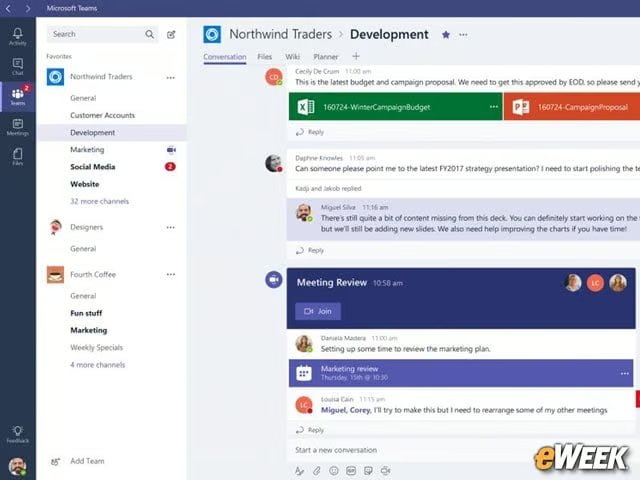
To make good on its teamwork concept, Microsoft Teams comes with full support for document editing. What that means is users can upload a Word document into Teams and collaborate on edits within the system. Once the document is ready, users can save it in the cloud or on their computers and ship it off to the intended recipient.
Bundled Microsoft Apps

Teams is fully compatible with other Office 365 applications. In addition to supporting Word, the platform has built-in access to Microsoft collaboration software SharePoint. Users also will be able to hold video calls through the service, thanks to Skype for Business and share notes from OneNote. Look for Microsoft to broaden that integration as Teams matures.
Try Out Third-Party Support
Microsoft has partnered with several third parties to expand Teams’ features. For instance, users can track Twitter feeds from Teams and can even access code snippets and other information from GitHub. Looking ahead, Microsoft plans to add more third-party integration, including solutions from Zendesk and Asana.
Microsoft Chats Up Teams’ Security

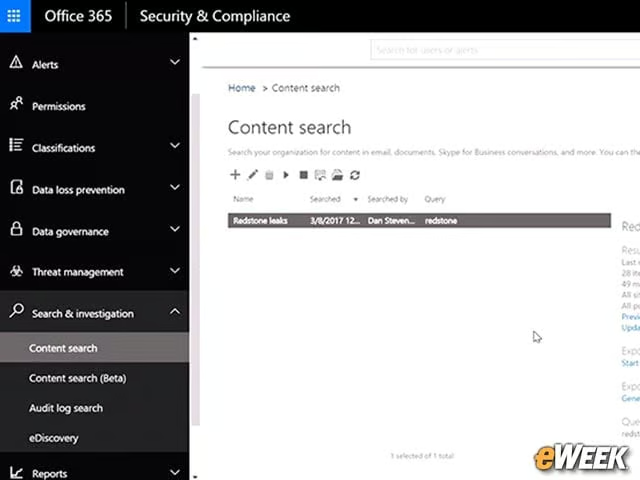
Security matters greatly to the IT side, so Microsoft has made Teams one of the more secure collaboration tools out there. All the data in Teams is encrypted and uses a “transparent operational model” that eliminates standing access to user data. Teams also comes with multifactor authentication and will support compliance and data protection standards, including those of the Health Insurance Portability and Accountability Act (HIPAA) and the International Standards Organization (ISO).
Try Teams on Mobile and Desktop

Since this is an Office 365-based platform, Teams can work across desktop and mobile devices, such as the iPad. However, for Teams to be accessible, the IT side must turn it on through the Office 365 administration portal. It’s available in the “Services and Add-Ins” section and needs to be toggled on to try it out. The software currently is in preview, which means Microsoft will be updating it as time goes on.