







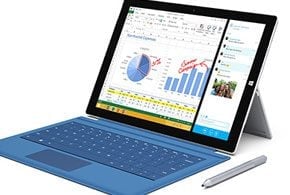
Microsoft had something big in store for its “small gathering” on May 20. During the press event, instead of unveiling the widely anticipated Surface Mini, the company took the wraps off the Surface Pro 3, an even bigger version of the company’s tablet with PC-based internals.
Microsoft’s target: notebook PCs.
“Surface Pro 3 is the tablet that can replace your laptop—packing all the performance of a fully powered laptop into a thin, light and beautifully designed device,” said Panos Panay, corporate vice president of Microsoft Surface. “You’ll love being able to carry a single device for your next class, workday or weekend getaway knowing you have all the power you need.”
Taking aim at both bulky laptops and underpowered tablets, the Redmond, Wash.-based tech giant squeezed an x86 PC into a tablet form factor.
Surface Pro 3 is both larger and slimmer than its predecessor, the Pro 2. It measures 11.5 by 7.93 inches, compared with the 10.81 by 6.81 inches that the Pro 2 occupies. Without a Touch Cover, the Pro 3 is 0.3 inches thick versus over just half an inch (0.53 inches) for the Pro 2.
The Surface Pen, a pressure-sensitive aluminum stylus, is included for pen input and digital inking. A new kickstand, which features a new “friction hinge,” can now prop the device at practically any angle (versus two predetermined angles previously).
The new Surface Pro takes less effort lift. Whereas the Pro 2 weighs in at 2 pounds, the Pro 3 shed nearly a quarter of a pound to come in at 1.76 pounds.
New to the Surface Pro is a bigger 12-inch touch screen with a resolution of 2,160 by 1,440 pixels and a 3:2 aspect ratio. By comparison, the Surface Pro 2 sports a 1080P display (1,920 by 1,080 pixels) with a widescreen, HDTV-like aspect ratio of 16:9.
Inside, Microsoft’s latest tablet is powered by an Intel Core i3, i5 or i7 “Haswell” processor. (The Surface Pro 2 is only available with an i5.) Buyers can opt for configurations that feature 64GB or 128GB of internal flash storage with 4GB of RAM, or 256GB or 512GB of storage with 8GB of RAM.
Like its predecessor, the Surface Pro 3 supports WiFi at 802.11 a, b, g and n speeds. However, due to design changes and hardware tweaks, the new slate can deliver “twice the [WiFi] speed,” said Microsoft’s Jason Graefe, senior director of channel partnerships, during an interview. Further, the company “tripled the front-side bus,” enabling the Pro 3 to shuttle data between its components faster for more snappy performance.
Accessories include a new docking station that can output video to a 4K display. An updated Surface Pro Type Cover features a larger, more responsive touchpad and a backlit keyboard. Graefe told eWEEK that instead of developing the Type Covers as a separate add-on, Microsoft “actually engineered the keyboard with the device.”
Expect more Surface accessories to wend their way to market as the company engages with hardware and channel partners with new programs and outreach, said Graefe. He pointed to stands and cases from ArmorActive and charging carts from Anthro as evidence of a growing accessories ecosystem.
Graefe also revealed that his company is “launching a series of new programs” for channel partners. “We rapidly iterated based on their feedback,” he said.