







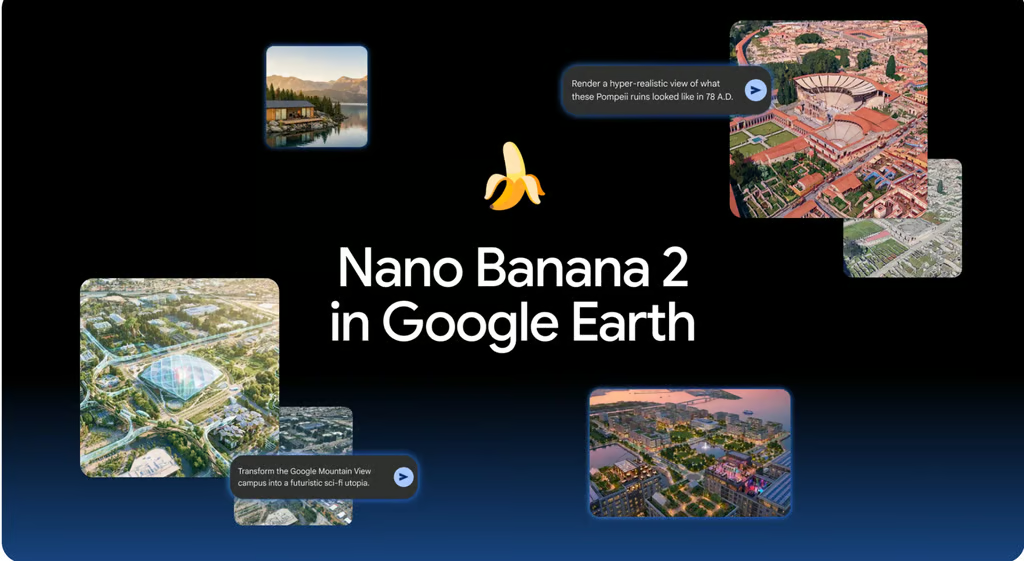
Google rolled back Nano Banana 2 image generation in Google Earth on Friday, just one day after launching the feature, after users shared screenshots of fabricated imagery that the company said appeared to violate its policies.
The experimental “Create image” tool allowed users to generate images from Google’s satellite, aerial, and 3D map views. Google promoted it as a way to visualize construction projects, real estate concepts, historical scenes, educational infographics, and possible changes to urban spaces.
But the tool also allowed users to produce plausible-looking images of events and infrastructure that did not exist, such as refugee camps, plane crashes, homeless encampments, explosion craters, and nuclear plants. Google said it was rolling back the feature while implementing stronger guardrails. Generated images were watermarked and remained separate from the main Google Earth experience, the company added.
Built-in limits weren’t enough
The tool was labeled experimental and came with several restrictions.
Generated images could only be saved inside Google Earth projects, could not be directly exported or shared outside the platform, and included both visible and invisible watermarks to distinguish them from standard map imagery, according to Google’s developer documentation.
Google also noted that image generation used Google Earth’s overhead imagery rather than Street View photos.
Early testing raised questions
More concerning tests showed that the feature could fabricate plausible-looking events at real locations. Digital investigator Henk van Ess generated images depicting refugees near the Mexican border, a nuclear plant in Iran, a fatal crash in Amsterdam, and a bomb crater near a hospital in Gaza. He reported that none of the prompts were rejected.
ZDNET, which tested the feature before launch, found it entertaining but less useful for professional geographic or architectural work. In several tests, the AI produced visually impressive results but struggled with historical accuracy, building placement, street layouts, and text generation in infographics.
The publication concluded that the system behaved more like an image editor working from a screenshot than a tool with deep geographic understanding of the locations shown in Google Earth.
What this could change
The more interesting part of this short-lived launch was not the image quality; it was where Google placed the model. By embedding Nano Banana inside a mapping product, Google briefly turned Earth from a tool for viewing places into a tool for imagining them.
If the feature returns, that could matter for architects, urban planners, educators, and real estate professionals who need quick visual concepts rather than precise engineering drawings. A teacher could illustrate an ancient city, a planner could mock up a neighborhood redesign, and a homeowner could preview a renovation without leaving the browser.
The tradeoff is accuracy and trust. AI-generated historical scenes, future projections, and development concepts may look convincing while being factually wrong or structurally unrealistic. For exploration and brainstorming, the feature is powerful; for documentation, planning approval, or historical reconstruction, it remains a starting point rather than a reliable source.
What this means for users
For now, the feature is unavailable while Google works on stronger guardrails. If the feature returns, most users should treat it as a creative visualization tool rather than an accurate representation of a place.
Educators could use it to make historical locations more engaging, while homeowners and community groups could quickly visualize renovations, parks, or neighborhood improvements. Real estate professionals, architects, and urban planners may also find it useful for producing rough concepts before investing time in more precise design software.
However, users should not rely on the generated images for construction plans, historical research, property decisions, or other work that requires geographic accuracy. The model may alter streets, buildings, landmarks, and text while still producing an image that appears realistic.
The sharing restrictions also reduced its usefulness outside Google Earth. Because generated images remained inside Earth projects, the tool is better suited to experimentation and internal brainstorming than polished presentations or public-facing materials.
Also read: For a closer look at how Nano Banana fits alongside Gemini, Veo, Imagen, and the rest of Google’s expanding AI lineup, read our guide to Google’s AI models.