







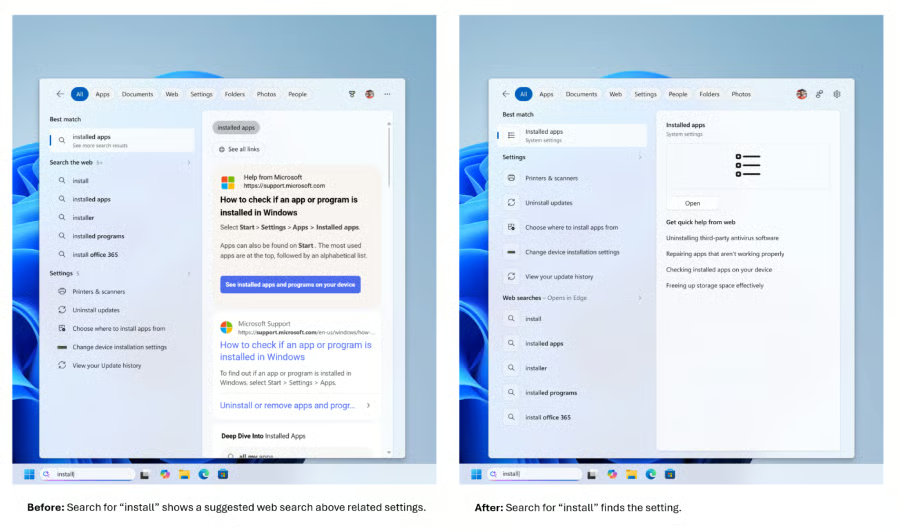
Microsoft is removing promotional content from Windows Search web results and giving users more control over whether online suggestions appear beside their files, apps, and settings.
The company began rolling out a series of Search Box improvements on July 13 to Windows Insiders in the Experimental channel. The update includes a simplified home screen, clearer result labels, stronger local search rankings, and a new setting for controlling web and Microsoft Store suggestions.
The changes could address a familiar Windows frustration: searching for something stored on a PC and receiving online content or Store recommendations alongside the local result the user actually wants.
Windows Search puts local results ahead of promotions
Microsoft said it has simplified the Search home screen so users can more easily return to recent searches with less visual clutter.
Search results will also more clearly indicate whether an item comes from an app, a setting, a local file, a website, or a Microsoft Store suggestion. The labels are intended to help users understand where a result will take them before they click it.
One of the most noticeable changes is the removal of promotional products and promotions from web results. Instead of placing related Microsoft products above an answer, Windows Search will prioritize what it considers the most relevant result.
Microsoft is also adding a setting under Settings > Privacy & Security > Search that lets users decide whether web and Microsoft Store suggestions appear alongside local results.
When a file, app, or setting is the stronger match, Windows should now place it ahead of web content. Built-in destinations such as This PC and Recycle Bin should also be easier to find.
Search is becoming more forgiving, too. Microsoft said the system can better recognize misspelled and incomplete app names. Typing “utlook,” for example, may still surface Outlook.
File and settings searches are getting smarter
Microsoft is adjusting how settings are ranked so more relevant options appear near the top of the results. The company described this as an initial round of improvements, with additional tuning planned over the coming months.
File search is also gaining support for two-character queries, which could make it faster to locate folders or documents with brief names. Windows will surface cloud and connected files when they are a better match than content stored locally.
The update also includes reliability work to reduce crashes and loading issues in Search.
Microsoft noted that the experience may vary by region, meaning some testers may see different web results or suggestions depending on their location.
What the Windows Search changes mean for you
For everyday Windows users, the most useful addition may be the ability to separate local PC search from Microsoft’s online ecosystem.
Turning off web and Store suggestions could make Search feel more like a traditional desktop utility, particularly for people who primarily use it to open applications, locate documents, or change system settings. It may also make it easier to avoid opening a browser or Microsoft Store page when the intended result is already stored on the computer.
The clearer labels should make mixed search results easier to scan, while improved typo recognition may help users reach frequently used apps without entering their exact names.
However, most Windows 11 users will not receive these changes immediately. Microsoft is gradually distributing them to Windows Insiders in the Experimental channel through a controlled rollout, meaning even eligible testers may not see the new experience right away.
Because the improvements remain limited to the Insider program, Microsoft may refine them before any broader release.
The company has not announced when the updated Search experience will become generally available. For now, Microsoft is asking testers to submit feedback as it continues adjusting the feature.
Related reading: Still using an older Windows 10 PC? Check out our guide to four products that can help extend its life after Microsoft's support deadline.