







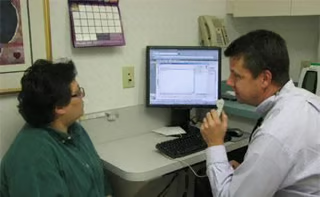
As doctors look to maintain patient satisfaction while they incorporate technology into their workflows, a health system in Gettysburg, Pa., is turning to ergonomics and voice dictation.
Computer ergonomics techniques can create the right visual angle that allows patients to help oversee data dictation into electronic health records (EHRs), said Dr. R. Hal Baker, vice president and CIO of WellSpan Health.
A computer pivot can help in this process, in which doctors can log in to an EHR securely without exposing sign-in data, Baker told eWEEK.
“We create a triangle where the patient and the doctor are looking at the screen together versus the computer being between the patient and provider,” he explained.
“Communication takes ergonomic and architectural design to facilitate it,” Baker said. “You have to make a decision on how you’re going to position it so that it is a sharing event rather than a separating event.”
Baker said he’s seen exam rooms in which large monitors on the wall allow patients to see a full EHR. WellSpan is looking to expand to 22-inch monitors in the future to aid interaction between doctors and patients, he said.
Although tablets are convenient for house calls and when doctors and clinicians are on the go, desktop monitors are more convenient as far as sharing data with patients, according to Baker.
But both tablets and PCs will have a role in doctor-patient interactions, Baker said.
“If you’re trying to record that I refilled their blood pressure medicine, a tablet’s fine, but if I’m trying to explain the discussion around whether or not we are going to try another round of chemotherapy for cancer, that’s telling a story—that’s got to be more words to convey the choices made and why,” Baker said of the need for a PC’s keyboard.
In addition, dictation using Nuance Dragon Medical allows doctors to maintain accountability to patients as they listen to doctors input data into EHRs. By listening to the dictation, patients can help correct doctors’ errors, Baker noted.
WellSpan Health uses AllScripts’ EHR platform and Dragon Medical Enterprise Network Edition 10.1, which is now Dragon Medical 360.
“For years, I have been dictating my notes in front of the patient, in part because it was faster,” he said.
Dictation allows Baker to save time by informing patients of their condition and entering data into an EHR at the same time, Baker said.
“It’s validating because patients know you’ve listened to them,” he said. “They hear you tell back their story, and they have a chance to correct it.”
Despite the doctor and patient having a conversation while a doctor dictates data into an EHR, the microphone only picks up the doctor’s voice, Baker noted. When a doctor lets go of the microphone button, recording stops, he said.
Dragon has a high accuracy rate on spelling of medical terms, according to Baker. He notes that it can pick up words such as epistaxis for nosebleed and ecchymosis for bruise.
But in the past Dragon would have difficulty with simpler words like “bruise,” and would mix up “he” and “she,” he said.
Nuance engineers have been working to rectify the problem, Baker said.