







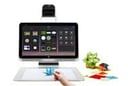
HP Inc. is expanding the capabilities in its Sprout all-in-one immersive computing system to make it more suited for the education and professional markets.
The company on Jan. 19 introduced Sprout Pro, which comes with new applications and security features that are designed to improve performance and protect data, according to officials. The new offering will help HP extend the reach of Sprout to new customer segments, according to Louis Kim, global head and general manager of immersive computing at HP.
“Sprout Pro adds tools for creative professionals, students and instructors to the ground-breaking Sprout platform,” Kim said in a statement. “Instant 2D/3D scanning, augmented reality and an immersive dual screen is now boosted by pro-class applications and security.”
The vendor launched Sprout in October 2014 as the foundation of its Blended Reality immersive computing initiative. Aimed at consumers, it’s designed to bring together physical and virtual worlds with the goal of arming users with innovative creative tools. Sprout integrates such components as a projector, 3D camera, scanner, keyboard and mouse, and a canvas with touch capabilities into a single system. It also includes a 23-inch full-HD touch-screen, and is designed to enable users to merge physical objects into a digital workspace.
The new Sprout Pro is armed with Intel’s latest sixth-generation Core i7 processors with 8GB of DDDR4 memory and integrated graphics, and can run Microsoft’s Windows 10 Professional operating system. It also comes with Trusted Platform Module for improved security.
For the education space, Sprout Pro offers a broad array of technologies as well as the ability to consolidate the PC, camera, scanners and other features into an all-in-one system that can help drive down computer budgets for schools, officials said. The technologies give students a broad array of creative tools and enable them to collaborate with others around the world.
For businesses, HP is bringing new software and hardware improvements, including Sprout Companion for Skype for Business, which offers enhanced remote sharing and collaboration. Among the features is the capability to share a 2D image during a Skype meeting and to annotate the Skype whiteboard using the pen and mat on Sprout, officials said.
HP’s External Display Mixer lets users share whatever is on Sprout’s dual screen, video capture by the webcam or the downward facing camera, and can do all of that at the same time. The system’s Scan feature offers enhanced document scanning and optical character resolution, while Magnifier lets customers share live physical objects or documents with an audience. Magnifier includes the ability to zoom in on images and capture them.
HP also has added new applications from companies such as Autodesk-Tinkercad, Sculpt+ and Print Studio that are optimized for 3D computing and offer professional-grade tools designed for Sprout.
The Sprout Pro, along with the new Intel chip and Windows 10 Professional, also comes with 1TB of storage, and Bluetooth 4.0 and 802.11ac WiFi connectivity. It will be available next month starting at $2.199, with all the new features—such as Sprout Companion for Skype for Business, External Display Mixer, Scan and Magnifier—included at no extra cost.