








- Boosting Your Online Privacy: 10 Best Practices
- Maximize Your Browser’s Privacy Settings
- Check Out Tor, but Be Careful
- Don’t Forget About Data Encryption
- Anti-malware Tools Always Come in Handy
- Two-Factor Authentication Improves Security
- Encrypt Communications Wherever Possible
- Bring On the VPN for Everyday Use
- Question the Cloud’s Value
- Don’t Forget Your Social Network Privacy
- Stop Linking All of Those Accounts
Boosting Your Online Privacy: 10 Best Practices
By Don Reisinger
Maximize Your Browser’s Privacy Settings

Your browser’s privacy settings might not be the panacea that will protect you from sneaky onlookers, but they are a good first step. Whether it’s Chrome or Firefox you’re using, you have the ability to modify privacy settings to limit when cookies are placed on your computer, how much information can be collected and more. There are loopholes, of course, but improving browser security is a good idea.
Check Out Tor, but Be Careful

There’s little doubt that Tor is one of the best ways to maintain privacy when surfing the Web. Tor uses a peer-to-peer networking technique to make it more difficult—but not impossible—for authorities to track what users are doing on the Internet. While Tor can be a useful tool for those with only privacy needs, it has been targeted by law enforcement for those who want to use Tor for other, less-savory things.
Don’t Forget About Data Encryption
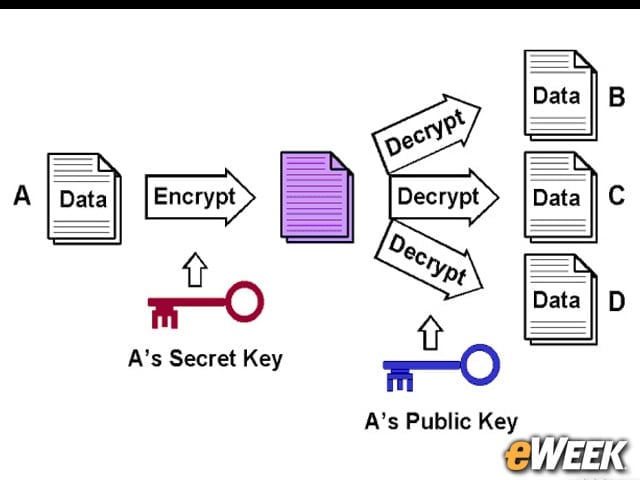
Data encryption is a huge concern for those who want to stay private. While the cloud has proved beneficial to people who use services such as Gmail and Dropbox, it’s important to note that without proper cloud data encryption, it’s hard to keep all of that information safe and secure. Don’t use anything in the cloud-based realm that isn’t protected by strong encryption.
Anti-malware Tools Always Come in Handy
Malware is still around and still allowing malicious hackers around the world to peer into a user’s computer and steal data. Realizing that, it’s a good idea for computer and mobile users to invest in anti-malware tools that will limit the chances of a hacker breaking in. Again, this isn’t a guaranteed technique for success, but it does improve privacy.
Two-Factor Authentication Improves Security
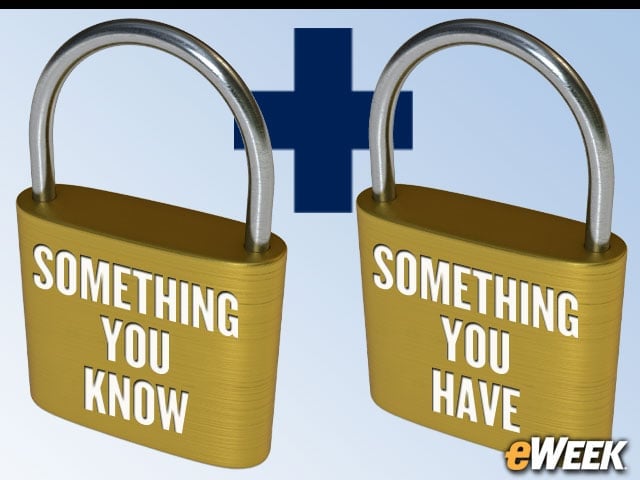
Two-factor authentication cannot be underestimated for its value to the average person. With two-factor authentication, users will know that in addition to inputting a password into an online field, they will be alerted to input credentials on another product, like a mobile device. That greatly enhances security and keeps data private from unscrupulous actors.
Encrypt Communications Wherever Possible

It’s always a good idea to use platforms that encrypt communications, like chat and email. Several chat services, such as Adium and Pidgin, use protocols that allow users to go off the record. Upon doing so, the communications are not recorded on either end and cannot be accessed a subsequent time. There are also several platforms that encrypt communication over email for those so inclined.
Bring On the VPN for Everyday Use
Virtual private networks are often used in the enterprise setting where employees are mobile and need to tunnel in privately to connect to a corporate network. However, VPNs can also be used for everyday use by masking traffic and ensuring that not even the ISP can determine where traffic is being routed. VPNs are not necessarily 100 percent anonymous, but they’re close. And that’s important.
Question the Cloud’s Value

Cloud computing is a bonanza for those who want to access a particular user’s data. Whether it’s the government or malicious hackers, gaining access to cloud services to access data is viewed as a grand opportunity. Realizing that, it might be worth it for the most adamant privacy seekers to take data off the cloud and move it offline, where encryption is more user-controlled. Think about it.
Don’t Forget Your Social Network Privacy
Social network privacy is practically an oxymoron, but it should still be a concern. Too often, people are willing to share too much information on social networks, and that data is easily gathered by unsavory individuals. Keeping social network privacy settings as locked down as possible and only sharing personal information with those you know is a best practice.
Stop Linking All of Those Accounts
Internet and social media companies are link-happy, hoping that people will link up their Facebook, Google, Twitter and email accounts with their mobile devices. It’s a recipe for privacy disaster. Whether it’s a company or individual, limiting the amount of linking between accounts and the sharing of information automatically between them is always a good idea.