








For more than two decades, Salesforce has been the undisputed heavyweight champion of customer relationship management (CRM). If you run an enterprise tech stack, chances are your customer data lives inside its walls.
But Salesforce is also famous for another thing: rebranding its conversational AI tool. We have watched Einstein Bots evolve into Einstein Copilot, then into Agentforce 1, and now into the current flagship platform: Agentforce 360.
Agentforce is Salesforce's big swing at agentic AI, software that doesn't just chat with people, but actually goes and does things. Look up an order. Issue a refund. Book a meeting. Update a CRM record. All without a human having to click through ten screens to make it happen.
That pitch is exciting. It's also expensive, complicated, and, depending on who you ask, not yet delivering on its promise. This guide pulls together what Agentforce actually is, how it has changed since launch, what it really costs, and where it tends to work versus where it tends to stall.
- What Agentforce actually is
- A quick history: How we got to Agentforce 360
- The building blocks: What's actually under the hood
- How a request actually moves through the system
- Who Agentforce actually fits
- What it costs: The sticker price vs the real bill
- The pros and cons
- Agentforce vs a traditional chatbot
- How it stacks up against other platforms
- Where Agentforce shows up in the real world
- A practical way to approach a pilot
- Verdict: Buy or skip?
What Agentforce actually is
Agentforce is Salesforce's platform for building AI agents that live inside your existing Salesforce setup and take action on your behalf. Not chatbots that hand off a script. Actual software workers who can read a request, figure out what's needed, pull the right data, and carry out a task, then hand the result to a human only when something needs judgment.
Salesforce splits these into two flavors:
- Autonomous agents: You give them a goal and the tools to reach it, and they handle the whole thing from start to finish without a person stepping in.
- Assistive agents: They work alongside an employee, surfacing information and drafting next steps, but a human still makes the call.
Both run on top of the same foundation: your CRM records, your business logic, and whatever outside systems you've connected. That's the whole pitch: agents that aren't guessing, because they're working from the same data your actual employees use.
A quick history: How we got to Agentforce 360
Salesforce didn't arrive at this overnight. The product has gone through a fast string of releases since it debuted at Dreamforce in September 2024.
Release | When | What changed |
| Agentforce 1.0 | Announced: September 2024 General availability (GA): October 2024 | First version. Agents plugged into CRM workflows for service and lead follow-up, powered by Data Cloud for context. |
| Agentforce 2 | Announced: December 2024 GA: February 2025 | Built for scale. Better orchestration, deeper Flow integration, and a jump from single-task bots to agents that could handle multi-step jobs. |
| Agentforce 2dx | Announced: March 2025 GA: April 2025 | Aimed at developers. New APIs, stronger governance and monitoring, and the ability to connect agents to outside tools. |
| Agentforce 3 | June 2025 | Agents started handing work off to each other across departments. Salesforce also opened up an agent-to-agent protocol so its agents could talk to agents built on other platforms. |
| Agentforce 360 | October 2025 | The big rebuild. A hybrid reasoning engine, voice support, a tool for grounding agents in live unstructured data, and a redesigned low-code builder. Slack got folded in as a workplace layer. |
Since the major Agentforce 360 launch in October 2025, Salesforce has continuously expanded its autonomous AI platform with key rollouts throughout 2026. The year began with the Spring '26 Release (Early 2026), which deeply embedded AI agents across all core clouds and enhanced real-time data connectivity.
This was followed in April 2026 by dedicated Sales Agent upgrades, which automated pipeline research, lead prospecting, and smart list-building. Most recently, in June 2026, Salesforce introduced specialized capabilities via the Agentforce Help Agent for autonomous customer service problem-solving and Agentforce Commerce for personalized, automated retail shopping and order management.
The product you'd buy today is Agentforce 360, and Salesforce frames it as four connected pieces working together: the core agent platform, a unified data layer (Data 360), the pre-built apps your employees and customers actually touch, and a marketplace of third-party agents and connectors called AgentExchange.
The building blocks: What's actually under the hood
If you're going to evaluate Agentforce seriously, it helps to know the names of the pieces, because Salesforce's pricing and marketing both lean heavily on this vocabulary.
- Atlas Reasoning Engine: The decision-making core. It reads a request, breaks it into steps, decides what data and actions it needs, executes, and checks its own work before moving on. The newer hybrid reasoning mode lets you lock in fixed steps for anything that needs to be predictable (think compliance workflows) while letting the model reason more freely on the open-ended parts. It can run on top of several different foundation models, including ones from OpenAI, Anthropic, and Google.
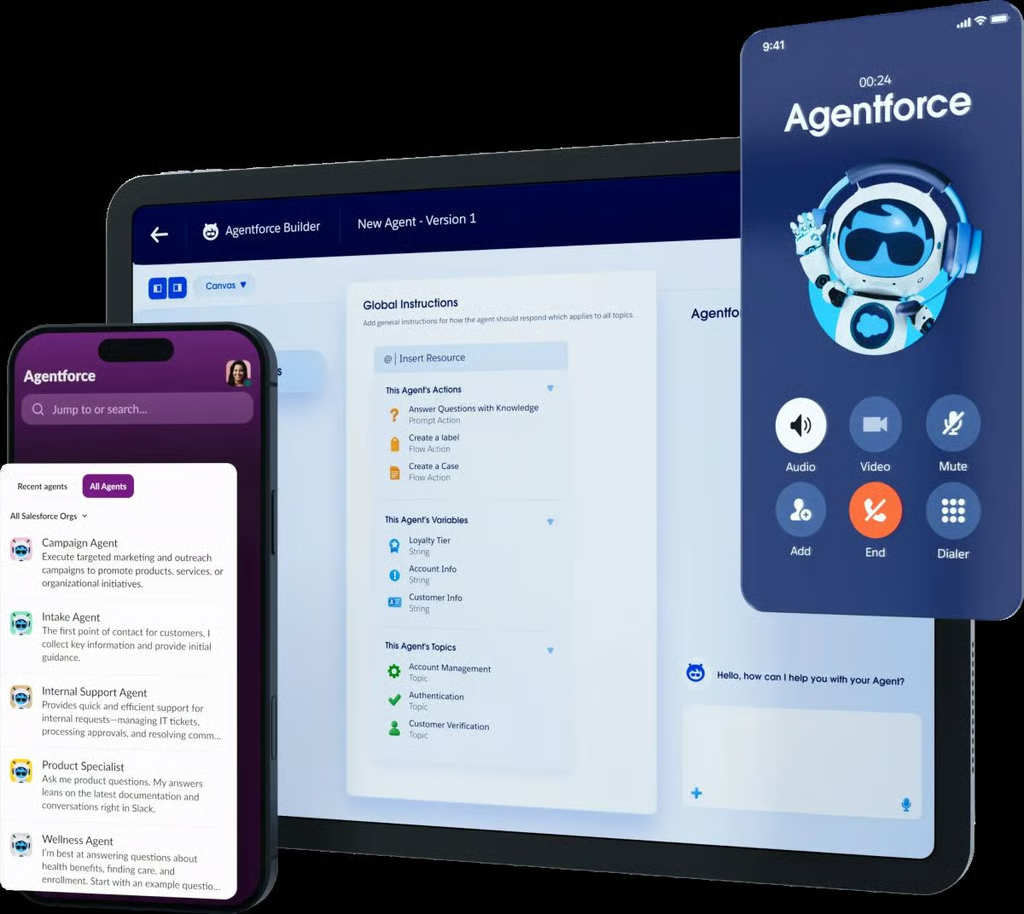
- Agentforce Builder: Where you actually configure an agent: what topics it covers, what actions it can take, and what rules it has to follow. You can build by typing plain-language instructions, dragging pieces around a low-code canvas, or writing scripts directly, depending on how much control you want.
- Agent Script: A way to lock down exactly how an agent behaves for the parts of a process that can't be left to chance, while still letting the AI handle the conversational, flexible parts. Useful if you're in a regulated industry where every interaction needs to be predictable and auditable.
- Agentforce Voice: Takes agents onto the phone. It can pick up calls, resolve routine requests, and pass anything complicated to a human with the conversation transcript already attached.
- Intelligent Context: Pulls structured information out of messy sources (PDFs, spreadsheets, scanned documents, images) so an agent isn't limited to whatever's already tidy and structured in your CRM.
- Trust Layer and Guardrails: The safety net. It masks sensitive data before anything reaches an outside model, keeps agents from wandering off-topic, and logs every action for review. These protections are switched on by default and can be tuned by an admin.
- Observability/Command Center: The dashboard for watching agents after they go live: how many conversations they're handling, how often they escalate to a human, where they're getting stuck, and where customers seem unhappy.
- Data 360 (formerly Data Cloud): This is the part most reviewers flag as a near-requirement rather than an optional add-on. It pulls together CRM records, purchase history, support tickets, and outside data sources into one real-time profile that an agent can draw from. Without it, an agent can only see what's already sitting cleanly inside Salesforce.
There's also a growing list of supporting tools — Prompt Builder for writing reusable instructions, Model Builder for plugging in custom predictive models, a mobile SDK for embedding agents in apps, batch testing tools for checking agent behavior before launch, and support for the Model Context Protocol (MCP), an open standard that lets Agentforce talk to outside systems and models without one-off custom integration work.
How a request actually moves through the system
It's worth walking through what happens in practice, because it explains both the appeal and the dependency on clean data:
- A request comes in, say a customer message, an employee question in Slack, or a trigger like a stalled deal.
- The Atlas Reasoning Engine reads it and figures out the actual intent, not just the literal words.
- The agent pulls live data such as order history, account status, and support history from Data 360 rather than relying on stale or generic information.
- The agent acts by replying, updating a record, processing a refund, booking a meeting, or kicking off a workflow. Bigger jobs might chain several actions together.
- Everything gets logged for review, so admins can see what worked and what didn't.
That last step is the entire pitch versus an old-school chatbot, which typically follows a fixed script, can't update records, and loses all context the moment it hands a conversation to a human.
Who Agentforce actually fits
Agentforce is built for companies that are already deep inside Salesforce.
It's a strong fit if you:
- Already run Salesforce as your system of record for sales, service, or both
- Have a Salesforce admin or developer team that's comfortable with Flow, Apex, and the broader platform
- Operate in a regulated or compliance-heavy industry that needs an audit trail
- Handle high volumes of repeatable customer interactions where automation has an obvious ROI
- Have already invested in (or budgeted for) Data Cloud/Data 360
It's a weaker fit if you:
- Run your CRM and GTM stack on HubSpot, Pipedrive, or a mix of tools instead of Salesforce
- Are a small or mid-market team without dedicated technical staff to configure and maintain agents
- Need something live in days, not weeks or months
- Want simple, predictable pricing you can forecast without a finance background
What it costs: The sticker price vs the real bill
This is where the marketing and the reality diverge the most. Salesforce's published pricing looks approachable. The total cost of actually running Agentforce in production usually isn't.
The advertised building blocks:
Plan or component | Price | What it gets you |
| Salesforce Foundations | Free | Basic builder tools and 200,000 starter Flex Credits |
| Flex Credits | $500 per 100,000 credits | Pay-as-you-go usage; a standard action costs roughly 20 credits (~$0.10), a voice action around 30 |
| Per-conversation pricing | $2 per conversation | An alternative billing model for customer-facing agents |
| Agentforce add-on (Sales/Service) | $125/user/month | Unmetered agent usage for employees plus AI-powered analytics |
| Industry-specific add-ons | $150/user/month | Everything above, plus vertical-specific agents for healthcare, financial services, etc. |
| Agentforce 1 Edition | From ~$550/user/month | The full bundle, including a large annual allotment of Flex Credits |
What that price sheet leaves out:
- A Salesforce Enterprise (or higher) license is a prerequisite, typically well over $100/user/month on its own.
- Data 360/Data Cloud, often described as practically mandatory for Agentforce to perform well, at roughly $25–$50/user/month in additional cost.
- Implementation services are commonly quoted in the tens of thousands of dollars for a serious deployment, and into six or seven figures for large enterprises.
- Training costs per agent or employee.
- Ongoing partner or consulting fees for anything beyond the simplest setup.
Several independent reviews estimate that a mid-market deployment typically costs between $150,000 and $600,000 in the first year, once you add up licensing, Data Cloud, and implementation. That's a wide range, which is itself part of the criticism: budgeting for Agentforce is genuinely hard to do in advance.
The less of your business that already runs inside Salesforce, the harder it is to justify Agentforce on cost and complexity alone.
The pros and cons
Where Agentforce earns its reputation:
- Genuinely deep, native access to Salesforce data. No bolt-on integration required if your data already lives there.
- An agent can complete a multi-step job end-to-end, not just answer a question and stop.
- Strong default guardrails and an audit trail, which matter a lot for regulated industries.
- A real roadmap and growing list of pre-built agents for sales, service, and marketing, so you're not always starting from a blank page.
- Flexible billing options (pre-purchase, pay-as-you-go, or commit-and-pay-monthly) that can match different budgeting styles.
Where it tends to disappoint:
- The total cost adds up fast once Data Cloud, implementation, and training are factored in.
- It only sees what's inside Salesforce. Knowledge sitting in Notion, a separate help center, or a data warehouse needs to be piped in first, and that work is rarely quick or cheap.
- Setting up anything beyond a demo typically requires real Salesforce expertise — admin or developer skills, not just drag-and-drop.
- Pricing has shifted multiple times since launch, making long-term cost planning harder than it should be.
Agentforce vs a traditional chatbot
| Old-school chatbot | Agentforce | |
| Handles a question that wasn't explicitly scripted for | Usually fails or escalates blindly | Reason through it using context |
| Live data during the conversation | No, works off whatever was loaded at setup | Yes, pulls current CRM and Data 360 records |
| Can take action (refunds, updates, bookings) | No, mostly just answers and collects info | Yes, can complete the task itself |
| Handoff to a human | Loses context, the customer often repeats themselves | Full transcript and data carried over |
| Improves over time | Only through manual rewrites | Learns from logged interaction data |
How it stacks up against other platforms
Agentforce isn't competing in a vacuum. Depending on what you're trying to solve, the realistic alternatives include:
- Microsoft Copilot/Dynamics 365 Copilot: The natural pick if your organization already runs on Microsoft tools rather than Salesforce.
- IBM WatsonX and Google's AI offerings: Broader enterprise AI platforms that come up in side-by-side evaluations, though detailed feature comparisons depend heavily on your existing vendor relationships.
- ServiceNow's AI agents: A common comparison for IT-service-heavy organizations.
- Lighter, model-agnostic support platforms: Newer entrants let you pick any underlying AI model, train on whatever knowledge base you already have (Notion, Google Drive, a help center), and go live in a day rather than a quarter. They trade away deep CRM-native integration for speed and flexibility.
- RevOps-focused orchestration tools: For go-to-market teams whose data is spread across a CRM, enrichment vendors, and scheduling tools, some platforms focus specifically on stitching that fragmented stack together rather than centralizing everything inside one CRM vendor's data lake.
Where Agentforce shows up in the real world
By function, the use cases that come up most often:
- Customer service: Triaging tickets, answering routine questions, processing returns and refunds, and escalating only the cases that genuinely need a person
- Sales: Qualifying inbound leads, drafting follow-ups, updating opportunity records automatically from call and email content, and coaching new reps through practice scenarios
- Marketing: Building audience segments off live behavior instead of static lists, and running automated content or timing tests
- Commerce: Personalized product recommendations, automated order tracking, and proactive outreach around abandoned carts or back-in-stock items
- Internal employee support: Handling IT tickets, HR questions, expense approvals, and policy lookups inside tools employees already use, like Slack
By industry, deployments tend to cluster around retail and e-commerce (order and returns support), healthcare (scheduling and intake, within HIPAA-compliant boundaries), financial services (account inquiries, fraud alerts, claims intake), manufacturing and logistics (supply chain exceptions, predictive maintenance), and travel (rebooking and loyalty support).
A practical way to approach a pilot
If you've made it this far and you're still considering Agentforce, here are my recommendations:
- Pick one narrow, repeatable use case, not five at once. Either a single FAQ workflow or a single routine support category is enough to learn from.
- Get your data in shape before you build anything. Duplicate contacts and inconsistent fields are the single biggest reason pilots fail to reach production.
- Decide your guardrails up front, what the agent can do on its own, what always needs a human, and how escalation should work.
- Track real numbers, not vibes: response time, how many conversations get resolved without escalation, and complaint or error rates.
- Expand only after the pilot proves itself. Resist the urge to roll agents out across five departments before the first one has settled.
Verdict: Buy or skip?
Agentforce is a genuinely capable platform, and the underlying engineering, the reasoning loop, the guardrails, and the native CRM access hold up under scrutiny. The catch isn't the technology. It's the fit.
Buy it if:
Your enterprise is already heavily consolidated onto Salesforce Enterprise or Unlimited editions. You have an internal team of dedicated Salesforce administrators, clean CRM data hygiene, high-volume customer support touchpoints, and the budget to absorb usage-based consumption scaling. In this environment, the native context and security of Agentforce are incredibly valuable.
Skip it if:
You run a small-to-mid-market team or operate on a hybrid tech stack (e.g., HubSpot CRM mixed with AWS warehouses and Google Workspace documentation). The prerequisite software licensing, combined with the implementation overhead and predictable pricing challenges of a usage-based wallet, makes the math incredibly hard to justify when compared to lighter, agile, and model-agnostic alternatives.
If you do take the plunge, start small: pilot the platform using Salesforce's free foundations tier on a single, low-risk, repeatable workflow, clean your underlying data fields first, and firmly establish your containment and deflection metrics before scaling across the enterprise.
Also read: Our agentic AI cheat sheet explains the broader technology behind platforms such as Agentforce, including key terms, architectures, risks, frameworks, and real-world use cases.