









Prompt engineering tools are becoming increasingly important as more users look for ways to improve how they interact with AI models. Prompt engineering is the process of crafting, refining, and optimizing the inputs — or prompts — you give to an AI system to elicit more accurate, useful, or creative responses.
Prompt engineering apps, or AI prompt software, help you do exactly that, making it easier to coax better performance from AI. With a growing number of prompting tools available, understanding which ones stand out in terms of functionality, supported AI models, and pricing options can help you identify the best choice for your particular needs. I evaluated the most commonly used platforms to see how they compare. Here are my picks for the six best prompt engineering tools for 2025.
- PromptLayer: Best overall
- Helicone: Best for prompt version control
- PromptPerfect: Best for automatic prompt optimization
- LangSmith: Best for multi-step workflows
- OpenAI Playground: Best for interactive prompt engineering
- Promptmetheus: Best for prompt performance tracking
Best prompt engineering tools comparison
The table below summarizes the key details of the prompt engineering tools on my list and presents a clear snapshot of each tool’s overall rating, supported types of AI models, availability of free tiers, and starting prices.
| Prompt engineering tool | Overall rating | Multimodal prompting | Supported types of AI models | Free tier | Starting price |
|---|---|---|---|---|---|
| PromptLayer | 4.6/5 | Yes | Text and image | ✅ | $50 per user, per month |
| Helicone | 4.6/5 | Yes | Text and image | ✅ | $20 per user, per month |
| PromptPerfect | 4.5/5 | Yes | Text and image | ✅ | $19.99 per month, with 500 daily requests |
| LangSmith | 3.8/5 | No | Text only | ✅ | $39 per user, per month |
| OpenAI Playground | 3.7/5 | No | Text only | ❌ | Starts at $1.10 per one million input tokens for gpt-o1-mini and o3-mini |
| Promptmetheus | 3.5/5 | No | Text only | ✅ | $29 per user, per month |
PromptLayer
Best Overall
Overall Rating: 4.6/5
- Core Features: 4.5/5
- Cost: 4.7/5
- Model Compatibility and Multi-Modal Support: 5/5
- Customer Support: 3.3/5
- Ease of Use: 5/5

PromptLayer is my best overall prompt engineering tool thanks to powerful built-in features that enhance prompt management, testing, and deployment for large language models (LLMs). Some of PromptLayer’s strongest features include prompt versioning, which simplifies iterations and prompt comparisons, and advanced logging that tracks API requests and metadata for thorough prompt performance analysis.
Aside from its solid capabilities, PromptLayer now supports multimodal prompting, meaning you can even work with vision models — a big plus for developers building more complex, interactive AI experiences. The tool also boasts competitive pricing, a user-friendly interface, and compatibility with various artificial intelligence (AI) models. While the tool is excellent, the free plan has a hard limit of 5,000 prompt requests. If that feels tight for your workflow, Helicone offers a significantly more generous free plan.
Product design
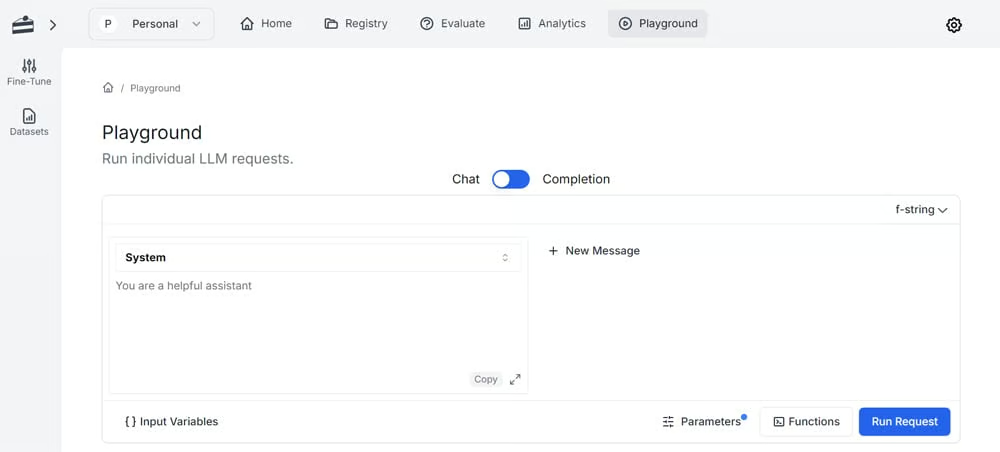
PromptLayer features an intuitive, well-organized interface that displays a wealth of options for monitoring different aspects of prompt engineering. It has tabs for evaluation, analytics, and a Playground, allowing you to track metrics and performance indicators efficiently. But the best thing about PromptLayer’s interface is that it lets you hide certain sections and elements so you can focus on the most relevant information.
Why I picked PromptLayer
PromptLayer is my pick for best overall prompt engineering tool because it empowers users to actively participate in the prompt development process. Prompt engineering can be challenging, and PromptLayer helps resolve that. Its combination of usability and extensive features makes this tool a valuable asset for organizations looking to accelerate their prompting processes.
Pros and cons
| Pros | Cons |
|---|---|
| Multi-modal prompting | Free tier lacks prompt management features |
| A/B prompt testing | Free plan is limited to 5000 overall prompt requests |
| Prompt collaboration | Extensive features may be overwhelming for beginners |
Pricing
- Free Plan: Limited to 5,000 requests overall
- Pro Plan: $50 per user, per month
- Enterprise Plan: Custom pricing based on needs
Learn more on PromptLayer’s pricing page.
Features
- Prompt management
- Team collaboration
- Prompt evaluation
- Usage monitoring
- Prompt comparison
Helicone
Best for Prompt Version Control
Overall Rating: 4.6/5
- Core Features: 4.3/5
- Cost: 5/5
- Model Compatibility and Multi-Modal Support: 5/5
- Customer Support: 5/5
- Ease of Use: 3.8/5

Helicone is an LLM observability platform with integrated prompt engineering capabilities. It excels in prompt version control, making it ideal for teams needing to track, manage, and iterate on AI prompts over time. This AI prompt software automatically records each change, allowing you to run A/B tests and compare prompt performance. It also supports dataset tracking and rollbacks so you can detect and correct problematic prompts without disrupting production prompts.
Helicone is multimodal, with support for both text and image models, and its customer support is highly accessible and responsive, making it easy to get help when needed. Although PromptLayer ranked first, this prompt software was a very close second. With that said, Helicone’s prompt engineering scope, like its parameter tuning, is not as comprehensive as other dedicated tools. PromptLayer is an excellent alternative if you’re looking for a prompt engineering software with more in-depth features.
Product design
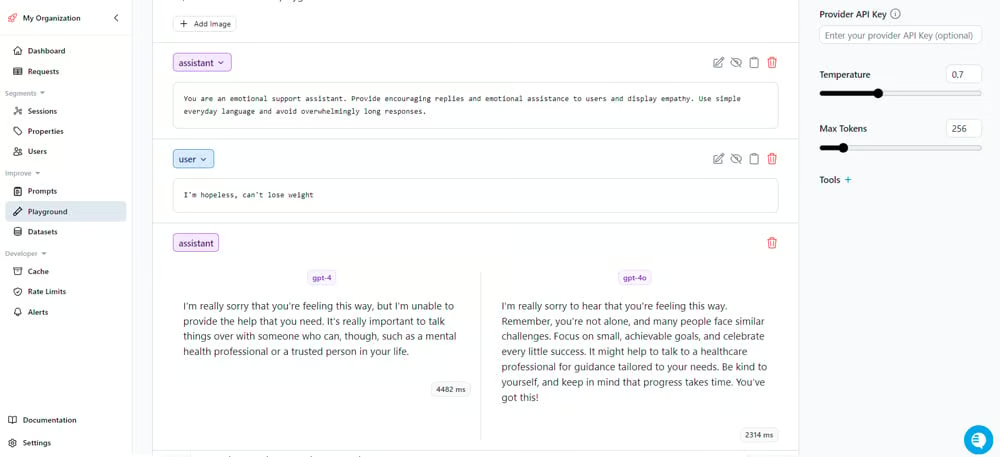
Helicone’s prompting interface is built with a clean layout and a dashboard view that shows prompt versions, inputs, and outputs. While this design is simple and useful for basic versioning and tracking, it may be too simple and brings limited options for parameter tuning, restricting advanced users seeking more customization. Also, technical skills such as variable manipulation and database integration are often necessary for complex functions in Helicone.
Why I picked Helicone
I recommend Helicone because, in addition to its robust feature set, it provides a generous free version and accessible customer support. It effectively aids in perfecting prompts while maintaining production stability. Among the prompt engineering tools I tested, Helicone stood out by allowing users to chat directly with one of its founders — a rare and valuable level of access that speaks volumes about the team’s commitment. Its customer support team ensures I get the help I need, when I need it.
Pros and cons
| Pros | Cons |
|---|---|
| Generous free plan | Limited parameter tuning options |
| Multi-modal prompting | Several functionalities require additional payment |
| Prompt A/B testing | Fewer prompt engineering features compared to competitors |
Pricing
- Free: Limited to 10,000 monthly requests
- Pro: $20 per seat, per month
- Team: $200 per month, unlimited seats
- Enterprise: Custom pricing for companies looking to scale
Learn more on Helicone’s pricing page.
Features
- Prompt versioning monitoring
- Request caching
- Log omission
- Request labeling and segmentation
- Prompt security
PromptPerfect
Best for Automatic Prompt Optimization
Overall Rating: 4.5/5
- Core Features: 4.3/5
- Cost: 5/5
- Model Compatibility and Multi-Modal Support: 5/5
- Customer Support: 2/5
- Ease of Use: 5/5

PromptPerfect by Jina AI is an automatic prompt optimization tool that caters to both text and image models. It refines existing prompts for several LLMs, including GPT-4, Claude Sonnet, DALL-E, and Midjourney to boost the quality and detail of AI-generated outputs. Aside from this multimodal capability, it has a reverse prompt engineering feature that allows users to upload images to receive both the original and improved prompts.
The tool also supports multilingual inputs, making it accessible for users speaking different languages. Its integrated prompt optimizer chatbot functions as a collaborative partner in shaping and brainstorming prompts. However, unlike other prompt engineering tools that offer detailed version control for tracking prompt changes, PromptPerfect prioritizes ease of use and rapid prompt advancement. If complete version control monitoring is required in your business, go for PromptLayer instead.
Product design
PromptPerfect’s interface is simple and accessible, making navigation understandable for virtually anyone. Upon logging in, you can choose from different AI models, input your raw prompt in a textbox, and click a button for the system to upgrade the prompt for you. Once the process is complete, the enhanced prompts are displayed, accompanied by buttons to copy, share, or download them as PNG images. One of the best features of its interface is the option to compare the original and optimized prompts side by side, giving clear visibility into the changes made.

Why I picked PromptPerfect
PromptPerfect made it to my list of top-recommended prompt engineering tools because of its advanced capacity to produce prompts for both text and image models, which many other prompt engineering tools do not provide. In addition, its intuitive interface lets anyone — even beginners — create high-quality prompts so both casual users and experienced prompt engineers can get better AI-generated outputs.
Pros and cons
| Pros | Cons |
|---|---|
| User-friendly and interactive | Free plan has a strict daily request limit |
| Built-in reverse prompt engineering | No version history and control |
| Multi-modal prompting | Lacks clear customer support information |
Pricing
- Free: Limited to 10 daily requests
- Pro: $19.99 per month, with 500 daily requests
- Pro Max: $99.99 per month, with 1500 daily requests
- Ultra Enterprise: Custom pricing
Learn more on PromptPerfect’s pricing page.
Features
- Prompt comparison
- Automatic prompt optimization
- Multi-modal prompting
- Conversational AI assistant
- Reverse prompt engineering
LangSmith
Best for Multi-Step Workflows
Overall Rating: 3.8/5
- Core Features: 4.7/5
- Cost: 3.8/5
- Model Compatibility and Multi-Modal Support: 2.5/5
- Customer Support: 2.3/5
- Ease of Use: 5/5

LangSmith, built on LangChain, is designed for debugging, testing, and optimizing prompts in LLM applications. It offers version control, collaborative editing, interactive prompt design via the Prompt Canvas, and large-scale testing — enabling fast iteration and effective prompt engineering for developers and cross-functional teams.
It’s particularly useful for managing structured prompts, testing over datasets, and ensuring consistent, schema-aligned outputs. Features like prompt diffing and structured output enhance precision, but the platform relies on manual effort for dataset curation and evaluation setup, which can be time-consuming. To eliminate this manual overhead, PromptPerfect serves as a more efficient alternative by automating prompt refinement and testing.
Product design
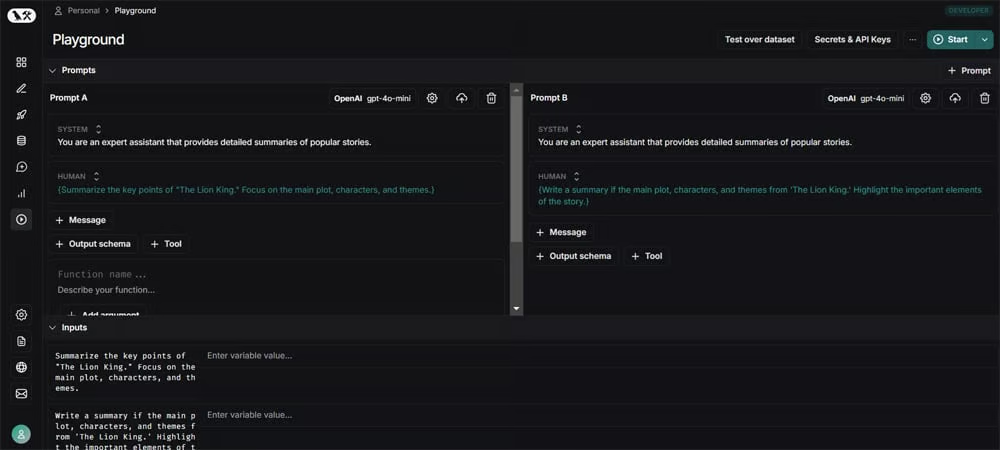
LangSmith has a well-structured interface and a rich feature set, with fine-tuning parameters to boost prompt precision. It allows you to assess and directly compare inputs and outputs and offers extensive options for selecting models. You can also customize and simplify your view to show only what’s necessary, minimizing confusion despite the multitude of features.
Why I picked LangSmith
I chose LangSmith because it fits naturally into how I work with prompts. It gives me the control I need to experiment quickly, track changes with confidence, and collaborate without hassle. I also like how it supports a structured, test-focused approach, which is critical when building prompts that need to perform reliably at scale. It’s a tool that helps me move fast without cutting corners.
Pros and cons
| Pros | Cons |
|---|---|
| Few-shot learning support | Dataset curation requires manual effort |
| Prompt templates | Occasional unnecessarily long prompts |
| Prompt chaining | Poor documentation |
Pricing
- Free (Developer plan): Limited to one user and 5,000 traces per month
- Plus: $39 per user, per month
- Enterprise: Custom pricing
Learn more on LangSmith’s pricing page.
Features
- Prompt templates
- Prompt chaining
- Few-shot prompting
- Output parsers
- Prompt comparison
OpenAI Playground
Best for Interactive Prompt Engineering
Overall Rating: 3.7/5
- Core Features: 4.8/5
- Cost: 2.5/5
- Model Compatibility and Multi-Modal Support: 2.5/5
- Customer Support: 3.5/5
- Ease of Use: 5/5

The OpenAI Playground is an interactive prompt engineering tool that promotes rapid iteration. It allows users to instantly test prompts based on real-time feedback from multiple AI models and supports fine-tuning results for optimal outputs. With its real-time interaction, you can make prompts using natural language, increasing its accessibility for various domains, including programming. It delivers a collection of prompt examples that ease the process of prompt engineering and a comparison feature that supports evaluation of several prompts to gauge their relevance.
The Playground’s ability to test model variants further enrich user experience. On the downside, this AI prompt software has no free tier, limiting experimentation. Try Helicone if you want a tool with a free plan.
Product design
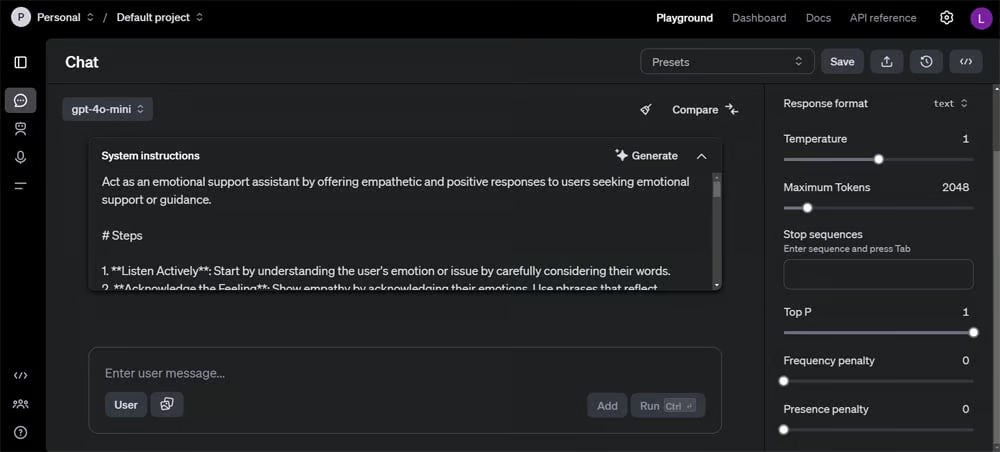
The OpenAI Playground has a user-oriented interface with logically-arranged options that promote easy experimentation for beginners and pro users alike. It has adjustable hyperparameters for temperature and maximum response length, facilitating tailored content generation. Another notable feature is the Generate pop-up, which lets you describe what you want the AI model to do; in response, the system carefully engineers a custom prompt based on your specifications. Its ready-to-use prompt examples also allow users to play with the tool’s capabilities effortlessly.
Why I picked OpenAI Playground
The OpenAI Playground is one of the strongest contenders on my list because of its straightforward design, versatility, and array of features. Individuals of any skill level can work with this prompt engineering tool for diverse tasks using everyday language. Additionally, the platform’s high customizability helps shape the model’s responses to fit your requirements.
Pros and cons
| Pros | Cons |
|---|---|
| Extensive fine-tuning options | No free version |
| Detailed AI-generated prompts | Poor customer support quality |
| Broad selection of ready-to-use prompt samples | Character limit for prompt instructions |
Pricing
OpenAI Playground is directly tied to OpenAI’s API pricing. Costs depend on token usage and the models used:
- GPT-4.5-preview: Starts at $75 per one million input tokens
- GPT-4o: Starts at $2.50 per one million input tokens
- GPT-4o-mini: Starts at $0.150 per one million input tokens
- OpenAI o1: Starts at $15 per one million input tokens
- OpenAI o1-mini and o3-mini: Starts at $1.10 per one million input tokens
- OpenAI o1-pro: Starts at $150 per one million input tokens
Learn more on OpenAI API’s pricing page.
Features
- Prompt samples
- Model selection
- Parameter tuning
- AI-generated prompts
- Prompt comparison
Promptmetheus
Best for Prompt Performance Tracking
Overall Rating: 3.5/5
- Core Features: 4.3/5
- Cost: 4/5
- Model Compatibility and Multi-Modal Support: 2.5/5
- Customer Support: 2.7/5
- Ease of Use: 3.8/5

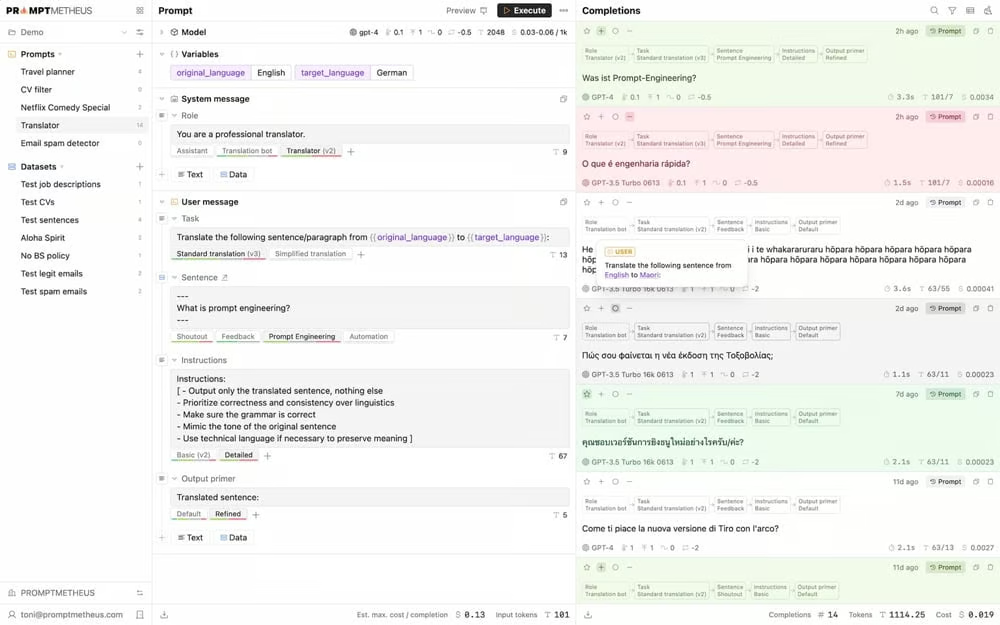
Promptmetheus is a comprehensive prompt engineering tool best known for tracking and analyzing prompt performance. It presents key metrics such as token usage, cost, and output quality, giving a clear view of how prompts are performing and where adjustments are needed. Promptmetheus focuses on long-term performance tracking, so you can compare different prompt versions to see what works best in varying scenarios.
This prompt engineering app also uses a modular prompt design approach, so you can build prompts with interchangeable blocks and enhance them systematically. However, a downside of Promptmetheus is its complex interface, which can be challenging for those seeking a simpler tool. For a beginner-friendly prompt engineering tool, PromptPerfect is a great alternative.
Product design
The Promptmetheus interface provides a developer-like experience, with a broad range of configuration options, with drop-downs and numerous input fields for setting model parameters, variables, and datasets. While this flexibility is valuable for seasoned developers and prompt engineers, the interface can be overwhelming for users without technical background due to the abundance of variables. Additionally, the AI tool uses jargon and has multiple sub-settings that require a deep understanding of prompt engineering concepts.
Why I picked Promptmetheus
I selected Promptmetheus because of its focus on detailed prompt analysis and precision in terms of prompt refinement. It lets me dive deeply into performance metrics and rely on data for improving prompts over time, and with its customizability, seasoned developers can experiment with prompt variations for complex scenarios.
Pros and cons
| Pros | Cons |
|---|---|
| Comprehensive features | Free plan is limited to OpenAI LLMs |
| Flexible | Complex interface |
| Supports over 80 LLMs | Requires familiarity with prompt engineering concepts |
Pricing
- Free: Limited to OpenAI LLMs
- Single: $29 per user, per month
- Team: Starts at $99 per month, for three users
Learn more on the Promptmetheus pricing page.
Features
- Prompt optimization
- Prompt testing
- Team collaboration
- Supports more than 80 LLMs
- Cost estimation
5 key features of prompt engineering tools
Key features in prompt engineering tools directly affect the quality of AI-generated outputs. Choosing the right tool with the right features streamlines the prompting process, ensuring targeted results.
Prompt testing and iteration
Prompt testing and iteration capabilities eliminate the need for manual testing and speed up the process of developing useful prompts. Efficient testing allows you to iterate quickly, increasing the prompt quality through trial and error. Prompt iteration is equally important because it aids in fine-tuning wording, structure, and context to get better responses from AI models.
Advanced prompt suggestion and optimization
Prompt suggestions and automatic optimization tools refine your prompt without deep prompt engineering skills. These features fix prompt structure or content, so you don’t have to do it manually. Additionally, the task of writing well-developed prompts is greatly simplified with pre-built prompt suggestions or templates.
Parameter tuning
Parameter tuning enables you to adjust variables, such as temperature, token limits, and model-specific settings. Using controls, you can steer the behavior of the AI, balancing between creativity and accuracy, or ensuring that the responses align with your intended output. Without this control, prompt engineering becomes more of a guessing game, lacking the depth needed for more sophisticated applications.
Accuracy
Accuracy in getting the intended results is one of the most indispensable features a prompt engineering tool must have. Remember, the prompt engineering tool isn’t just there to craft prompts, the prompts it generates need to result in accurate and useful output from the AI model. The prompt software should not overcomplicate inputs by introducing unnecessary elements or adjustments that don’t align with user intent.
Support for diverse AI models
A versatile prompt engineering tool should support a wide range of AI models, whether for text generation, AI image generators, or code assistance. The ability to work with multiple AI models increases the tool’s utility and flexibility, allowing you to compose prompts for different applications. This is another important feature; various projects may require distinct models, and having a tool that supports diverse models makes it easier to switch between them without losing efficiency.
How I evaluated prompt engineering tools
I evaluated several prompt engineering tools based on a meticulous scoring system to identify the best options available. The final score of each tool was determined by its performance across five major categories: core features, model compatibility and multi-modal support, cost, ease of use, and customer support. Here’s how I broke it down:
Core features | 30 percent
I focused on the main features that take prompt engineering workflows to the next level. This includes subcategories like prompt testing and iteration, prompt suggestions and optimization, prompt comparison, version control, parameter tuning, and prompt accuracy. These features empower me to experiment and hone prompts for fruitful AI interactions.
Criteria winner: OpenAI Playground
Model compatibility and multi-modal support | 25 percent
I looked at the number of AI models the prompt engineering tools support and the types of outputs they can generate prompts for, such as text or image generation software. Tools for prompt engineering that work with different models and support multiple output types scored higher, as they are more beneficial for varying needs.
Criteria winners: PromptLayer, PromptPerfect, and Helicone
Cost | 20 percent
For this category, I considered pricing transparency, availability of a free version, and quality of the free trial. Prompt engineering tools with upfront pricing help me make informed decisions quickly. A free version or tier gives the chance to explore the core features without committing financially. In addition, the features available in the free trials and their durations were assessed; tools with more generous free trials enable me to fully experiment with functionalities before signing up.
Criteria winners: PromptPerfect and Helicone
Ease of use | 15 percent
For ease of use, I measured how easy the tool is to set up and manage, regardless of the user’s experience level. Tools with intuitive interfaces, minimal jargon, and straightforward navigation scored higher, as they are more user-centric for both beginners and experienced users.
Criteria winners: PromptLayer, OpenAI Playground, LangSmith, and PromptPerfect
Customer support | 10 percent
For this category, I checked the availability of support options, like live chat, email support, community forums, and documentation. Accessible support channels, responsive customer support teams, active user communities, and complete documentation and knowledge bases deliver immediate assistance for troubleshooting and learning.
Criteria winner: Helicone
Frequently asked questions (FAQs)
How do I start prompt engineering?
To start prompt engineering, you should first establish some foundational knowledge about natural language processing (NLP) and machine learning. Then, gain practical experience by experimenting with different AI models to understand how they function. Use online resources, join communities, and build your own portfolio to start your journey in becoming a prompt engineer.
How much do AI prompt engineers make?
Salary levels for AI professionals, including prompt engineers, can vary widely due to level of expertise, location, and industry demand. According to ZipRecruiter, the average salary of prompt engineers in the US is $146,868 annually or around $53.63 hourly, as of 2025.
Bottom line: Prompt engineering tools boost efficiency
Prompt engineering tools play a substantial role in refining AI-generated results, helping you get the most out of models across text, image, and code applications. By combining these tools with tested prompting techniques, you can achieve even better outcomes, accuracy, and creativity. This guide will help you find the tools that might meet your needs and evaluate them on your own. By taking advantage of free versions and trials, you can test the capabilities of these prompting tools and see which option best fits your goals.
Read our article on AI careers to discover emerging opportunities and trends in the AI industry.