







Not content to let Windows 8 serve as both a mobile and desktop operating system, Microsoft is banking that its flagship software platform will help advance a burgeoning and rapidly evolving field of 3D printing.
3D printing support will be among the many tweaks, enhancements and added functionality that the Windows 8.1 update will contain when it officially launches later this year. Microsoft’s Shanen Boettcher, general manager of the Startup Business Group, put forth the possibility of “a factory on every desktop” starting with operating system’s built-in support for 3D printing.
“Making a 3D object on your PC will be as easy as writing a document in Word and sending it to print. Just as desktop publishing transformed how we write, we think desktop manufacturing will transform how we create,” wrote Boettcher in a June 26 blog post.
Noting that 3D printing has taken off in the “maker” community, Boettcher hinted that a huge market opportunity awaits. In fact, “some market analysts predict that the global 3D printing market will reach $3.1 billion by 2016,” he wrote.
For its part, the software maker is enabling plug-and-play support for printers, 3D file format recognition and ways for applications to submit 3D print jobs. Microsoft is also lining up industry partners.
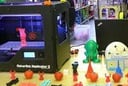
“What we’ve seen from partners like 3D Systems, Autodesk, Dassault Systèmes, Formlabs, MakerBot, netfabb, Stratasys, Tiertime, Trimble and many others will be very appealing to a broad set of users and, ultimately, create a new ecosystem for Windows customers,” stated Boettcher. Microsoft is attempting to prod the market further by carrying MakerBot’s Replicator 2 3D printer in Microsoft retail store locations in Palo Alto, Calif., and San Francisco, with other markets to follow.
MakerBot drew huge crowds at CeBit in March with its Replicator 2 and 2X 3D printers. The devices use durable PLA (Polylactic Acid) plastic to churn out objects and multipart prototypes that can stand up to some rough handling. The Brooklyn-based company also made news on June 21 when it was revealed that it was merging with 3D printing specialist Stratasys.
In a statement, MakerBot CEO Bre Pettis cheered Microsoft’s embrace of 3D printing. “MakerBot is about creating the MakerBot 3D Ecosystem that makes 3D designing and printing more accessible. We want to empower more people to create and make things, and working with Microsoft helps our mission,” he said.
It helps that the price of 3D printers are dropping. Boettcher noted that Staples is putting 3D Systems’ Cube 3D printer, which retails for $1,299, on its shelves. He added that “several companies are offering consumer-friendly 3D printers that range from $800 to $3,000.”
For Microsoft, 3D printing support in Windows 8.1 could potentially help close the loop on the Kinect’s newfound 3D scanning support.
On March 16, the company announced that the Kinect for Windows software development kit (SDK) version 1.7, which was released just two days later, would include the GPU-assisted 3D scanning tool called Kinect Fusion. Bob Heddle, director of Kinect for Windows, boasted that “Kinect Fusion is one of the most affordable tools available today for creating accurate 3D renderings of people and objects. Kinect Fusion fuses together multiple snapshots from the Kinect for Windows sensor to create accurate, full, 3D models.”