







A new AI meeting assistant can follow a call without joining it.
Google released AI Edge Foresight for Mac, introducing a free experimental app that turns conversations into searchable notes using AI running directly on the computer. It can operate without an internet connection and keeps meeting information on the device, according to the company.
Because Foresight works independently of conferencing platforms, it also raises questions about how organizations control the recording and processing of workplace conversations.
Foresight fills in notes and answers live questions
Mac microphone and system audio allow the app to capture conversations across video conferencing services and in-person meetings. Unlike Gemini-powered notes inside Google Meet, Foresight operates independently of a particular meeting platform.
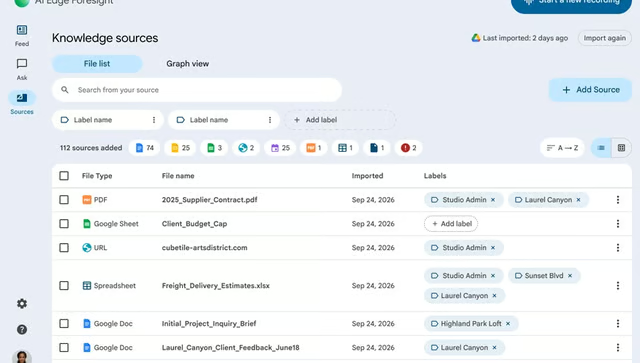
During meetings, users can type incomplete phrases or quick reminders and have the app expand them using details from the conversation. Its Live Assistance feature can also detect questions as people speak and retrieve information from previously indexed material.
Foresight extends familiar AI meeting assistant capabilities into a searchable personal knowledge library containing previous conversations, documents, and images. Someone preparing a project update, for example, could retrieve a decision from an earlier discussion without replaying the meeting.
Two AI models handle search and responses
Foresight divides the work between EmbeddingGemma 2 and Gemma 4. One locates relevant information, and the other uses it to generate written answers and expand meeting notes.
EmbeddingGemma 2 has 740 million parameters and can process text, images, audio, and video. It converts content into numerical representations that allow the application to identify related information, even when someone uses different wording from the original material.
Local processing also introduces hardware considerations. The Gemma 4 model family includes configurations with different memory demands, so EmbeddingGemma 2's relatively small size does not represent the requirements of the entire application. Published model specifications also do not establish Foresight's total memory consumption across Mac configurations.
What eWeek found: Foresight's recording method creates a gap between Google Meet controls and Mac permissions
eWeek compared Google's existing Workspace recording policies with Apple's macOS privacy controls and found two separate systems governing how conversations can be captured.
Workspace administrators can disable recording inside Meet. In May 2026, the tech giant also introduced explicit participant consent controls for native recording, transcription, and AI note-taking, although the feature is disabled by default.
Apple, however, manages system-audio recording permissions and microphone access separately through macOS. Disabling Meet's recording feature therefore does not establish that another authorized desktop application is prevented from capturing the same conversation.
IT administrators considering Foresight for employee devices should review three areas before authorizing it for sensitive meetings.
- Recording permissions. Check which applications can access microphone and system audio on managed Macs. Verify whether existing device policies can restrict those permissions.
- Participant consent. Establish when employees must obtain permission to record conversations, including recordings initiated outside the meeting platform.
- Transcript management. Determine who can access locally stored meeting records, how long they should be retained, and when they must be deleted. Existing enterprise AI governance policies can inform these decisions.
The available information does not establish that Foresight bypasses Google Meet's recording restrictions or how it behaves when those controls are disabled.
Organizations should test the app on managed Macs with informed participants before allowing it into confidential meetings, particularly where existing policies assume recording is controlled entirely through the conferencing platform.
Get more out of your AI tools with our free How to Talk to AI course. In just six minutes, you’ll learn a few straightforward prompting techniques, and you can explore additional Neuron Academy courses free for seven days. Check out all the lessons here →