







It’s officially back.
After months of rumors, Microsoft finally announced that the venerable Start Button is coming back to Windows 8 in the upcoming “Blue” update, which will officially kick Windows up to version 8.1.
Antoine Leblond, corporate vice president of Windows Program Management, delivered the news in a May 30 Blogging Windows post. “We’ve improved the way you navigate to Start with the mouse by changing the Start ‘tip’ to be the familiar Windows logo,” he wrote.
“The new tip appears anytime you move the mouse to the bottom left corner of the screen, and is always visible on the taskbar when on the desktop. There are also options to change what the corners do, and options to boot into alternate screens,” added Leblond.
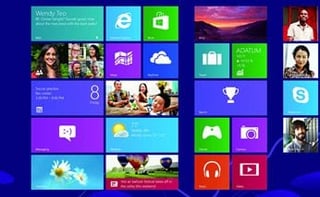
Since the debut of Windows 8, one of its most polarizing features—or non-features—was the lack of the Start Button, which graced the Windows desktop since Windows 95. Instead, the company instituted a Start Screen, the tiled interface that greets users when they boot up a Windows 8 system.
The decision was met with some outcry, but the company stuck to its guns.
In an effort to defend the decision, Marina Dukhon, a senior program manager lead on Windows’ Core Experience team, took to the Building Windows 8 blog on Oct. 11 and stated Microsoft’s case.
“We know major changes like this can be controversial and we are looking forward to continuing this dialog with you. I wanted to address some of the specific topics that have been brought up so far as they pertain to the design,” stated Dukhon.
Dukhon added, “In Windows 8 we assume that there are even more apps (and sites) than the XP/Vista/7 eras and so we needed even more scale. We also wanted to provide an at-a-glance view and a navigation model that requires much less dexterity.”
Old habits die hard, however. And today, the company signaled that it is relenting just a bit to users who found the operating system to be a radical departure from the Windows experience.
Leblond revealed that Microsoft recognizes that “there are many non-touch devices in use today—especially in the commercial setting. As such we’ve focused on a number of improvements to ensure easier navigation for people using a mouse and keyboard. “
Among them is the return of the Start Button and “options to boot into alternate screens.” An option that allows users to boot directly into the Windows desktop has been heavily rumored. While the Start Button is set to return, Leblond’s post suggests that the Start Menu may not be coming back.
Instead, the Start Button appears to invoke Windows 8 tiled or apps views. “For example, if you prefer to see the Apps view versus all the tiles, you can choose to have the Start screen go directly to Apps view,” wrote Leblond.