






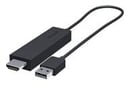


Google’s popular Chromecast media dongle for HDTVs will soon be facing off against a competitor from Microsoft.
Like Chromecast, the straightforwardly named Microsoft Wireless Display Adapter plugs into an HDTV, allowing users to pump videos, audio and Web content to their living room televisions. The device “will let you easily share content from any Miracast-enabled device—including many PCs and tablets running Windows 8.1,” announced Microsoft spokesperson Brandon LeBlanc in a statement. Miracast is a WiFi Direct standard that supports connections between devices without the involvement of a wireless router.
“Miracast is an industry-wide solution, so the technology works well across devices, regardless of brand. Connections are easy to set up and use since the devices choose the appropriate settings automatically,” according to the Wi-Fi Alliance’s website. Microsoft added Miracast support to Windows 8.1 last month as part of an operating system update.
The Microsoft Wireless Display Adapter is scheduled to go on sale in October for $59.95, but potential buyers can preorder one now. By comparison, Google’s year-old Chromecast dongle, which works with Netflix, YouTube and Google Play streaming content, costs $35.
“It just automatically works,” said Sundar Pichai, Google’s senior vice president of Android and Chrome, when he introduced Chromecast last year during a media event in San Francisco. Chromecast would go on to quickly sell out after it hit store shelves.
Both Chromecast and Microsoft’s Wireless Display Adapter aim to narrow the gap between feature-rich smart TVs and their back-to-basics counterparts (or older television sets). As cheaper alternatives to devices like Apple TV and Roku, they enable users to access Web-based content and streaming services, typically with the help of a smartphone, tablet or PC.
Set-up is easy, claimed LeBlanc. “All you need to do is plug the USB end and High-Definition Multimedia Interface (HDMI) end of the Microsoft Wireless Display Adapter into an HDTV, monitor or projector. Then, select the right input on your TV, pair it with your laptop, tablet or smartphone, and you’ll be ready to go.”
Once Windows 8.1 detects the adapter, users can mirror their PC, tablet or Windows Phone 8.1 screens. “Because the Microsoft Wireless Display Adapter uses Miracast technology, you’re not limited to certain apps or content streaming. It’ll show anything and everything from your device,” stated LeBlanc.
Mobile workers can find business uses for the device, like leveraging big displays for PowerPoint presentations, he noted.
“This makes it a great tool for use at work—in a conference room—and not just at home. Remember, the Microsoft Wireless Display Adapter works with projectors and monitors, too, so no more searching for the right, fitted adapter that plugs into your laptop every time you’re presenting,” wrote LeBlanc.
The adapter also works with devices with 4.2.1 (Jelly Bean) and later versions of the Android OS, the company claims. The unassuming device, which is powered by USB, boasts a 23-foot range.